EasyManua.ls Logo

HP 654A - 5-35. Distortion Check

HP 654A
82 pages
Print Icon
To Next Page IconTo Next Page
To Previous Page IconTo Previous Page
Loading...
Model
654A
Section
V
k.
Adjust
the
654A
to
10MHz
and
reset
the
AMPLITUDE
control
for
OdBm
indication
on
the
654A
meter.
I.
Repeat
steps
d
through
j
of
this
paragraph
to
check
tracking
at
10MHz.
m.
These
checks
verify
meter
tracking
accuracy
of
+/-0.05dB;
perform
the
adjustments
of
Paragraphs
5-58
through
5-60
if
the
limits
are
not met.
5-22
ATTENUATOR ACCURACY
CHECKS.
5-23.
MEASUREMENT
PROBLEMS.
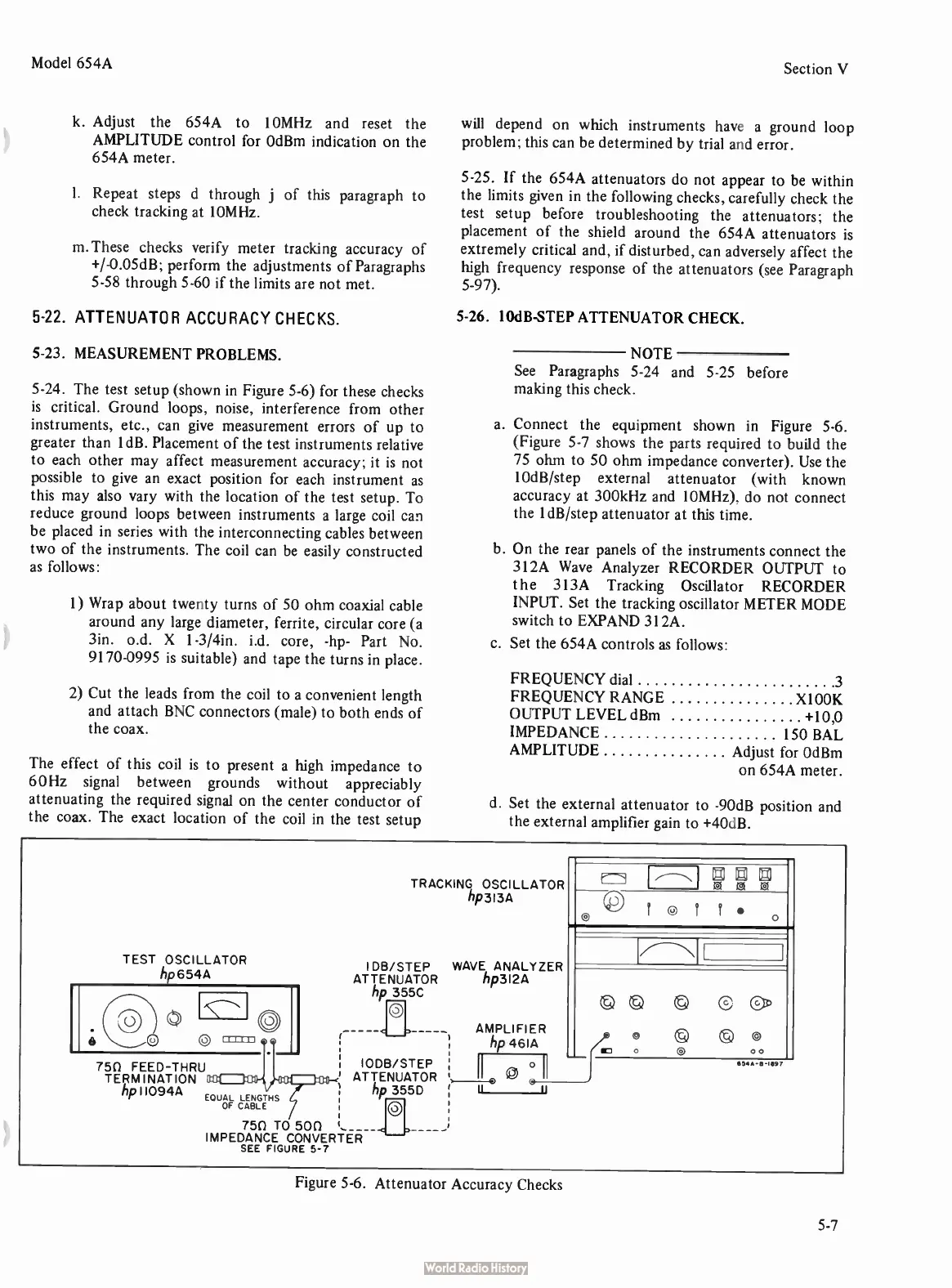
5-24.
The
test
setup (
shown
in
Figure
5-6)
for
these
checks
is
critical.
Ground
loops,
noise,
interference
from
other
instruments,
etc.,
can
give
measurement
errors
of
up
to
greater
than ldB.
Placement
of
the
test
instruments
relative
to
each
other
may
affect
measurement
accuracy;
it
is
not
possible
to
give
an
exact
position
for
each
instrument
as
this
may
also
vary
with
the
location
of
the
test
setup.
To
reduce
ground
loops
between
instruments
a
large
coil
can
be
placed
in
series
with
the
interconnecting
cables
between
two
of
the
instruments.
The
coil
can
be
easily
constructed
as
follows:
1)
Wrap
about
twenty
turns
of
50
ohm
coaxial
cable
around
any
large
diameter,
ferrite,
circular
core (
a
3in. o.d.
X
1-3/4in.
i.d.
core, -
hp-
Part
No.
9170-0995
is
suitable)
and
tape
the
turns
in
place.
2)
Cut
the
leads
from
the
coil
to
a
convenient
length
and
attach
BNC
connectors (
male)
to
both
ends
of
the
coax.
The
effect
of
this
coil
is
to
present
a
high
impedance
to
60Hz
signal
between
grounds
without
appreciably
attenuating
the
required
signal
on
the
center
conductor
of
the
coax.
The
exact
location
of
the
coil
in
the
test
setup
will
depend
on
which
instruments
have
a
ground
loop
problem;
this
can
be
determined
by
trial
and
error.
5-25.
If
the
654A
attenuators
do
not appear
to
be
within
the
limits
given
in
the
following
checks,
carefully
check
the
test
setup
before
troubleshooting
the
attenuators;
the
placement
of
the
shield
around
the
654A
attenuators
is
extremely
critical
and,
if
disturbed,
can
adversely
affect
the
high
frequency
response
of
the
attenuators (
see
Paragraph
5-97).
5-26.
10dB-STEP
ATTENUATOR
CHECK.
NOTE
See
Paragraphs
5-24
and
5-25
before
making
this
check.
a.
Connect
the
equipment
shown
in
Figure
5-6.
(Figure
5-7
shows
the
parts
required
to
build
the
75
ohm
to
50
ohm
impedance
converter).
Use
the
10dB/step
external
attenuator (
with
known
accuracy
at
300kHz
and
10MHz),
do
not
connect
the
1dB/step
attenuator
at
this
time.
b.
On
the
rear
panels
of
the
instruments
connect
the
312A
Wave
Analyzer
RECORDER
OUTPUT
to
the
313A
Tracking
Oscillator
RECORDER
INPUT.
Set
the
tracking
oscillator
METER
MODE
switch
to
EXPAND
312A.
c.
Set
the
654A
controls
as
follows:
FREQUENCY
dial
3
FREQUENCY
RANGE
X1 00K
OUTPUT
LEVEL
dBm +
10,0
IMPEDANCE
150
BAL
AMPLITUDE
Adjust
for
OdBm
on
654A
meter.
d.
Set
the
external
attenuator
to -
90dB
position
and
the
external
amplifier
gain
to +
40dB.
TEST OSCILLATOR
hp
6544
750 FEED-THRU
TERMINATION
hp
110944
EQUAL
LENGTHS
OF
CABLE
TRACKING
OSCILLATOR
lip
3134
I
DB/STEP
WAVE
ANALYZER
ATTENUATOR
hp3I2A
hp
355C
0
IODB/STEP
ATTENUATOR
hp
355D
0
750
TO
500
IMPEDANCE
CONVERTER —
SEE
FIGURE
5-7
AMPLIFIER
hp 4614
II
_ .
Il
11
? 9
o
©G§C
Cc)
M7
0 u
00
65.-B-1697
Figure
5-6.
Attenuator
Accuracy
Checks
5-7

Related product manuals