EasyManua.ls Logo

HP 654A - 5-70. Troubleshooting the 654 A; 5-74. Front Panel Checks

HP 654A
82 pages
Print Icon
To Next Page IconTo Next Page
To Previous Page IconTo Previous Page
Loading...
Model
654A
Section
V
TEST
OSCILLATOR
hp654A
654A-8-1902
I
DB/STEP
ATTENUATOR
hp
355C
THERMAL
CONVERTER
hpl
10504
e
n:
DC
NULL
VOLTMETER
hp
4194
O O
r-
®
REFERENCE
I
0
SUPPLY
I
SEE
FIGURE
5-4
I
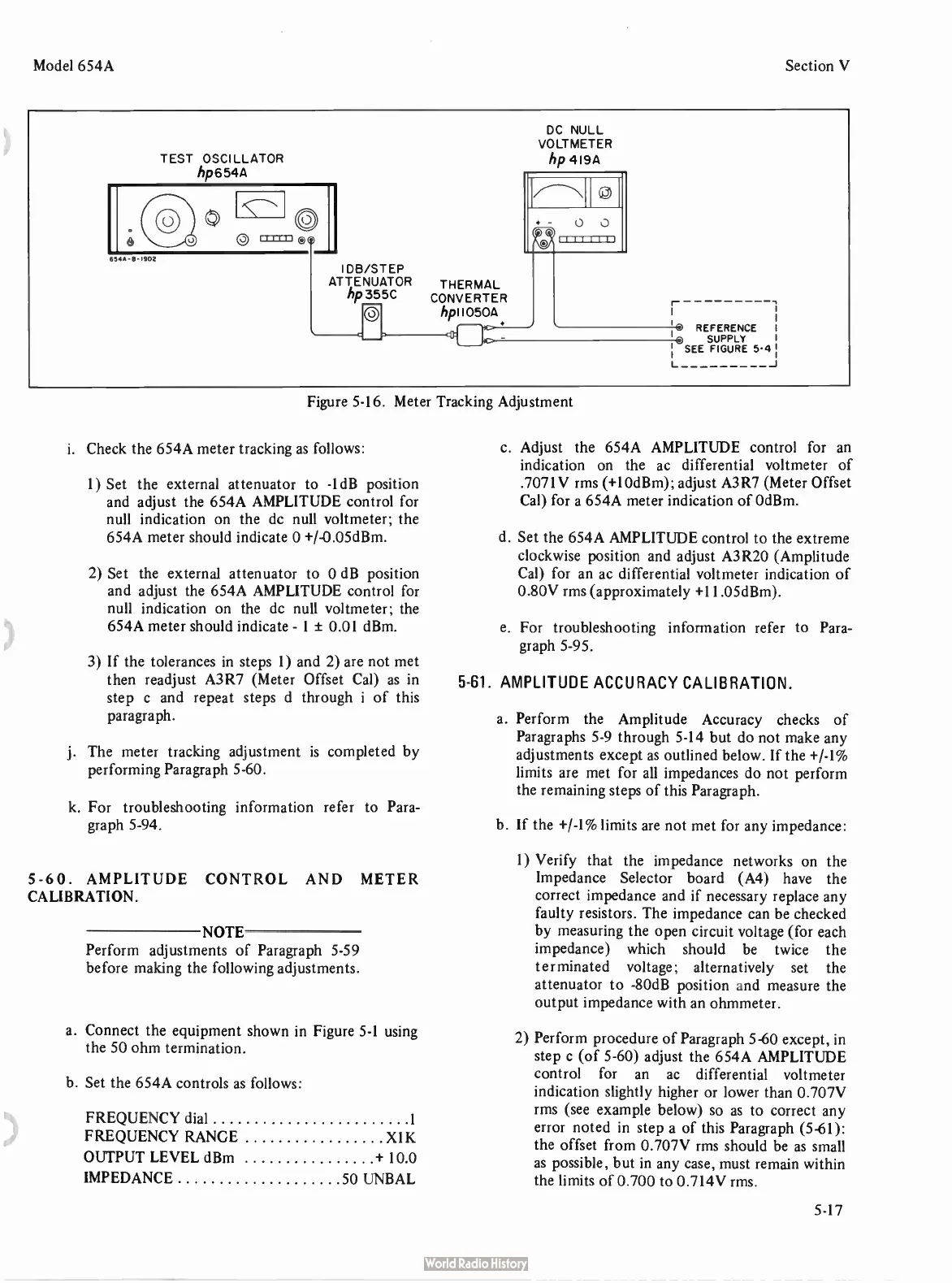
Figure
5-16.
Meter
Tracking
Adjustment
i.
Check
the
654A
meter
tracking
as
follows:
1)
Set
the
external
attenuator
to -
1dB
position
and
adjust
the
654A
AMPLITUDE
control
for
null
indication
on
the
dc
null
voltmeter;
the
654A
meter
should
indicate
0 +/-
0.05dBm.
2)
Set
the
external
attenuator
to
0
dB
position
and
adjust
the
654A
AMPLITUDE
control
for
null
indication
on
the
dc
null
voltmeter;
the
654A
meter
should
indicate -
1 ±
0.01
dBm.
3)
If
the
tolerances
in
steps
1)
and
2)
are
not
met
then
readjust
A3R7 (
Meter
Offset
Cal)
as in
step
c
and
repeat
steps
d
through
i
of
this
paragraph.
j.
The
meter
tracking
adjustment
is
completed
by
performing
Paragraph
5-60.
k.
For
troubleshooting
information
refer to
Para-
graph
5-94.
5-60.
AMPLITUDE
CONTROL
AND
METER
CALIBRATION.
NOTE
Perform
adjustments of Paragraph
5-59
before
making
the
following
adjustments.
a.
Connect
the
equipment
shown
in
Figure
5-1
using
the
50
ohm
termination.
b.
Set
the
654A
controls
as
follows:
FREQUENCY
dial
1
FREQUENCY
RANGE
X1K
OUTPUT
LEVEL
dBm +
10.0
IMPEDANCE
50
UNBAL
c.
Adjust
the
654A
AMPLITUDE
control
for
an
indication
on
the
ac
differential
voltmeter
of
.7071V
rms (+
10dBm);
adjust
A3R7 (
Meter
Offset
Cal)
for
a
654A
meter
indication
of
OdBm.
d.
Set
the
654A
AMPLITUDE
control
to
the
extreme
clockwise
position
and
adjust
A3R20 (
Amplitude
Cal)
for
an
ac
differential
voltmeter
indication
of
0.80V
rms (
approximately +
11.05dBm).
e.
For
troubleshooting
information
refer
to
Para-
graph
5-95.
5-61.
AMPLITUDE
ACCURACY
CALIBRATION.
a.
Perform
the
Amplitude
Accuracy
checks
of
Paragraphs
5-9
through
5-14
but
do
not
make
any
adjustments
except
as
outlined
below.
If
the +/-
1%
limits
are
met
for
all
impedances
do
not
perform
the
remaining
steps
of
this
Paragraph.
b.
If
the +/-
1%
limits
are
not
met
for
any
impedance:
1)
Verify
that
the
impedance
networks
on
the
Impedance
Selector
board (
A4)
have
the
correct
impedance
and
if
necessary
replace
any
faulty
resistors.
The
impedance
can
be
checked
by
measuring
the
open
circuit
voltage (
for
each
impedance)
which
should be
twice
the
terminated
voltage;
alternatively
set
the
attenuator
to -
80dB
position
and
measure
the
output
impedance
with
an
ohmmeter.
2)
Perform
procedure
of
Paragraph
5-60
except,
in
step
c (
of
5-60)
adjust
the
654A
AMPLITUDE
control
for
an
ac
differential
voltmeter
indication
slightly
higher
or
lower
than
0.707V
rms (
see
example
below)
so
as
to
correct
any
error
noted
in
step
a
of
this
Paragraph (
5-61):
the
offset
from
0.707V
rms
should be
as
small
as
possible,
but
in
any
case,
must
remain
within
the
limits
of
0.700
to
0.714V
rms.
5-17

Related product manuals