Modulate
or
Sum
the Signals
2-3
7.
Continue pressing the
NEXT
key to step through the
Configuration displays for Channels
B,
C
and
D.
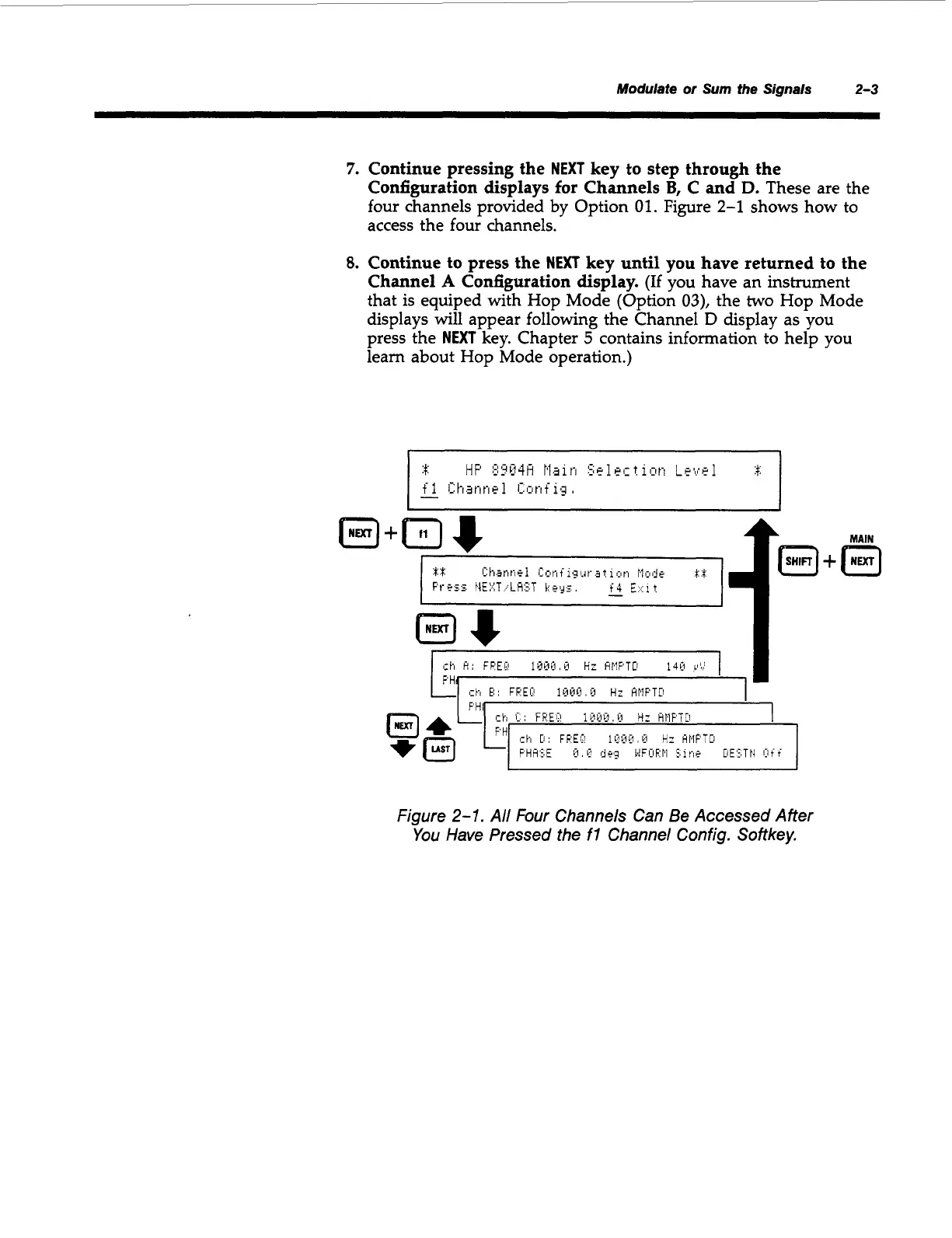
These are the
four channels provided by Option
01.
Figure
2-1
shows how to
access the four channels.
8.
Continue to press the
NEXT
key until
you
have returned to the
Channel
A
Configuration display.
(If
you have an instrument
that is equiped with Hop Mode (Option
03),
the
two
Hop Mode
displays will appear following the Channel
D
display as you
press the
NEXT
key. Chapter
5
contains information to help you
learn about Hop Mode operation.)
Figure
2-1.
All Four Channels Can Be Accessed After
You Have Pressed the
fl
Channel Config. Softkey.
Artisan Technology Group - Quality Instrumentation ... Guaranteed | (888) 88-SOURCE | www.artisantg.com



 To Next Page