EasyManua.ls Logo

HP 8904A - Page 108

HP 8904A
281 pages
Print Icon
To Next Page IconTo Next Page
To Previous Page IconTo Previous Page
Loading...
2-6
Modulate
or
Sum
the Signals
Now
Look
at
the Possibilities
Change
the
Modulation Waveform
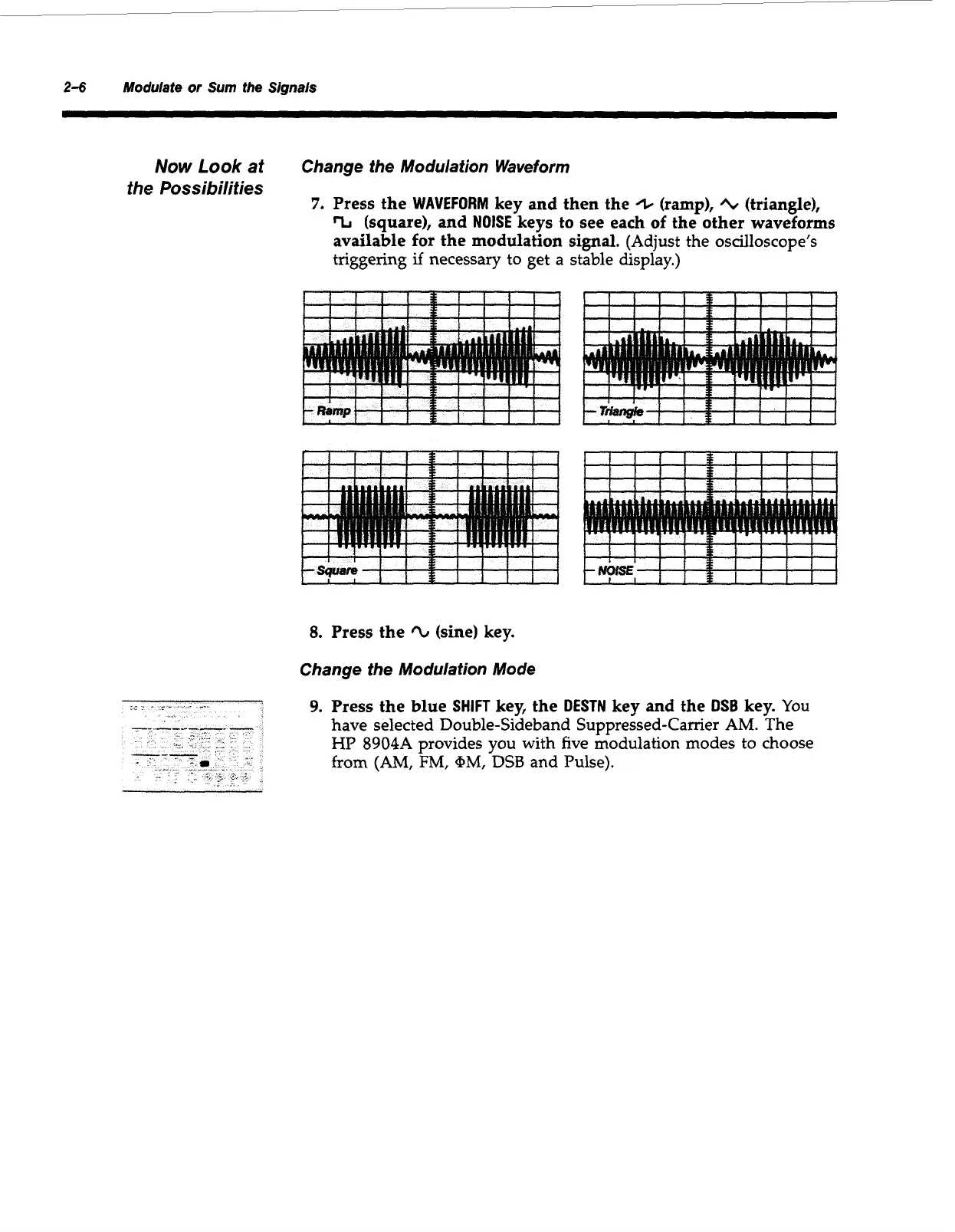
7.
Press the
WAVEFORM
key and then the
/I,
(ramp),
'L
(triangle),
%
(square), and
NOISE
keys to see each
of
the other waveforms
available
for
the modulation
signal.
(Adjust the oscilloscope's
triggering
if
necessary
to
get a stable display.)
8.
Press the
'L
(sine) key.
Change the Modulation Mode
IillIllli
IlliPIIII
9.
Press the blue
SHIFT
key, Le
DESTN
key and the
DSB
key.
You
have selected Double-Sideband Suppressed-Carrier AM. The
HP
8904A provides you with five modulation modes to choose
from
(AM,
FM,
+MI
DSB
and Pulse).
Artisan Technology Group - Quality Instrumentation ... Guaranteed | (888) 88-SOURCE | www.artisantg.com

Table of Contents

Other manuals for HP 8904A

Related product manuals