Output
a Sequence
of
Signals
3-3
How
to
Output
a
Tone Sequence
Tone Sequencing refers to the serial transmission
of
individual tones
in a predetermined order. The
HP
8904A’s
Tone Sequence Mode
enables you to configure
16
individual sinewave tones and arrange
them in a sequential order that contains up to
250
sequence steps. In
this demonstration, you will learn about Tone Sequence operation by
configuring a seven-step sequence using four individual tones.
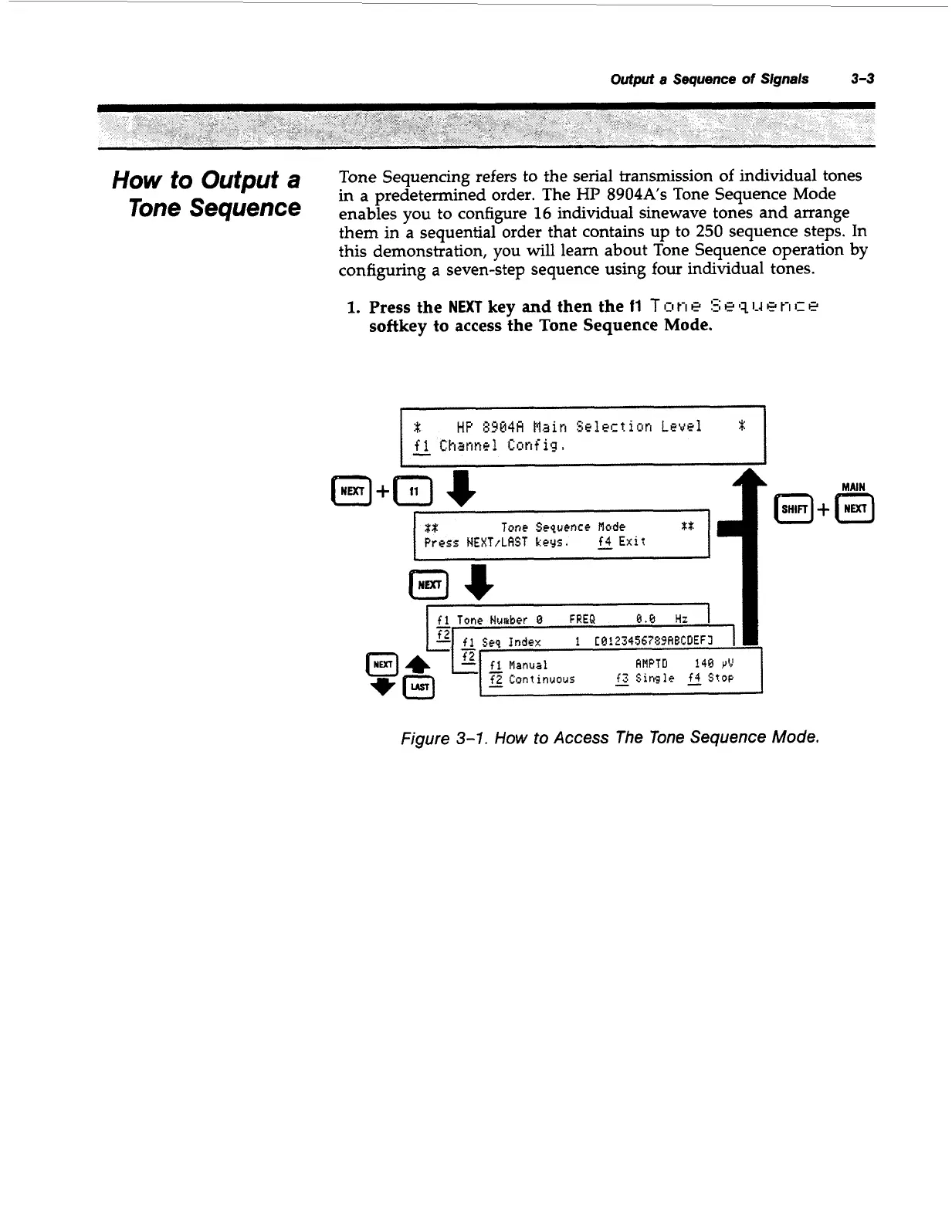
1.
Press the
NEXT
key and then the
11
T
I:I
t-i
e
5;
e
11
1-4
e
t-i
c
e
softkey to access the Tone Sequence Mode.
:t:
HP
8914A
flain
Selection
Level
I-
f
1
Channel
Config.
xx
Tone
Sequence
Mode
Press
NEXT/LAST
keys,
E
Exrt
fl
Tone
Number
8
FREQ
9.6
Hi
I
fi
S~Q
Index
1
CQ1234567Z9HBCDEFI
f2
b.
-
AMPTD
149
YV
fl
Manual
-
f2
Continuous
-
f3
$Ingle
2
Stop
-
+
Figure
3-1.
How
to
Access The
Tone
Sequence
Mode.
Artisan Technology Group - Quality Instrumentation ... Guaranteed | (888) 88-SOURCE | www.artisantg.com



 To Next Page