3-4
Output
a Sequence
of
Signals
Enter
the
Tone
Parameters
2.
Press the
NEXT
key to access the Tone Configuration display.
This display allows you to specify the characteristics of the tones
you wish to have in your sequence. You can configure up to 16
different tones using the
HP
8904A’s
16 Tone Registers
(numbered
0
through
F).
Configure Tone Register
O
3.
Press the
FREQ
key and enter
1
kHz.
4.
Press the
14
0
f
f
T
1
rii
e
softkey and enter
.8
ms.
You have
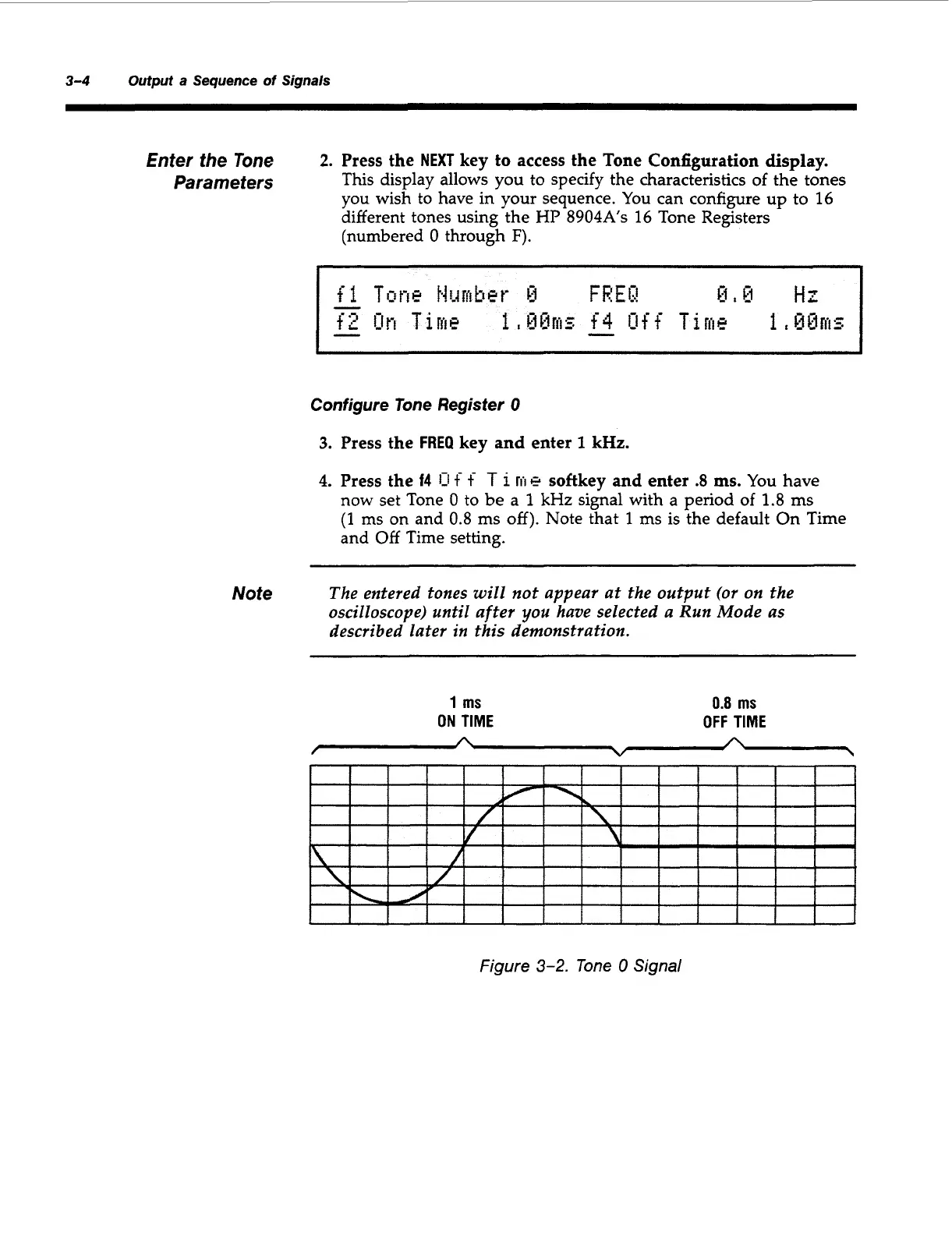
now set Tone
0
to be a
1
kHz
signal with a period
of 1.8
ms
(1
ms
on and
0.8
ms
off).
Note that
1
ms is the default On Time
and Off Time setting.
Note
The entered tones
will
not
appear at the output
(or
on the
oscilloscope) until after
you
have selected a Run Mode as
described later in
this
demonstration.
1
ms
ON
TIME
0.8
ms
OFF
TIME
A
A
V
Figure
3-2.
lone
0
Signal
Artisan Technology Group - Quality Instrumentation ... Guaranteed | (888) 88-SOURCE | www.artisantg.com



 To Next Page