3-10
Output
a
Sequence
of
Signals
How
to
Output
a
DTMF
Sequence
(Dual-Tone Multi-Frequency) signals.
In this demonstration, you will learn
how
to configure your
HP
8904A
to
emulate a telephone keypad
for
outputting DTMF
1.
If
you are not currently at the Main Selection Level display,
press the blue
SHIFT
key and the
MAIN
key.
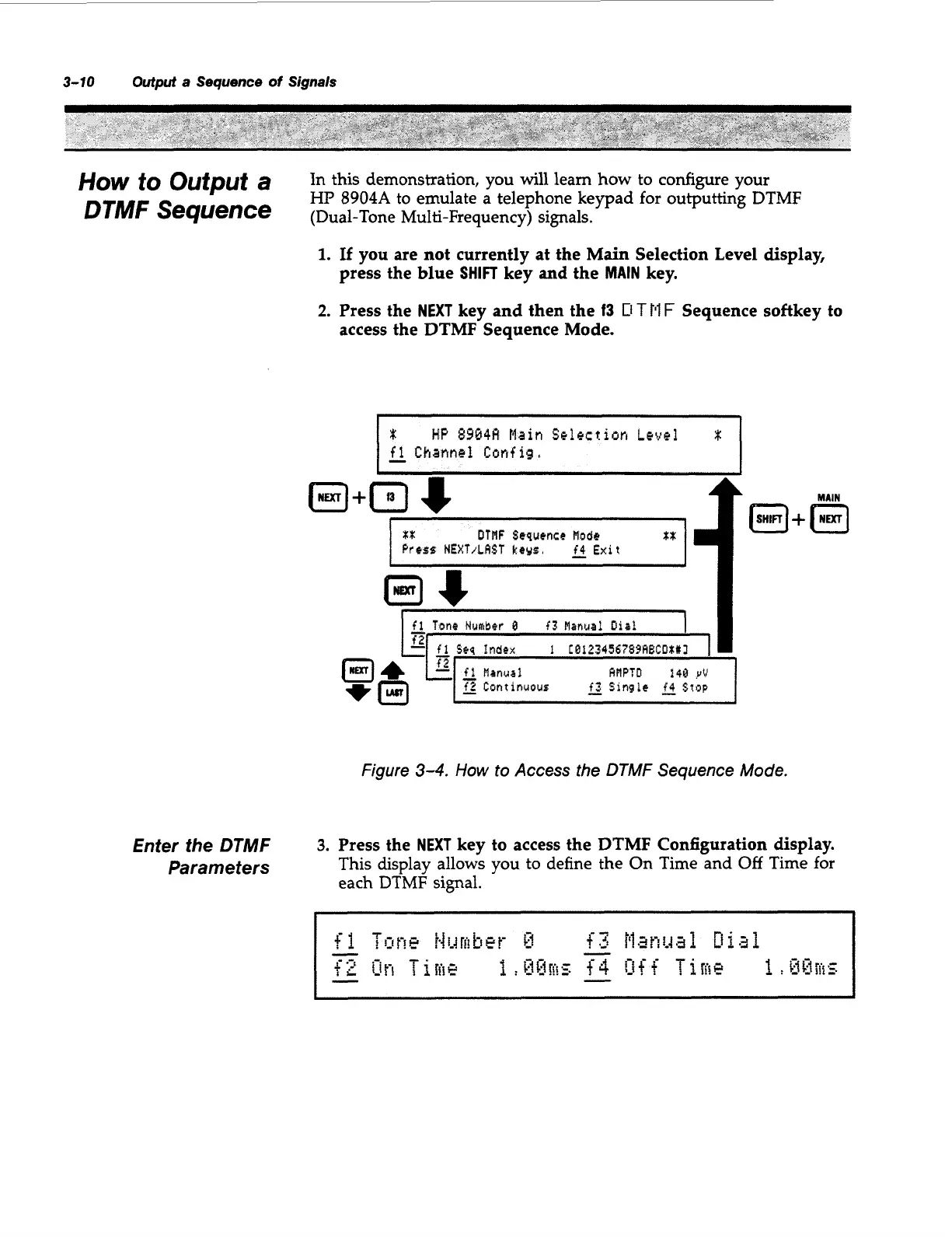
2.
Press the
NEXT
key and then the
13
D
T
Pl
F
Sequence softkey to
access the DTMF Sequence Mode.
Enter the
DTMF
Parameters
I
HP
$9048
tlain
Selection
Level
fl
Chournbl
Config,
L
m.n
I
J
I
xx
DTNF
Scsuencr
Nodr
tX
I
Press
NEXT/LAST
keys.
fi
Exit
I
~
I-
fl
Tone
ffufftber
B
f3
Manual Uiaf
I
I
Figure
3-4.
How
to
Access the DTMF Sequence Mode.
3.
Press the
NEXT
key to access the DTMF Configuration display.
This display allows you
to
define the On Time and
Off
Time
for
each
DTMF
signal.
I
1
Artisan Technology Group - Quality Instrumentation ... Guaranteed | (888) 88-SOURCE | www.artisantg.com



 To Next Page