Hop the Output
Signal
5-3
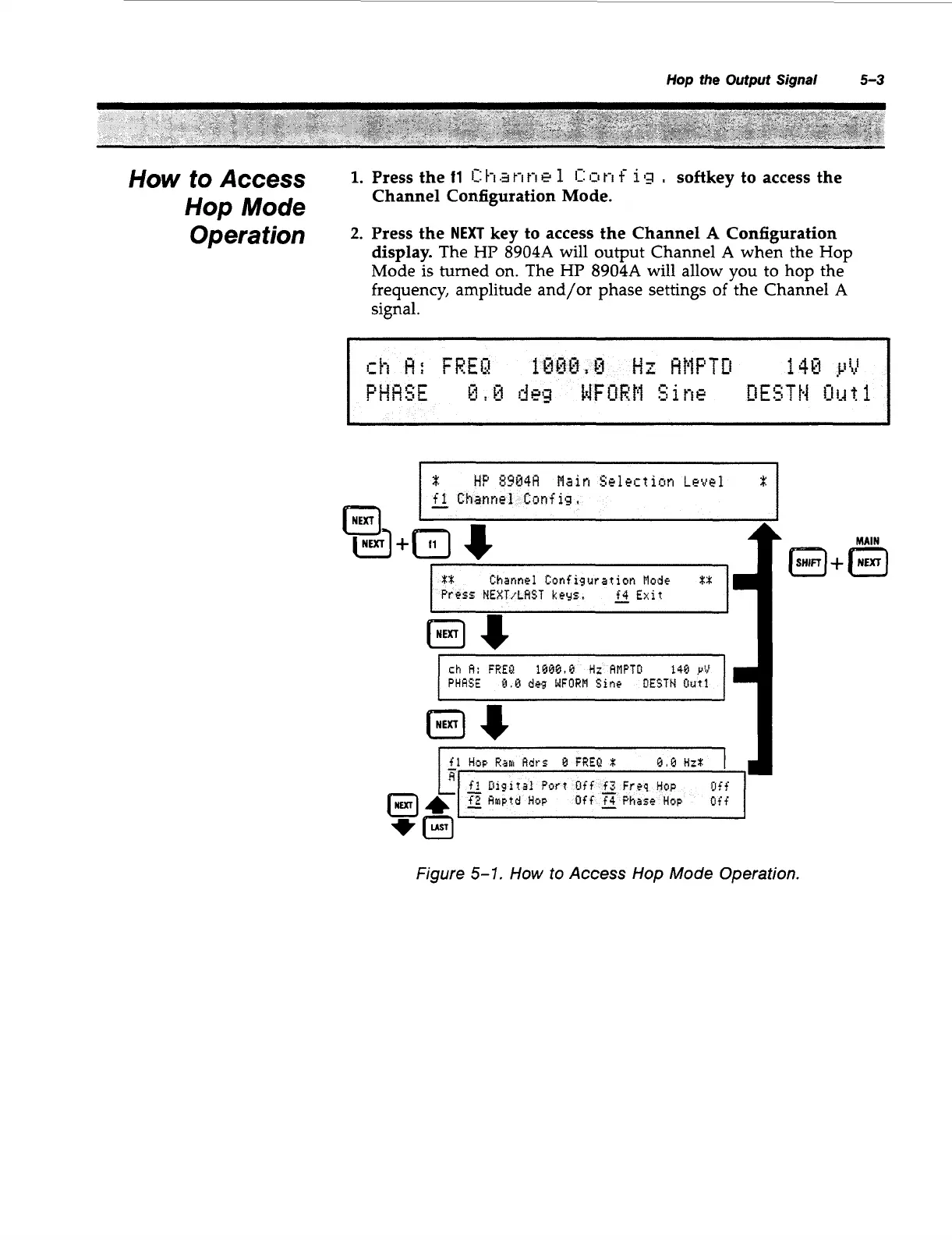
How to Access
1-
Hop
Mode
Operation
2-
Press the
11
11:
h.3
t-i
t-i
e
1
11:
111
t-i
f
113
,
softkey to access the
Channel Configuration Mode.
Press the
NEXT
key to access the Channel
A
Configuration
display.
The
HP
8904A
will output Channel
A
when the Hop
Mode is turned on. The
HP
8904A
will allow you to hop the
frequency, amplitude and/or phase settings
of
the Channel
A
signal.
I
I-
fl
Channel
Config,
-
f
1
pxTJ
(nu;l+m
8
ch
A:
FREU
1Q#Q,8
tiz
AMPTO
148
VV
PHRSE
0.8
d4g
WFORM
Sine
OESTW
frat1
I
fl
HOP
Ra
Rdrs
B
FREU
x:
J
L
TU
Figure
5-1.
How
to
Access Hop Mode Operation.
Artisan Technology Group - Quality Instrumentation ... Guaranteed | (888) 88-SOURCE | www.artisantg.com



 To Next Page