Performance Tests Model
8904A
NOTE
Perform step
4
quickly to minimize
the
effect
of
thermal drift on
the
thermal
converter. Check
the
level at
1
kHz
before setting the next frequency
if
drift
is
suspected.
4.
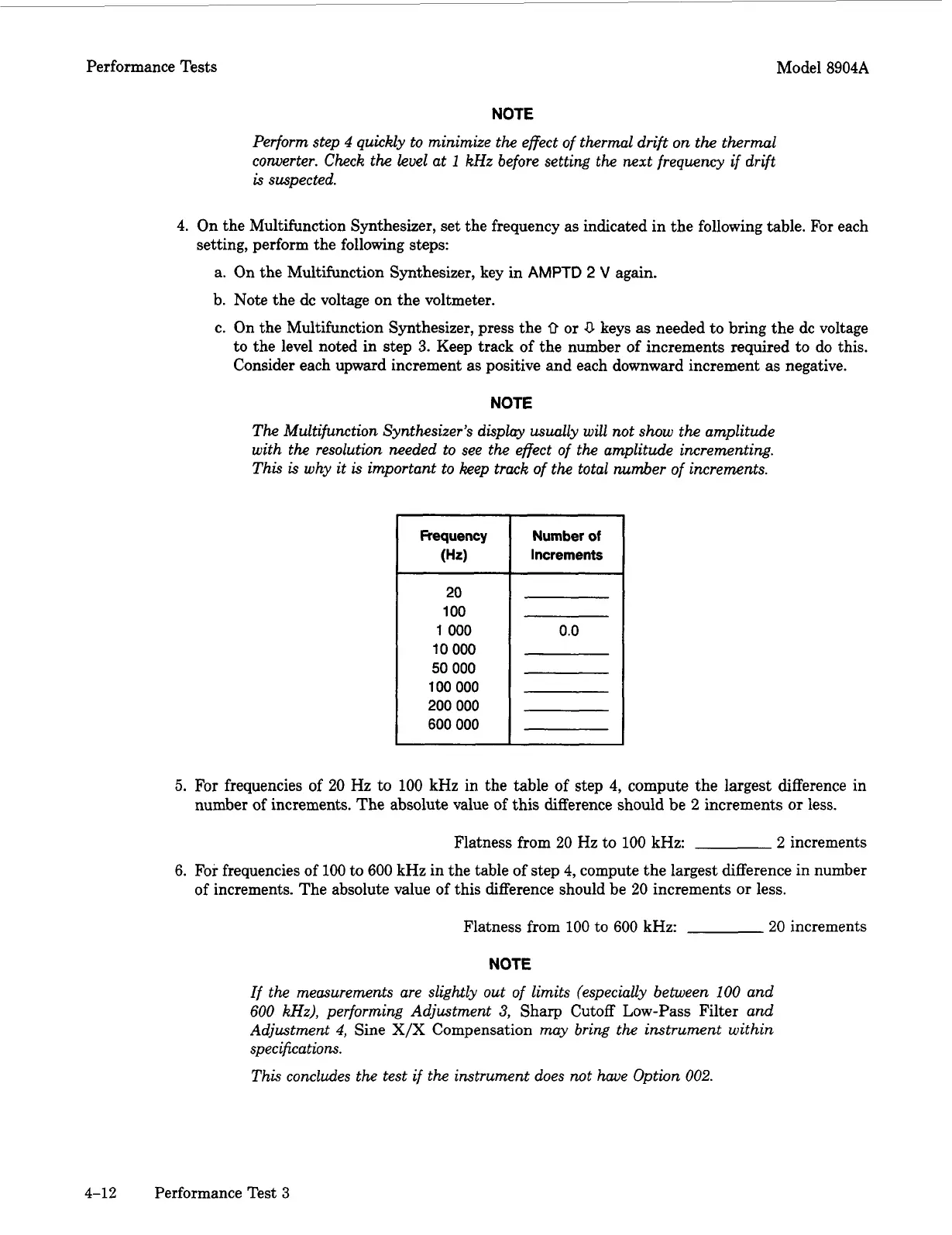
On the Multifunction Synthesizer, set the frequency as indicated in the following table. For each
setting, perform the following steps:
a. On the Multifunction Synthesizer, key in
AMPTD
2
V
again.
b. Note the dc voltage on the voltmeter.
c. On the Multifunction Synthesizer, press the
0
or
0
keys
as
needed to bring the dc voltage
to the level noted in step
3.
Keep track of the number of increments required to do this.
Consider each upward increment as positive and each downward increment as negative.
NOTE
The
Multifunction Synthesizer’s display
usually
will not
show
the
amplitude
with
the
resolution needed to see
the
effect of
the
amplitude incrementing.
This
is
why
it
is
important to keep track
of
the
total
number
of
increments.
I
I
I
Number
of
Increments
20
100
1
000
10
000
50
000
100
000
200
000
600
000
0.0
5.
For
frequencies
of
20
Hz to
100
kHz in the table of step
4,
compute the largest difference in
number of increments. The absolute value of this difference should be
2
increments
or
less.
Flatness from
20
Hz to
100
kHz:
2
increments
6.
For frequencies of
100
to
600
kHz in the table of step
4,
compute the largest difference
in
number
of increments. The absolute value of this difference should be
20
increments
or
less.
Flatness from
100
to
600
kHz:
20
increments
NOTE
If the measurements are slightly out
of
limits (especially between
100
and
600
kHz),
performing Adjustment
3,
Sharp Cutoff Low-Pass Filter
and
Adjustment
4,
Sine
X/X
Compensation
may bring
the
instrument within
specifications.
This
concludes the test if the instrument does not he Option
002.
4-12
Performance Test
3
Artisan Technology Group - Quality Instrumentation ... Guaranteed | (888) 88-SOURCE | www.artisantg.com



 To Next Page