Performance Tests Model 8904A
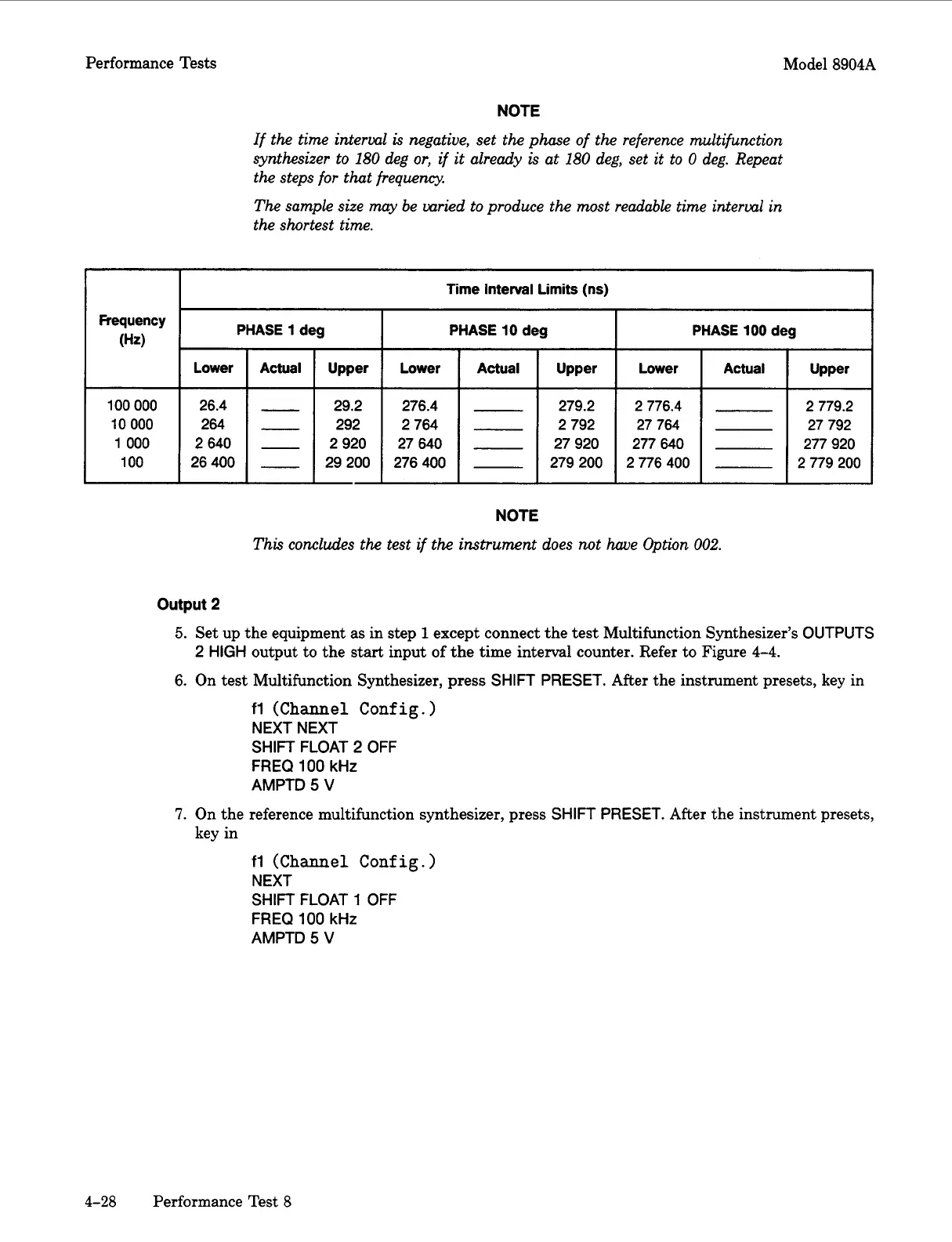
PHASE
1
deg
Lower Actual Upper
26.4
-
29.2
264
-
292
2640
-
2920
26400
-
29 200
NOTE
If the time interval
is
negative, set
the
phase of
the
reference multifunction
synthesizer to 180 deg
or,
if
it
already
is
at 180 deg, set it to
0
deg. Repeat
the
steps for that frequency.
The sample size may be varied to produce
the
most readable time interval
in
the shortest time.
PHASE
10
deg
PHASE
100
deg
Lower Actual Upper Lower Actual Upper
276.4
-
279.2
2 776.4
2 779.2
2764
-
2792
27 764
27 792
27640
-
27920 277640 277 920
276400
-
279200 2776400 2 779 200
Frequency
(Hz)
100
000
10
000
1
000
100
NOTE
This concludes
the
test
if
the
instrument does
not
have Option
002.
output
2
5.
Set up the equipment
as
in step
1
except connect the test Multifunction Synthesizer’s
OUTPUTS
6.
On test Multifunction Synthesizer,
press
SHIFT
PRESET.
After the instrument presets, key in
2
HIGH
output to the
start
input of the time interval counter. Refer to Figure
4-4.
fl
(Channel Config.
)
NEXT NEXT
SHIFT
FLOAT 2
OFF
FREQ
100
kHz
AMPTD
5
V
7.
On
the reference multifunction synthesizer, press
SHIFT
PRESET.
After the instrument presets,
key in
fl
(Channel Conf ig.
)
NEXT
SHIFT
FLOAT
1
OFF
FREQ
100
kHz
AMPTD
5
V
4-28
Performance Test
8
Artisan Technology Group - Quality Instrumentation ... Guaranteed | (888) 88-SOURCE | www.artisantg.com



 To Next Page