HT63
EN - 10
4.3.2. AC Voltage measurement
CAUTION
The maximum input AC voltage is 1000V. Do not measure voltages
exceeding the limits given in this manual. Exceeding voltage limits could
result in electrical shocks to the user and damage to the instrument.
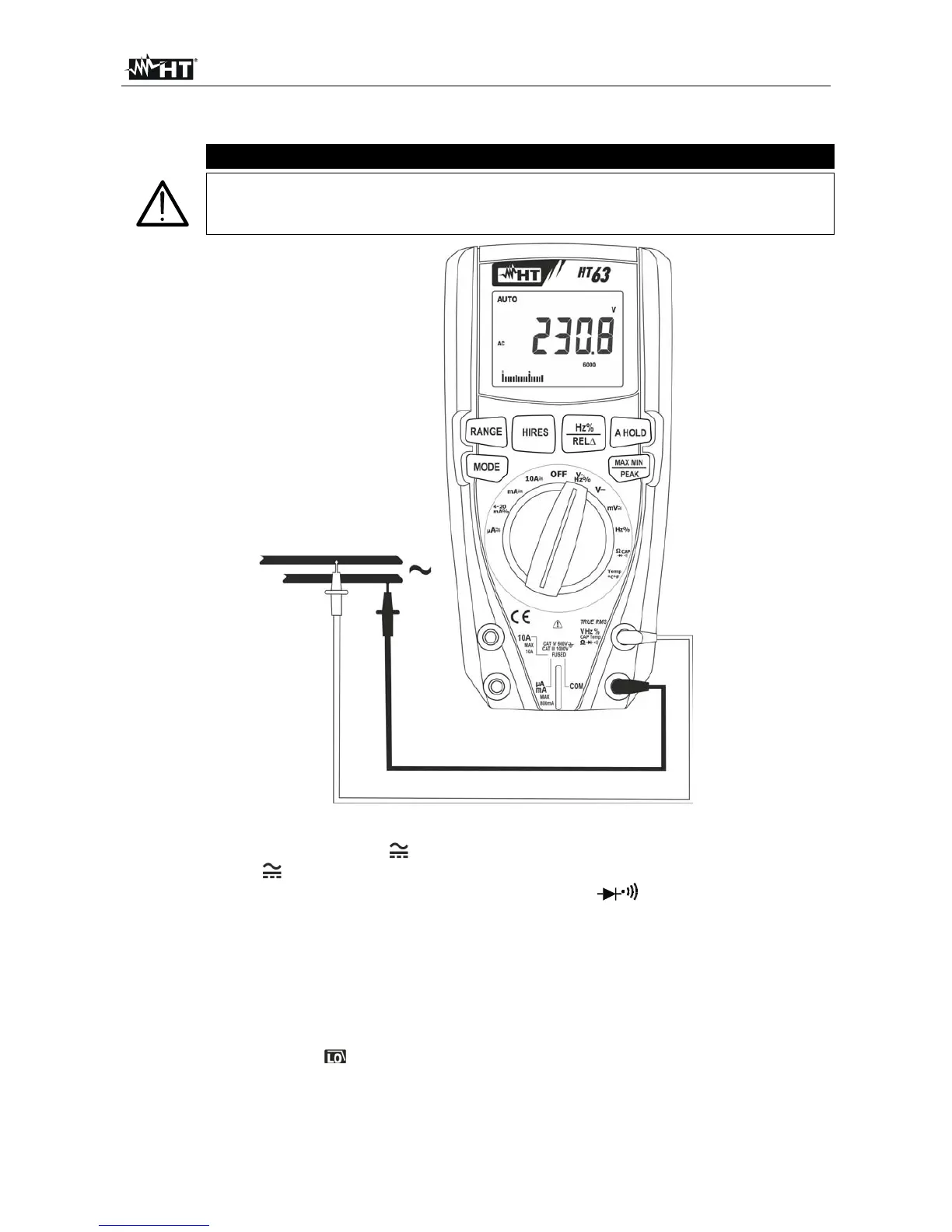
Fig. 3: Use of the instrument for AC voltage measurement
1. Select positions VHz% or mV
2. In position mV , press the MODE key to display the “AC” symbol on the display
3. Insert the red cable into input terminal VHz%CAPTemp and the black cable into
input terminal COM.
4. Position the red lead and the black lead respectively in the spots of the circuit to be
measured (see Fig. 3). The display shows the value of voltage.
5. If the display shows the message "O.L", select a higher range.
6. Press the Hz%/REL key to select measurements
“Hz” o “%” in order to display the
values of frequency and duty cycle of input voltage. The bargraph is not active in these
functions. Press the MODE key to go back to voltage measurement and activate the
function, if necessary.
7. To use the HOLD, RANGE, MAX MIN, PEAK, HIRES and REL functions, see § 4.2



 To Next Page