HT63
EN - 14
4.3.6. Capacitance measurement
CAUTION
Before carrying out capacitance measurements on circuits or capacitors, cut
off power supply from the circuit being tested and let all capacitance in it be
discharged. When connecting the multimeter and the capacitance to be
measured, respect the correct polarity (when required).
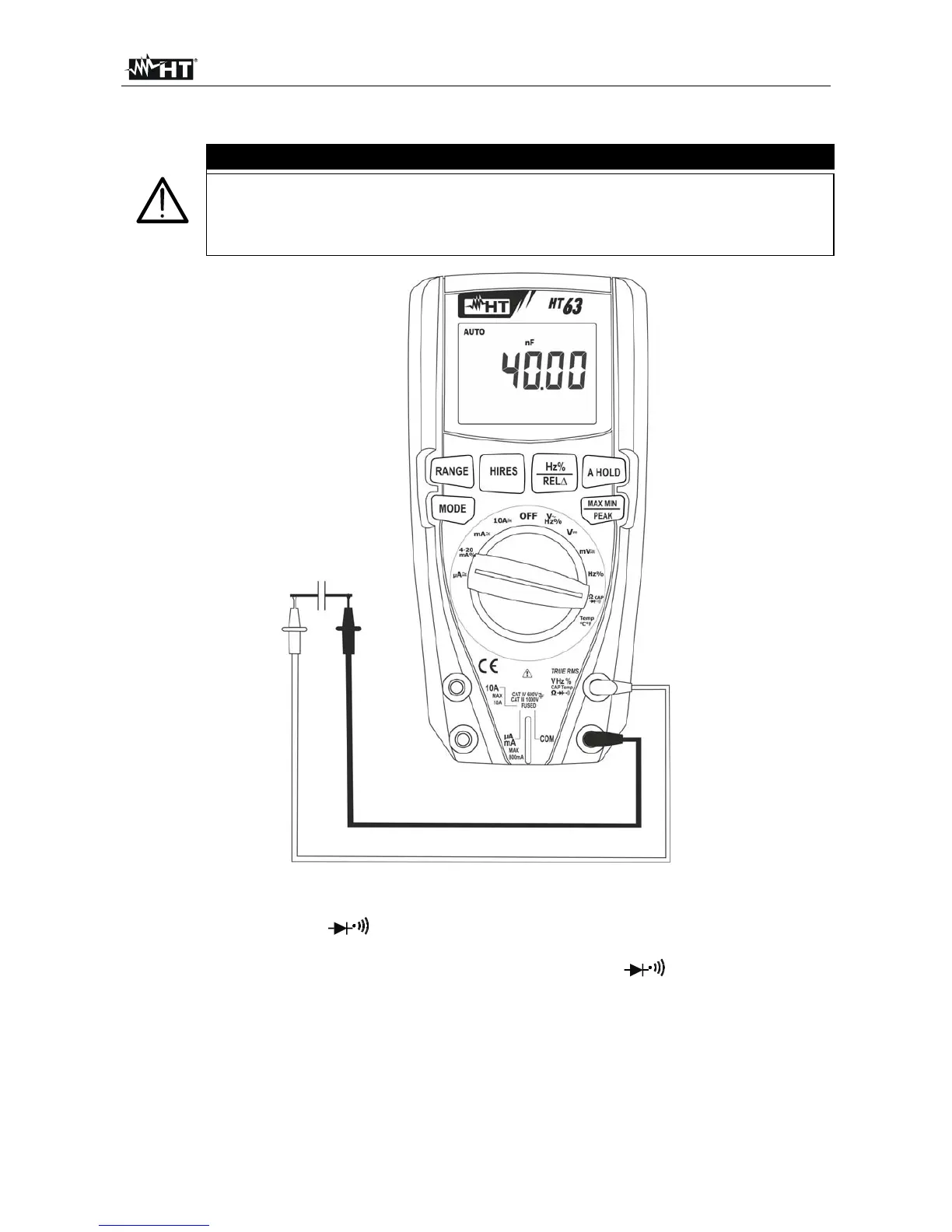
Fig. 7: Use of the instrument for Capacitance measurement
1. Select position CAP
2. Press the MODE key until the symbol “nF” is displayed.
3. Insert the red cable into input terminal VHz%CAPTemp and the black cable
into input terminal COM.
4. Press the REL/ key before carrying out measurements.
5. Position the leads at the ends of the capacitor to be tested, respecting, if necessary,
the positive (red cable) and negative (black cable) polarity (see Fig. 7). The display
shows the value of capacitance. The bargraph is not active in this function.
6. The message “O.L.” indicates that the value of capacitance exceeds the maximum
measurable value.
7. To use the HOLD and REL functions, see § 4.2.



 To Next Page