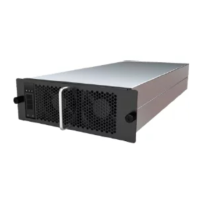
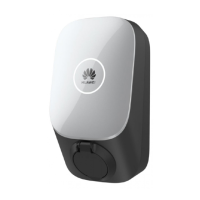
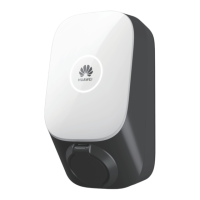
This document describes the PV+ESS+Charger Solution, a system designed to integrate PV (photovoltaic) power, energy storage systems (ESS), and an EV charger to optimize energy usage and reduce electricity costs. The charger implements dynamic charging based on power information delivered by the management system and grid-connection point power information reported by the meter.
Function Description
The PV+ESS+Charger Solution serves as a comprehensive energy management system for residential applications. It allows users to:
- Integrate PV, ESS, and Charger: Seamlessly combine solar power generation, battery energy storage, and electric vehicle charging.
- Dynamic Charging: Adjust charging power based on real-time grid conditions and available PV/ESS power, prioritizing self-consumption and minimizing grid imports.
- Cost Optimization: Reduce electricity bills by leveraging PV generation and ESS to charge the EV during off-peak hours or when surplus solar power is available.
- Remote Management: Monitor and control the system through the FusionSolar app, enabling features like scheduled charging, power preference settings, and remote troubleshooting.
- Identity Authentication: Secure charging sessions using Bluetooth or RFID cards.
- Grid Interaction: Manage power flow at the grid-connection point, supporting various meter connection modes (FE meter, virtual meter) and dynamic charging power settings.
Important Technical Specifications
The solution supports various components, including:
- Inverters:
- SUN2000-(2KTL-6KTL)-L1: Suitable for charging vehicles.
- SUN2000-(5KTL-12KTL)-M1: Provides 5 kWh per battery module, with a system capacity up to 30 kWh when two ESS are cascaded.
- SUN2000-(8KTL-20KTL)-M2: Provides 5 kWh per battery module, with a system capacity up to 30 kWh when two ESS are cascaded.
- ESS:
- LUNA2000-(5-30)-S0: Provides 5 kWh per battery module, with a system capacity up to 30 kWh when two ESS are cascaded.
- AC Chargers:
- SCharger-7KS-S0 (single-phase): Supports multiple charging modes.
- SCharger-22KT-S0 (three-phase): Supports multiple charging modes.
- Backup Box:
- Backup Box-B0 (single-phase): Supports On/Off-grid scenarios.
- Backup Box-B1 (three-phase): Supports On/Off-grid scenarios.
- Smart Power Sensors (RS485):
- DDSU666-H: Connects to the inverter over RS485 for output power management and power limiting control. Used for dynamic charging power through virtual meter networking.
- DTSU666-H: Connects to the inverter over RS485 for output power management and power limiting control. Used for dynamic charging power through virtual meter networking.
- Smart Power Sensors (FE):
- DDSU666-FE: Controls dynamic charging power.
- Smart Dongle:
- WLAN/FE Dongle: Connects to the management system and performs power scheduling.
- 4G Dongle: Connects to the management system and performs power scheduling.
- Smart PV Optimizer:
- SUN2000-450W-P2: Long and short input cables are available to connect to PV modules with different cable lengths.
- SUN2000-600W-P: Long and short input cables are available to connect to PV modules with different cable lengths.
Usage Features
The system offers several user-friendly features for managing EV charging and energy flow:
- PV Power Preferred Mode: In this mode, the charger prioritizes using surplus PV power for charging. If PV power is insufficient, the ESS can supplement the charging power. The actual charging power is related to the surplus PV power and the setting of Max Charging Power from Grid. The minimum charging power of a single-phase charger is 1.38 kW.
- Max Charging Power from Grid: This parameter allows users to set the maximum power that the charger can draw from the grid during charging in PV power preferred mode.
- Surplus Power to Start Charging: This defines the threshold of surplus PV power required to initiate vehicle charging.
- Switch Between Single and Three Phases: For three-phase chargers, users can switch between single-phase and three-phase charging to increase PV energy utilization rate.
- Enabling PV Power Preferred (Charge Now): Users can log into the FusionSolar app, tap the charger icon on the home screen, and enable PV Power Preferred in the Settings screen. A green icon indicates that PV Power Preferred is enabled.
- Enabling PV Power Preferred (Scheduled Charging): Users can log into the FusionSolar app, tap the charger icon on the home screen, tap Settings > Scheduled Charging, add a scheduled time period, and enable PV Power Preferred mode.
- Charging Mode Settings: Users can set the charging mode to "Charge Now" for immediate charging or "Scheduled Charging" for predefined charging times.
- Identity Authentication: This feature ensures that only authorized users can initiate charging. It can be enabled or disabled in the Advanced Settings. When enabled, the charger automatically starts charging after the charging connector is inserted into the charging port of a vehicle. Authentication can be done via Bluetooth or RFID card.
- Lock Charging Connector: This function allows users to lock the charging connector to the charger for property safety and to ensure the charging connector is securely inserted into the vehicle.
- Grounding Self-Check: The charger performs a grounding self-check to detect the ground impedance of the neutral wire and PE wire. This function is disabled by default in an IT system.
- Virtual Plug-In of Charging Connector: This feature allows the charger to simulate a connected vehicle, enabling dynamic charging power to be performed or overload protection to be tested, even when no physical vehicle is connected.
Maintenance Features
The manual outlines various maintenance aspects to ensure the system's longevity and optimal performance:
- Troubleshooting: A detailed table of charger alarms, including alarm name, severity, possible cause, and suggested solutions, helps users diagnose and resolve common issues. Examples include:
- Charging Connector Removed Abnormally: Indicates the connector was removed while charging. Solution: Instruct the user to stop charging before removing the connector.
- Overcurrent: Indicates the charging current exceeds the limit. Solution: Check for vehicle alarms, current settings, and if the charger alarm persists, replace the charger.
- Control Pilot Circuit Fault: Indicates a problem with the charging cable connection or the control pilot circuit. Solution: Replace the charging connector or the charger.
- Electric Leakage: Indicates a leakage detection circuit fault or damaged PE cable. Solution: Restart the charger, use a simulator, or replace the charging cable/charger.
- Charging Connector Lock Faulty: Indicates the charging connector is not properly inserted or the lock control is faulty. Solution: Reinsert the connector, use the app to unlock, or replace the charger.
- Charging Cable Abnormal: Indicates abnormal through-current capability of the charging cable. Solution: Measure PE resistance and check for damage.
- Leakage Detection Circuit Fault (AC Charger): Indicates a fault in the leakage detection circuit. Solution: Restart the charger or replace it.
- Contactor Fault (AC Charger): Indicates the contactor is adhered. Solution: Restart the charger or replace it.
- Temperature Sensor Faulty (AC Charger): Indicates a faulty temperature sensor. Solution: Restart the charger or replace it.
- Input Phase Failure (AC Charger): Indicates the charging cable is incorrectly connected. Solution: Rectify the mains input circuit or restart the charger.
- Input Undervoltage/Overvoltage (AC Charger): Indicates unstable mains or inverter power supply. Solution: Rectify the mains input circuit or restart the charger.
- High Temperature (AC Charger): Indicates high ambient temperature or a short-circuited cable. Solution: Shield the charger from direct sunlight, check for heat sources, or replace the charger.
- Cable Connection Abnormal (AC Charger): Indicates the charger is not properly grounded or live/neutral wires are reversed. Solution: Contact an electrician to ground the charger or correct wiring.
- Certificate Expired/Will Expire (AC Charger): Indicates the charger system time is incorrect or the charging host certificate has expired. Solution: Reset/synchronize system time, apply for a new certificate, or import a new certificate.
- Communications Failure (Meter): Indicates incorrect meter configuration or abnormal router configuration. Solutions vary based on the scenario (FE meter direct, FE meter connected to router, RS485 meter and Dongle connected to router).
- Connecting to a Charger: Instructions for connecting to the charger via the FusionSolar app, including logging in as an installer or owner.
- Exporting Logs and Performing an Update: Steps to export app operation logs and charger run logs, and how to authorize device updates from the message center.
- Resetting Charger Passwords: Procedure to reset the password by swiping an RFID card, which requires the charger login password to be reset to "Changeme" and the WLAN connection password to be reset to the initial password.
- RFID Card Management: Instructions for adding or deleting RFID cards, including manual entry and swiping the card.
- Restoring Factory Settings: Steps to restore factory settings, which unbinds the charger from the plant and clears app login and WLAN passwords, alarms, and management system access passwords. This can be done via the installer or owner settings in the FusionSolar app.
- Exception Description: Provides guidance on how to unbind the charger from the PV plant and restore communication if factory settings are restored without unbinding.

 Need help?
 General

 To Next Page