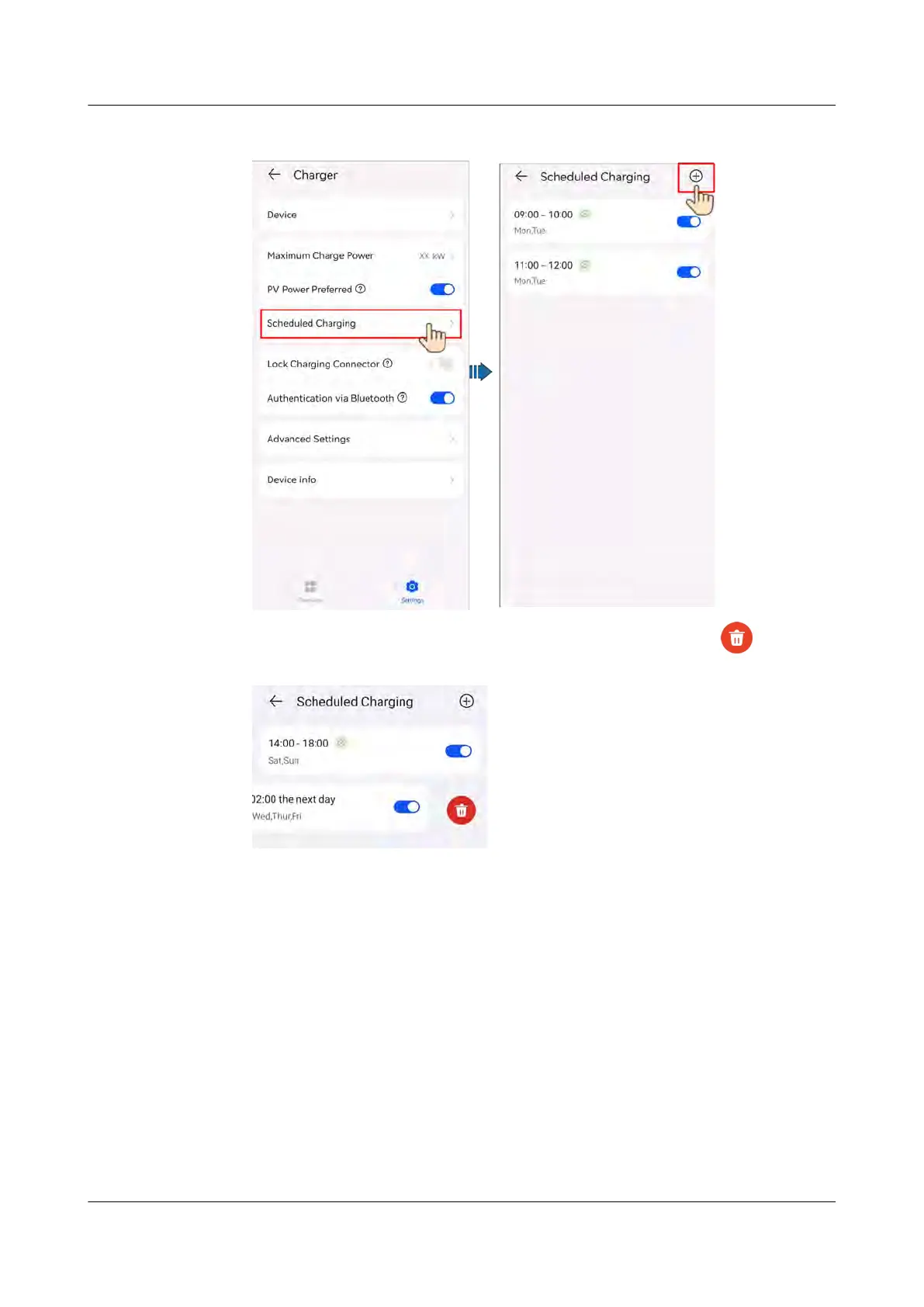
Figure 4-12 Set
ting a scheduled charging plan
● Select a plan you want to delete, press and swipe left, and tap to delete
the time.
4.5.3 Starting and Stopping Charging on the App
Pr
ecautions
Before charging, you need to completely insert the charging connector into the
charger and vehicle. If the indicator on the charger turns blue on and o cyclically
(on f
or 4s and o for 1s), the charger is successfully connected to the vehicle.
Start
ing Charging
Log in to the FusionSolar app as an owner and tap the charger icon on the home
screen. Tap Start Charging in Charge Now mode, or tap Schedule in Scheduled
Charging mode.
PV+ESS+Charger Solution
User Manual 4 System Commissioning
Issue 02 (2023-01-13) Copyright © Huawei Technologies Co., Ltd. 55



 To Next Page