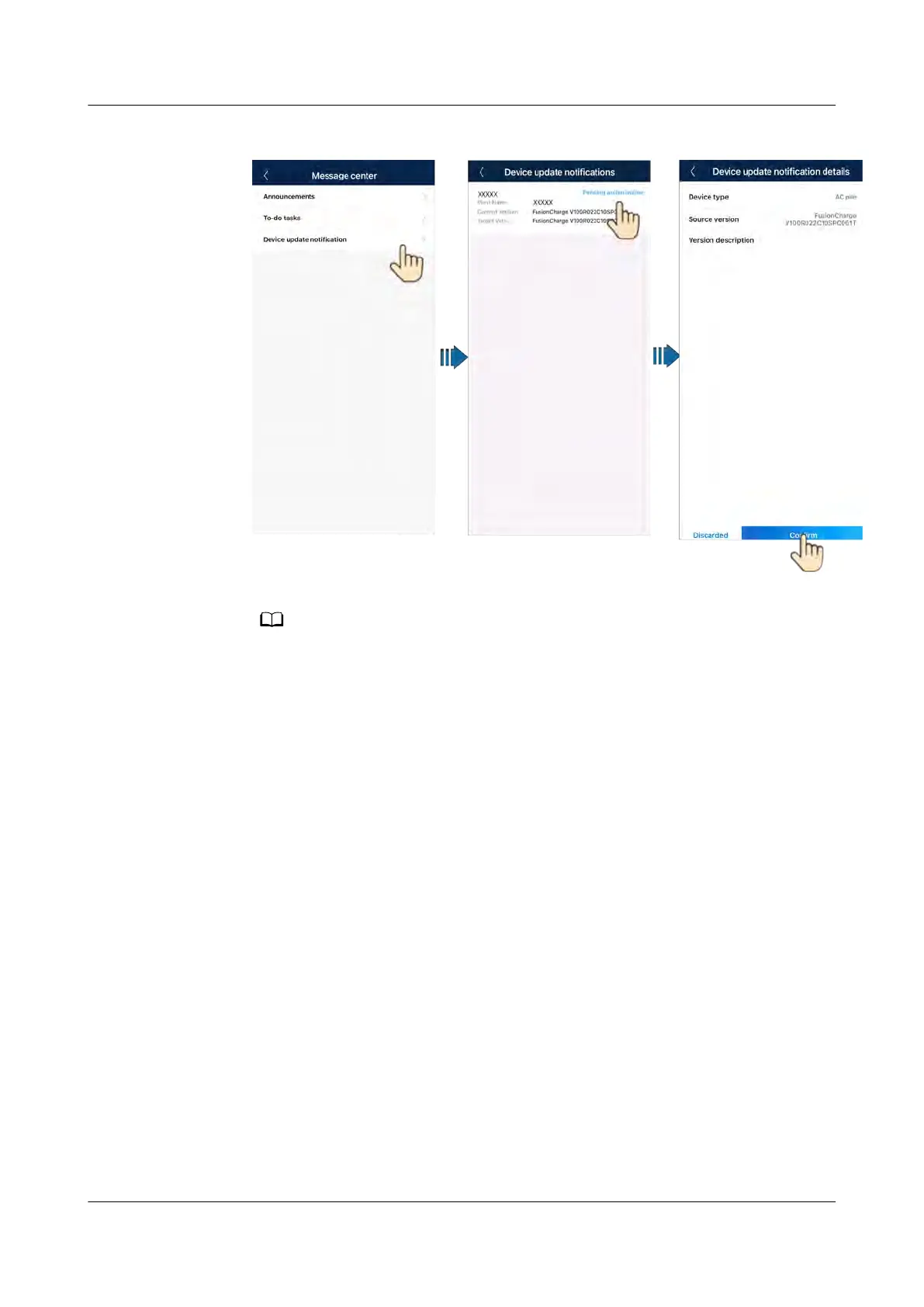
Figure 5-3 Devic
e update
The charger cannot be updated when it is in the charging or charging waiting state.
5.4 Reset
ting Charger Passwords
Description
If you forgot the password, you can reset the password by swiping the card.
Precautions
● This operation will reset both the WLAN password and login password. The
charger login password will be reset to Changeme. The WLAN connection
password will be reset to the initial password. The password for connecting
the charger to the router will be deleted and needs to be recongured.
● Before resetting the passwords, ensure that the charger is idle.
Pr
ocedure
1. Swipe the card for
ve consecutive times (at an interval of less than 5s). The
indicator on the charger is steady white for 3s and the charger enters the
swipe protection state. Stop swiping the card now.
2. After 3s, the indicator blinks white fast for 20s. If you swipe the card again
within this 20s, the indicator turns o and pulsates after 3s, indicating that
the char
ger password has been successfully reset.
PV+ESS+Charger Solution
User Manual 5 Maintenance
Issue 02 (2023-01-13) Copyright © Huawei Technologies Co., Ltd. 73



 To Next Page