4.4.2 PV+Charger/PV+ESS+Charger
If virtual meter networking is used, log in to the inverter connected to the Smart Dongle.
On the devic
e commissioning screen, choose Settings > Communication conguration >
Dongle parameter settings, and set Modbus TCP to Enable (unrestricted). If an FE meter
is used, set Modbus TCP to Disable.
PV+Charger/PV+ESS+Charger Devices Under the Same Installer
1. Connect the PV and ESS devices to the management system and create a
plant. For details, see the corresponding inverter quick guide or FusionSolar
App Quick Guide.
2. Commission the charger and connect it to the management system. For
details, see Device Commissioning (Charger).
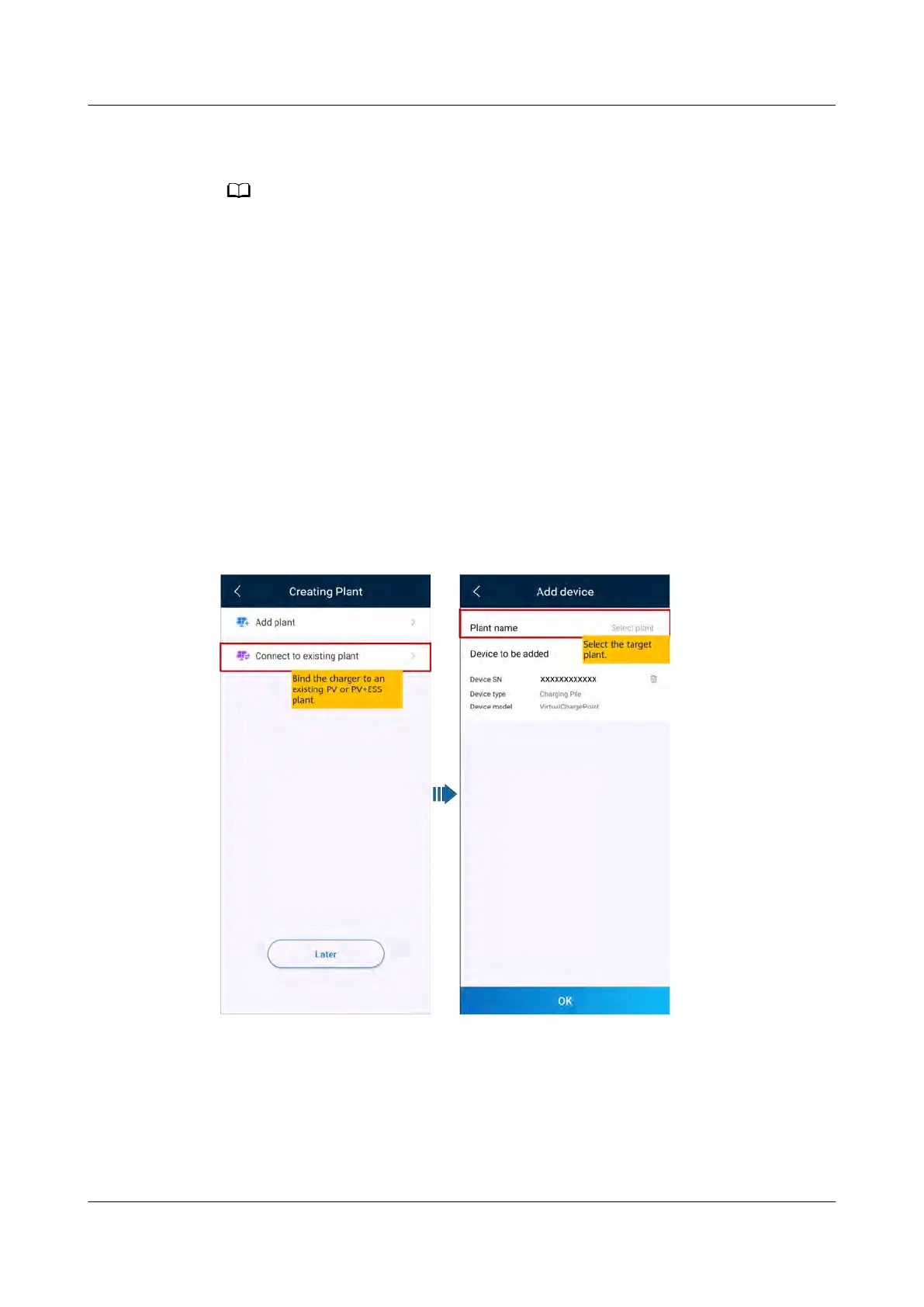
3. Connect the charger to the created PV plant.
Method 1: In the Setup wizard, scan the QR code of the charger and select
Connect to existing plant.
Figure 4-10 Connecting to an existing plant
Method 2: On the O
verview screen, tap Add device to connect to the charger.
PV+ESS+Charger Solution
User Manual 4 System Commissioning
Issue 02 (2023-01-13) Copyright © Huawei Technologies Co., Ltd. 51



 To Next Page