4 S
ystem Commissioning
4.1 System Power-On
1.
Power on the PV+ESS system. For details, see the corresponding user manuals.
2. Turn on the upstream switch (RCBO) of the charger.
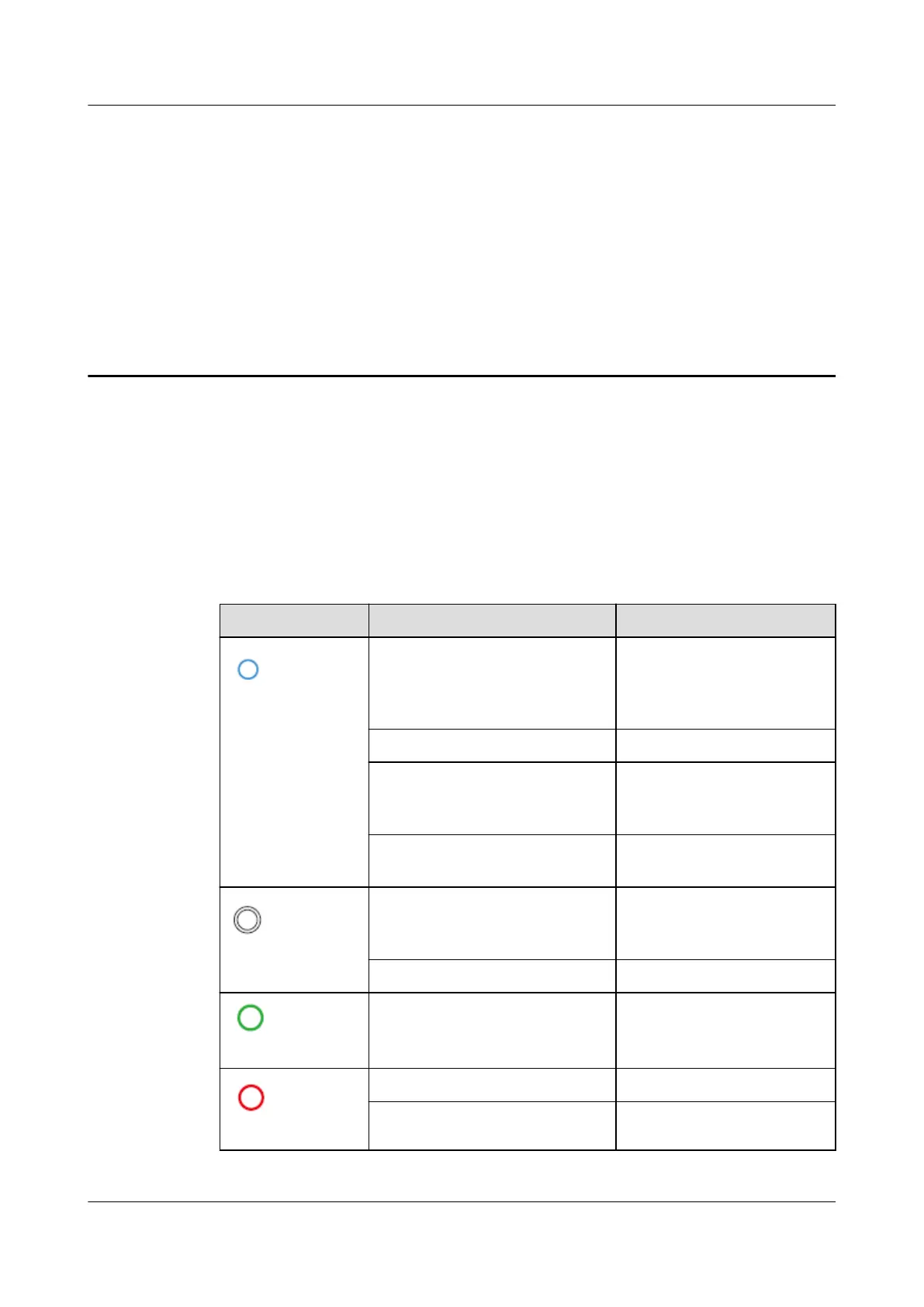
Table 4-1 Charger indicator description
Indicator Indicator Status Charger Status
Blue
Cycle: steady blue for 4s and
o for 1s
Charging connector
plugged (The
authent
ication function is
disabled.)
Cycle: pulsating blue for 1s Charging in progress
Steady blue Charging ended (The
charging connector is not
removed.)
Cycle: pulsating blue for 4s
and o for 1s
Scheduled charging
waiting
White
Cycle: pulsating white for 4s
and o for 1s
Idle (default state or
char
ging connector
removed from the vehicle)
Cycle: ashing white for 0.5s Upgrading
Green
Cycle: pulsating green for 1s PV power charging waiting
and PV po
wer charging in
progress
Red
Cycle:
ashing red for 0.5s Alarming
Steady red Faulty
PV+ESS+Charger Solution
User Manual 4 System Commissioning
Issue 02 (2023-01-13) Copyright © Huawei Technologies Co., Ltd. 41



 To Next Page