AC Electric Systems
8.5
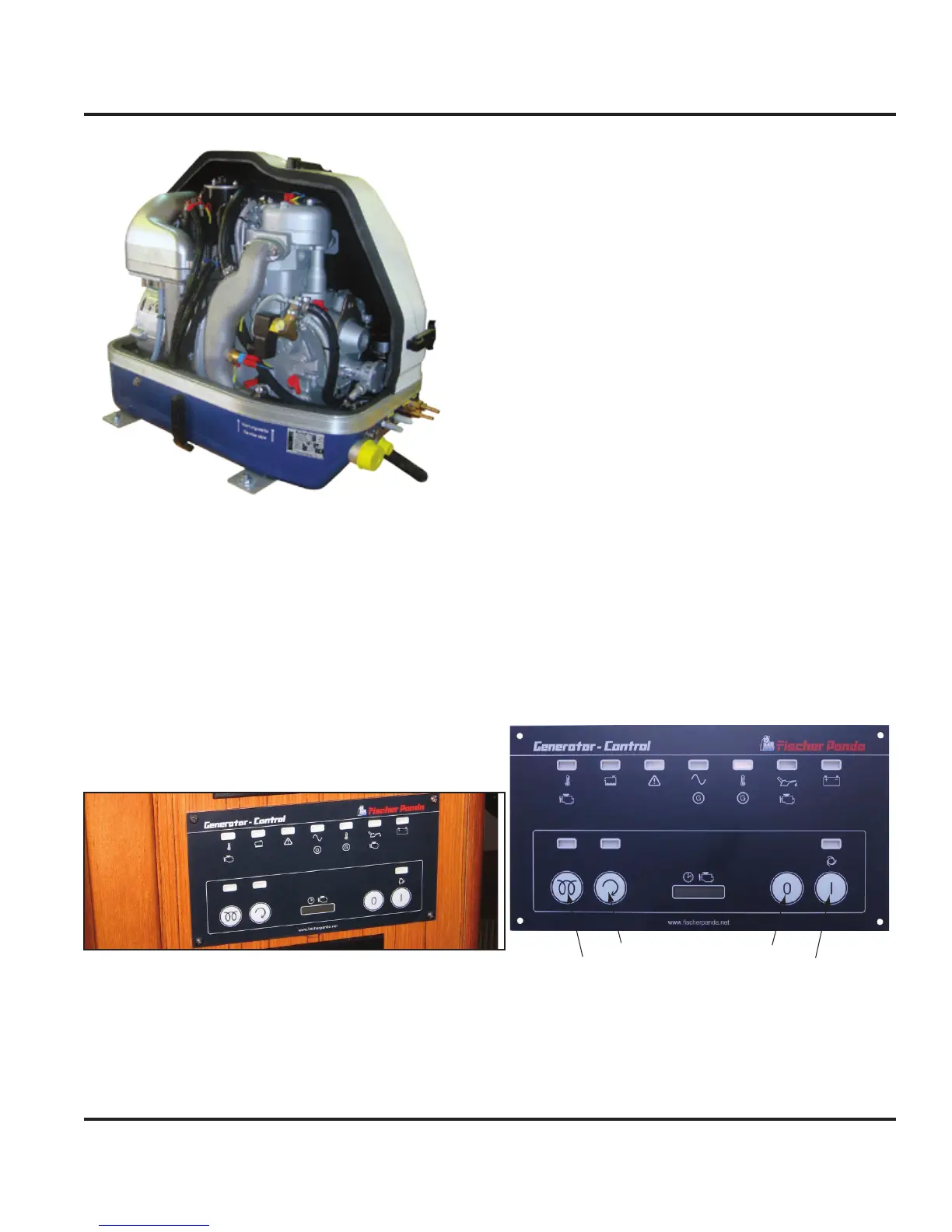
Figure 8.7
8.2.5.1 Generator Basic Operation
When powered up, the energy produced from the gen-
erator is routed through the AC Panel’s 50 amp toggle
double-breaker switch labeled “Generator”. The toggle
switch is managed by a slide-bar stopper. This stop-
per will only allow source power to be either from shore
power or from the generator. Switching on the generator
toggle breaker switch will energize the AC panel. Actual
control of the generator is through the generator remote
panel.
Figure 8.8
8.2.5.1.1 Generator Start
NOTE: Consult the generator manufacturer’s OEM manual for
specifications when operating the generator’s remote panel.
Check generator oil level. Ensure level is in accor-
dance with the manufacturer’s specifications.
1.
Check the external expansion tank water level.
Ensure level is in accordance with the manufacturer’s
specifications.
Check the raw water filter is free of debris.
Ensure cooling water intake valve is open.
Turn off all AC Panel breakers, including the
“Generator” breaker.
Turn on the desired battery selector switches (see
DC Electric System chapter in this manual).
Press the “Panel On” button on the generator remote
panel (Fig. 8.9). A green LED should illuminate
above the button.
Press the “Pre-Heat” button on the generator remote
panel, if necessary (as per the manufacturer’s speci-
fications). An orange LED should illuminate above
the button.
Press the “Start” button on the generator remote
panel. A green LED should illuminate above the
button. Refer to the manufacturer’s specifications
for delay time on re-pressing the start button if the
engine does not immediately start.
Turn on the “Generator” breaker switch at the AC
Panel.
Turn on breakers at the AC Panel for the desired AC
components.
HEAT (PRE-GLOW)
ENGINE START
PANEL OFF
PANEL ON
Figure 8.9
8.2.5.1.2 Generator Stop
NOTE: Consult the generator manufacturer’s OEM manual for
specifications when operating the generator’s remote panel.
2.
3.
4.
5.
6.
7.
8.
9.
10.
11.



 To Next Page