2.5
The following must be done to activate the cutting modes:
1. The head must be fully retracted.
2. Then the head must pass 90 degrees. The approach can be done in fast speed, but the passing of 90 must be
done in slow.
After the above points are achieved the screen will change to manual mode.
MANUAL MODE
MANUAL MODE is the default mode. All functions are enabled when in MANUAL MODE.
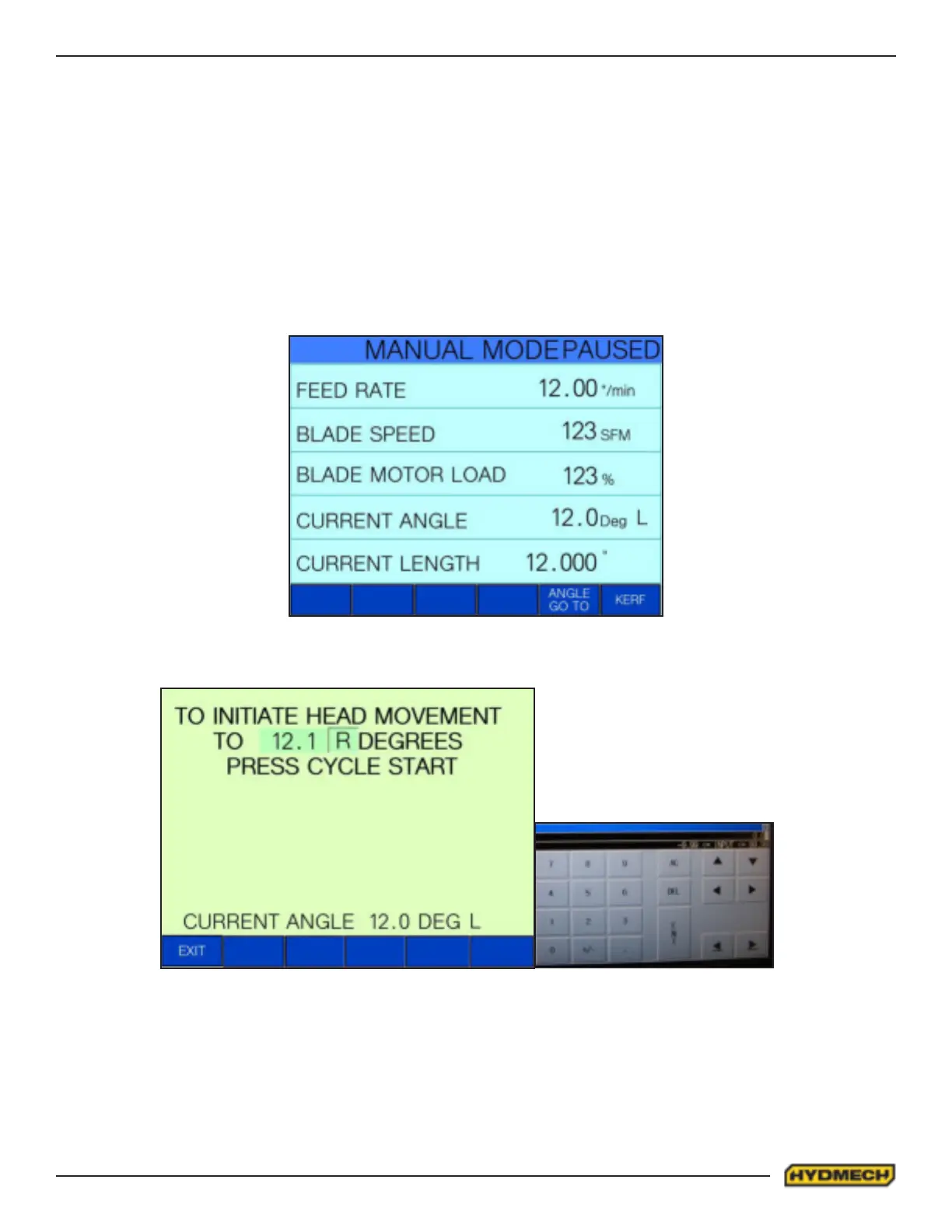
The screen should look as follows:
To program the required angle, press Angle Go To. The screen will change to the picture below.
To enter the required angle touch the screen at the angle numerical values. The number pad display window will open.
Enter a numerical angle then press the ent button. Left or Right is changed by toggling L or R on the display. Press the
CYCLE START button once the desired angle is chosen.
The screen will change back to manual mode after “ANGLE GO” cycle was completed. The saw head will move to the
new angle.


 To Next Page