2.10
PROCEDURE FOR EDITING OR STARTING A NEW JOB IN AUTO MODE (SIMPLE SHAPES)
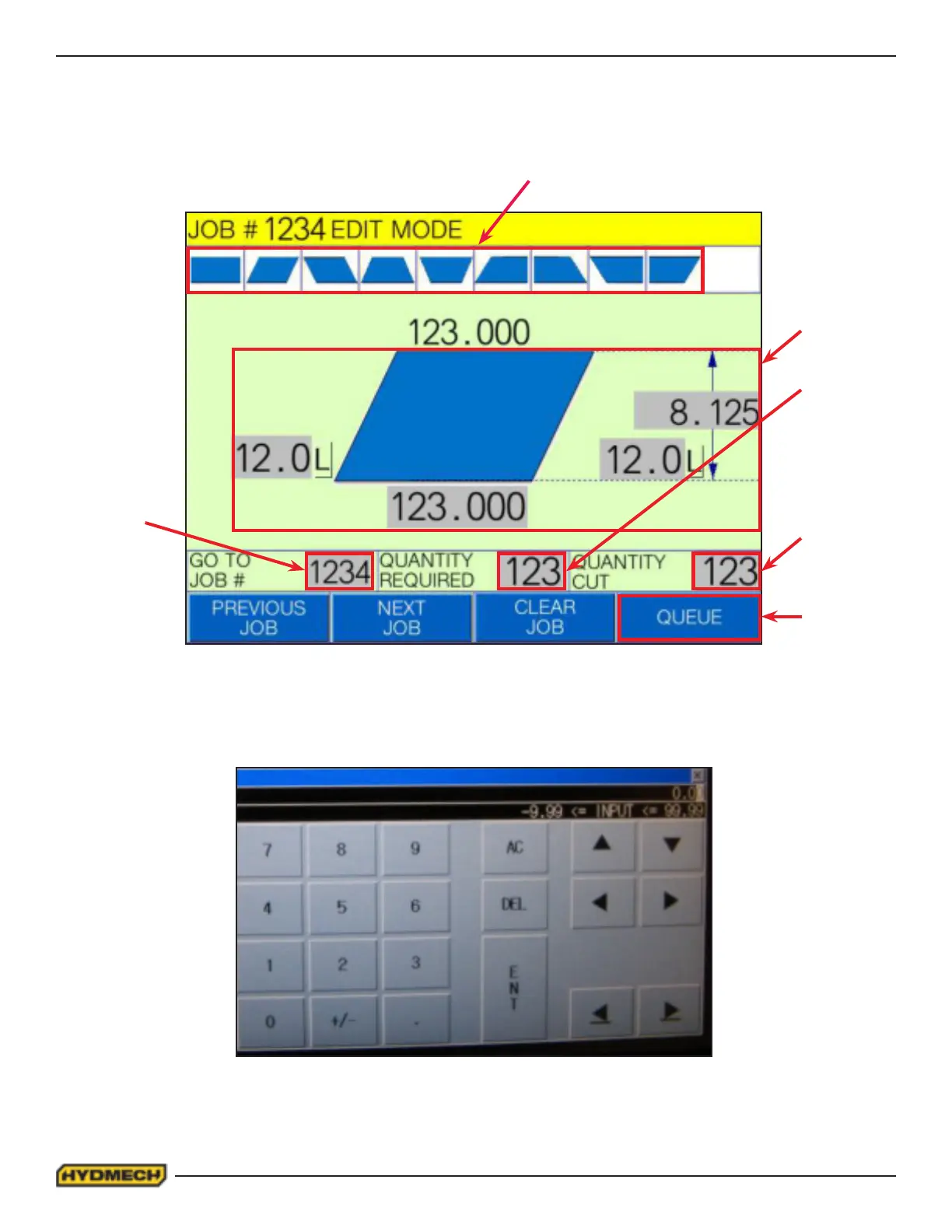
Step 1. In AUTO mode and under the job display window, select the grey input box under “GO TO JOB #” on the touch
screen. A number pad display window will appear over the job display window.
Key in the desired job number from 1 to 1000 on the touch screen and press ent. The number pad display window will dis-
appear and the Job # will be changed to the inputted value in the top eld highlighted in yellow. Select the “CLEAR JOB”
option on the touch screen to clear all the previous job properties. It is important to note that the current job # being edited
is always the job # indicated in the yellow highlighted eld.
AUTOMATIC OPERATION
To enter AUTO MODE, the Infeed Vise must be in the closed position. When the AUTO MODE push button is pressed, the
red indicator will come on. The screen will change to the JOB display window as shown below and will be ready for editing
or starting a new job. All manual functions will be disabled.
STEP 2 (SIMPLE SHAPES)
STEP 1
STEP 3
STEP 4
STEP 5
STEP 6


 To Next Page