Home
Hydrafeed
Industrial Equipment
MSV 80
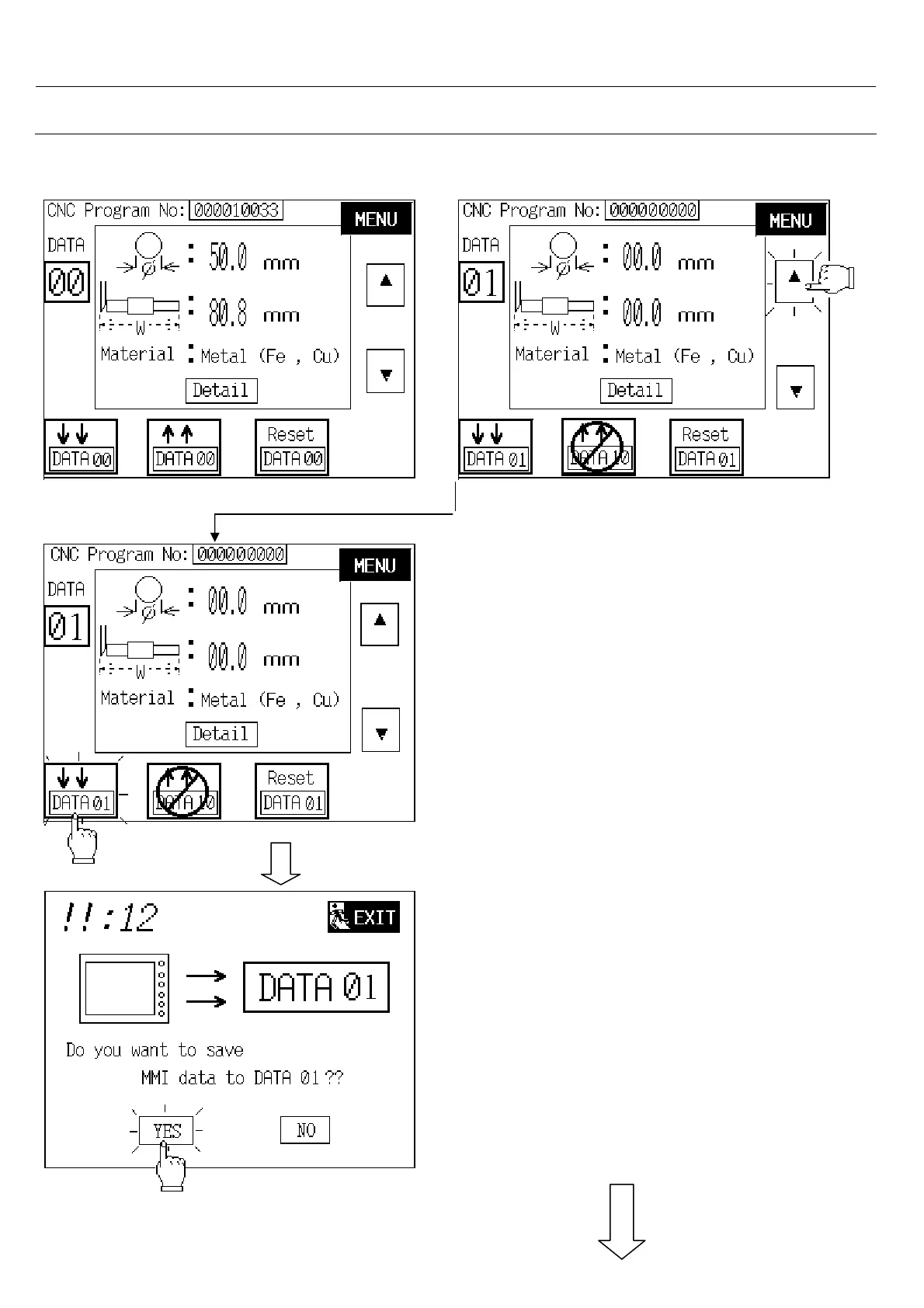
Page 63 (To Save MMI Data to DATA 01)
Hydrafeed MSV 80 - To Save MMI Data to DATA 01
224 pages
Manual
Save Page as PDF
To Next Page
To Next Page
To Previous Page
To Previous Page
Loading...
60
3. User Setup
3.10.2. To Save MMI Data to DATA 01
Step 1: Touch “ up “ button.
Step 2: Touch “ save “ button.
Step 3: Touch on YES button to save.
Note: if touch on NO or NEXT button
will jump back to last screen.
62
64
Table of Contents
Main Page
Default Chapter
2
Table of Contents
2
1 Mechanism
4
Notes for Your Safety
4
Description
4
Identification
4
Transport and Unpacking
5
Accessories Supplied
5
Preparations for Installing the Barfeeder
5
Mounting, Anchoring and Alignment
6
Changing the Pushrod Position
7
Retraction of the Barfeeder for Spindle Service
7
Material Rack Height and Diameter Adjustment
7
Maintenance
7
2 Operation Panel
16
Power on and First Screen
16
Select Manual / Auto Mode
17
Manual Operation
18
Auto Cycle
19
3 User Setup
25
User Setup Introduction
25
BAR TYPE / Diameter
27
Bar Type
27
Bar Diameter Setting
28
Material Selection
28
Push Torque Adjustment
29
Component Length
30
Position Setup
31
End of Bar Position
31
Spindle Length Setup
32
Clamping Length Setup
32
Loading Selection
33
Pushrod Retract Position
35
Feeding Type
37
Sub Spindle Pull
38
Barfeeding with / Without Turret
41
Back Stop
53
Shaft Load
57
Chucking Mode
59
Center Line Correction
60
Barfeed Programs
61
Ways to Search DATA Address
61
To Save MMI Data to DATA 01
63
To Transfer DATA 10 to MMI Data Base
67
To Reset DATA 10
69
Other
71
Eject Remnant
71
Part Counter
75
Bar Length (MAX Setting)
77
Hexagonal Bar Time Setting
78
1St Feed Error Correction
79
Chuck Close Bar Check Torque Value Setting
80
4 System Setup
81
System Setup Introduction
82
Interface Signals Selection
83
Bar End Signal Function
83
CNC Auto Mode Signal Function
85
CNC Emergency Stop Signal Function
86
Interface Signal Optional Function Selection
86
CNC Chuck Open / M Code Signal Selection
88
Carriage Position Setup
91
Loading Position Setup
93
Lathe Selection
94
Chuck Open/Close Bar Check Function Setup
94
Time Delay for Chuck Close then Pushrod Retract Setup
96
Bar End then Turret Comes to New Bar Loading Position Function Setup
96
Cover/Sliding Rail Operation Function Setup
103
Servo Motor Speed Value Setting
103
Demo Function
113
Sensor Position Setting
113
Chuck Type Selection
117
Shaft Load Space Setting
118
Maintenance
119
Pulse Output Selection
120
Back Stop Option
121
Thickness of Shaft Load Plate
122
Eject Remnant by New Option
123
5 History
124
Alarm History
124
Workpiece Record
125
6 PLC Input/Output Signal and Data List
126
7 Alarm List
127
8 Warning List
140
9 Appendix : Electronic Controller
151
Input List
151
Output List
152
Spare Parts List
153
Electrical Components Distribution
157
Electric Circuit Diagram
158
10 Parameter List
172
User Parameter List
172
System Parameter List
174
11 Appendix : Mechanism
176
Related product manuals
Hydrafeed MSV 65
214 pages
Hydrafeed Multifeed 65
89 pages



 To Next Page