宏宇达数控 & 弘宇达智能
地址:深圳市南山区中山园路 1001 号 E4-6C(TCL 国际 E 城)
TEL:0755-26625800 FAX:0755-26729960 -16-
characteristics of the capacitance change during the calibration process. The ideal
situation for this indicator is “excellent” or “good”.
RMS: The value of the capacitor from 0.5mm to infinity. Reflects the measurement range
of the nozzle sensing. The larger the measurement range, the better the accuracy and
stability of the tracking. Press <ENTER> to save the calibration value.
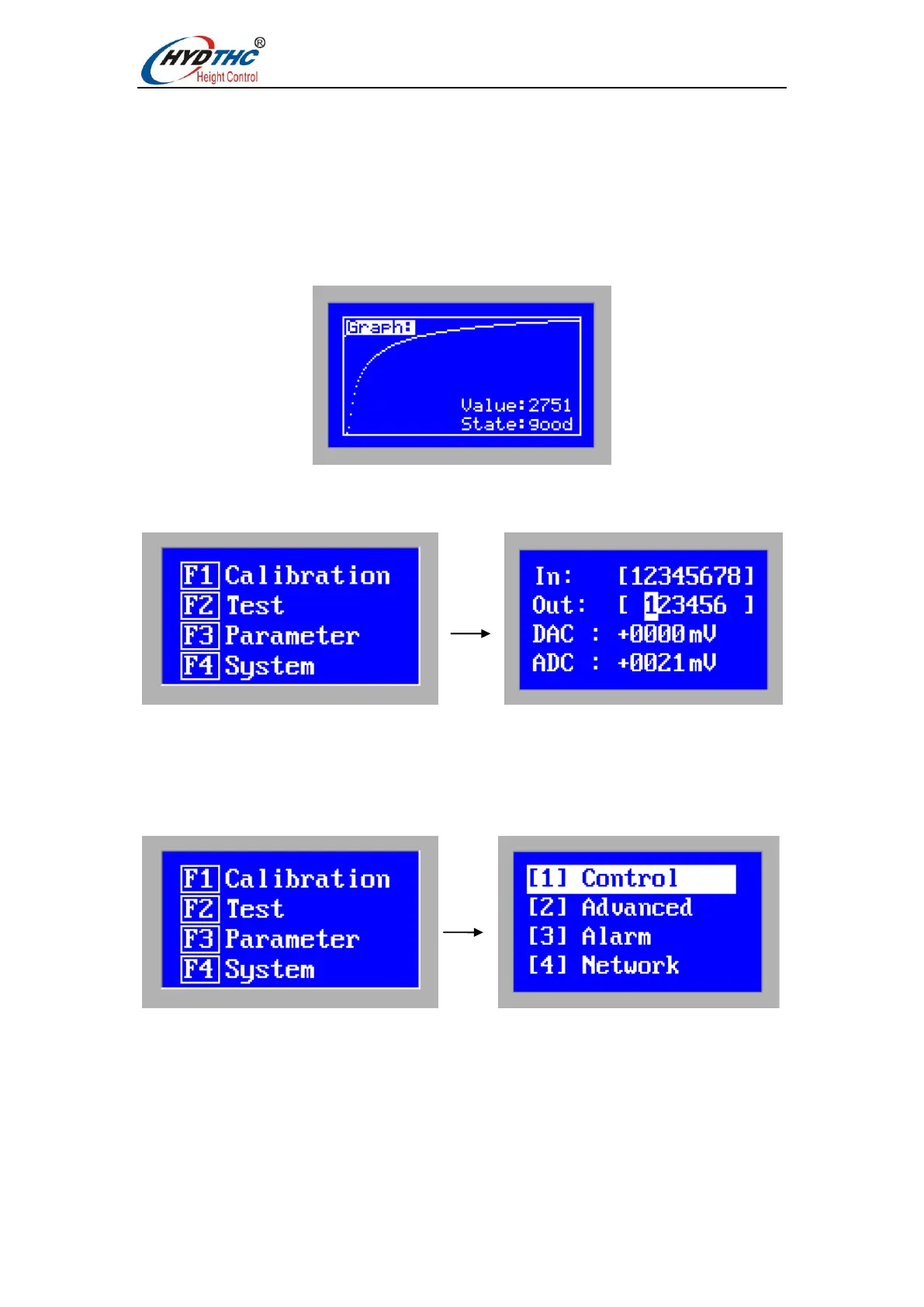
Show height-capacitance curve. The normal curve should be smooth, as shown below:
3.5 Test menu
In the main menu, press <F2> to enter the [Test menu]. As shown below:
The direction left/right key is used to select the object to be operated.
The direction up/ down key is used to change the state value of the operation object.
3.6 Parameter menu
In the main menu, press <F3> to enter the [Parameter menu]. As shown below:
When using the CHC-1000S for the first time, the user must set the above parameters
correctly. In particular, the "control parameters" must be set correctly, otherwise the
system will not work properly.


 To Next Page