宏宇达数控 & 弘宇达智能
地址:深圳市南山区中山园路 1001 号 E4-6C(TCL 国际 E 城)
TEL:0755-26625800 FAX:0755-26729960 -18-
3.6.2 Advanced parameters
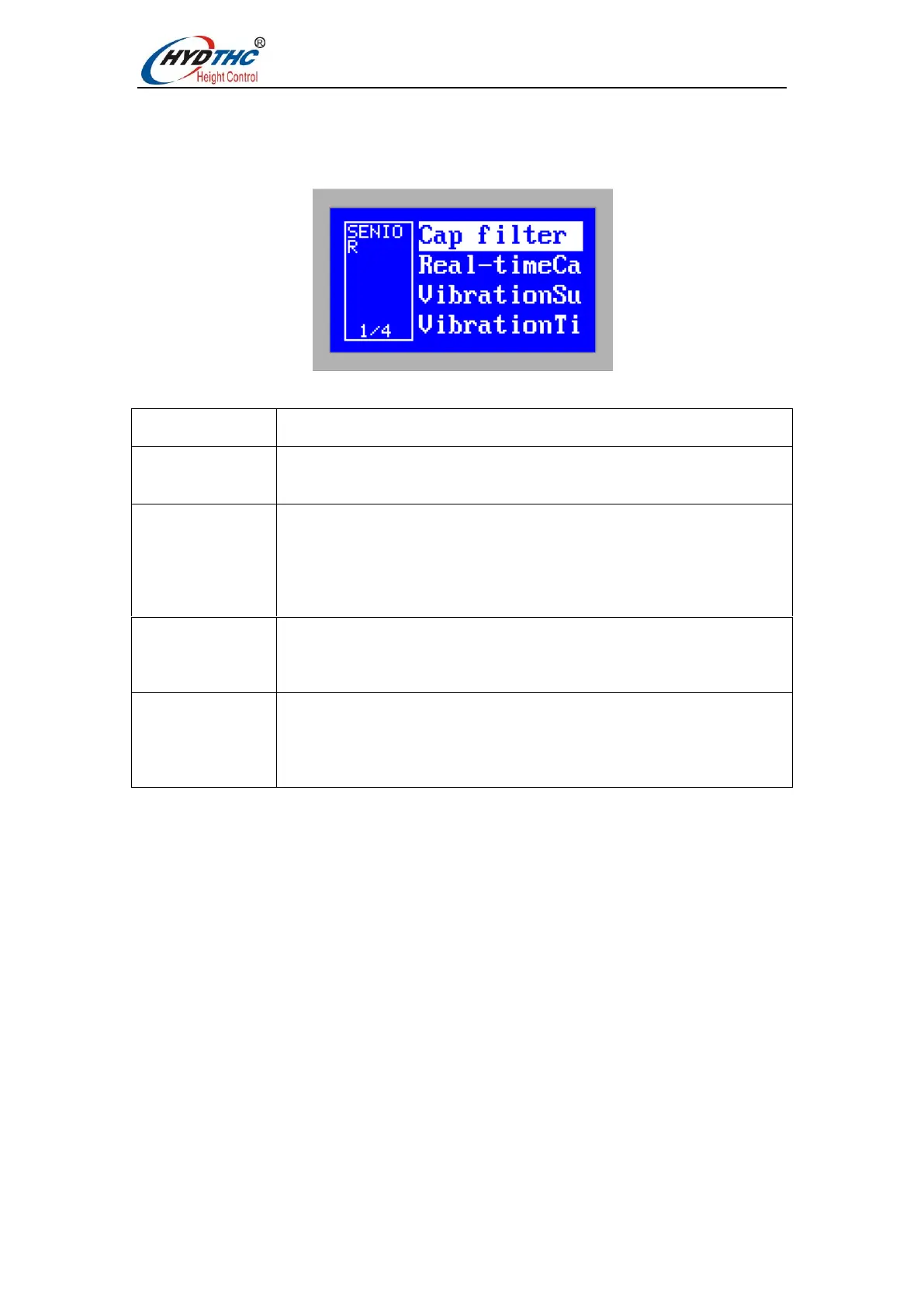
Press <Up> or <Down> to select the target menu item, press <ENTER> to enter the
[Advanced Parameters] menu, as shown below:
The meaning of the parameters is shown in the following table:
The capacitive signal returned from the sensor is filtered through a
filter to provide stability.
Set the real-time calibration function to turn on. The height adjuster
will automatically calibrate the body capacitance of the cutting head
after each processing, to reduce the number of manual calibration.
When using this function, please ensure height that the cutting head
at the stopping point is over 30mm from the board surface. The IN8
input signal is triggered and the signal is held for more than 100ms.
Set the vibration suppression function to turn on. This function can
suppress the vibration caused by the cutting airflow disturbing the
structurally weaker plate, thereby reducing the cross-sectional wave
pattern.
This parameter is the intensity of vibration suppression. The larger
the value is, the more obvious the vibration suppression effect will
be, but the response of the height regulator will be reduced.The
default value is 20ms and the recommended range is 5-50ms.


 To Next Page