iCharger Synchronous Balance Charger/Discharger 4010DUO
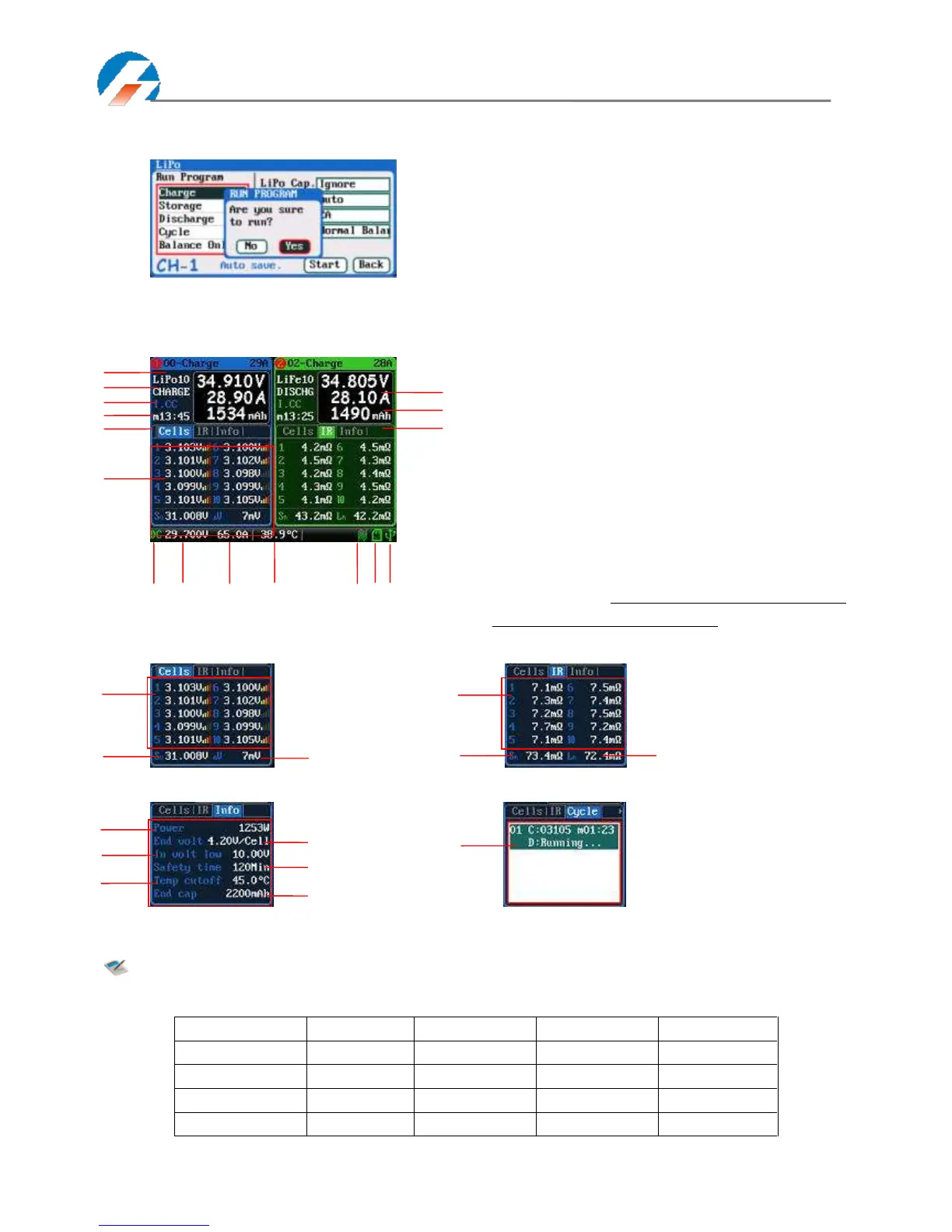
After selecting the program to run, click confirmation to pop up RUN PROGRAM window, as below:
Click Yes to run the program, click No to cancel.
Program Running Status
Press STATUS-x button when running program to switch the multipage information displays, as below:
Note: Different types of batteries and programs have different multipage information displays, see
details below:
Cells voltage information
1: Cells voltage
2: Cells voltage sum
3: Maximum cells voltage
difference
IR information
1: Cell internal resistance
2: Pack internal resistance
3: Line resistance
Information page
1: Power
2: End voltage
3:Lowest input voltage
4: Safety time
5: Temp. cutoff
6: End charge capacity
Cycle charge status
1: Cycle charge status
1: Running program name 2: Battery type
3: Running channel status
4: Channel control status/external temperature
5: Running program time
6: Multipage information
7: Charging voltage 8: Charging current
9: Charging capacity 10: Input power source type
11: Input voltage 12: Input current
13: Internal temperature 14: Fan status
15: SD card status 16: USB status
See details on Page39 Status Indication of Running Channel
& Status Indication of Channel Control.



 To Next Page