iCharger Synchronous Balance Charger/Discharger 4010DUO
Power Supply Setup
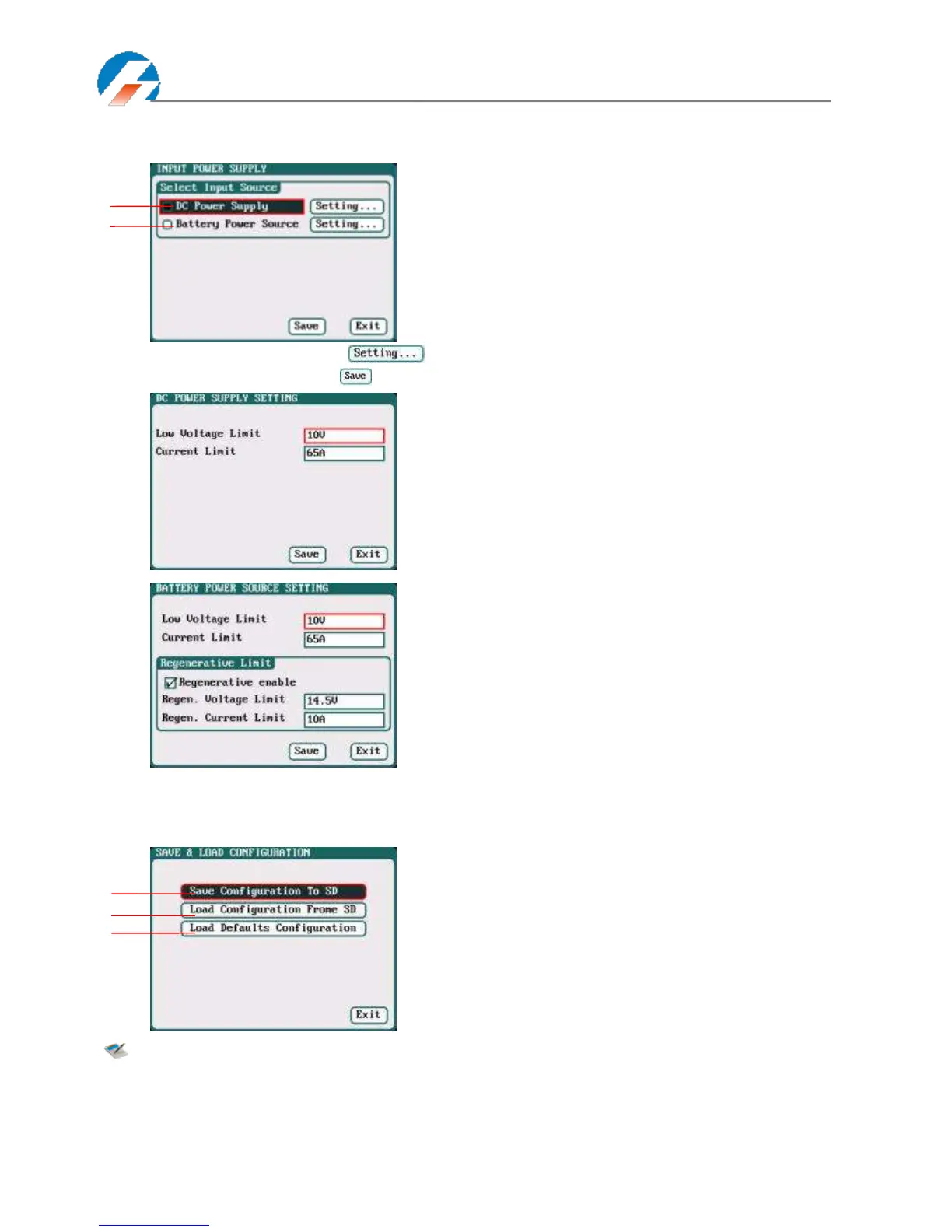
Select SYSTEM MENU→Charger Setup→Power Supply to enter the setup interface.
After selecting input source, click the " " followed by the option, enters the relevant power supply setting to
set the parameters, after setting click “ ”to save and return to the previous interface.
Save & Load Configuration Setup
Select Save & Load Config on SYSTEM MENU and enter the setup interface.
Note: 1. Users can save configuration to SD card and re-load via the SD card if needed.
2. After loading the configuration files, in addition to Calibration Select, it will cover all settings
within the charger.
Low Voltage Limit: 9V-48V; default: 10V
Current Limit: 1A-65A; default: 65A
Low Voltage Limit: 9V-48V; default: 10V
Current Limit: 1A-65A; default: 65A
Regen.Voltage Limit: 9V-48V;default:14.5V
Regen. Current Limit: 1A-65A;default:10A
After ticking Regenerative enable, if run the
regenerative discharge to input, the electrical
discharged will be re-charged as the battery of input
power.
1: DC Power
2: Battery Power
1: Save Configuration to SD card
2: Load Configuration from SD card
3: Load Defaults Configuration



 To Next Page