NiMH/NiCd Battery Cycle Setup
Select Program→Cycle to enter Cycle setup interface, see details about setting on Page21 LiPo/LiIo/LiFe Battery Cycle
Setup.
Pb Battery Charge/Discharge Setup
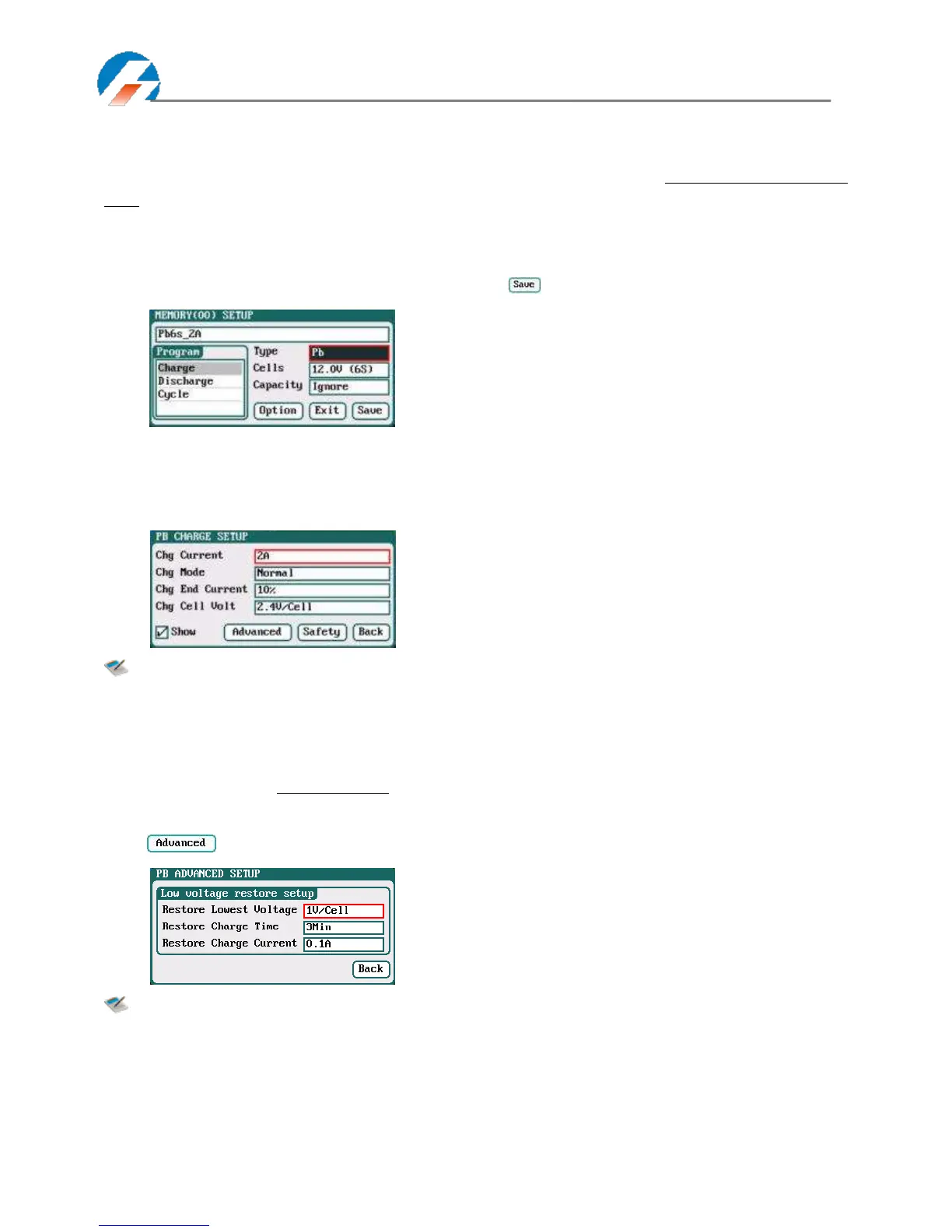
After adding program, it will switch to Pb battery in Type option on the MEMORY SETUP interface. Set the number of
cells and capacity, after editing all parameters for program, click" "to save and return to the previous interface.
As shown in above picture, the program of Pb battery has the following modes: Charge, Discharge and Cycle.
Pb Battery Charge Setup
Select Program→Charge to enter Charge setup interface.
Note: 1.The charger first charges with constant current (CC) according to the user setting then turns to
constant voltage (CV) when the charging voltage reaches the peak point. In the CV phase the
current gradually falls, and the charger will terminate charging when the current falls below
the percentage of the configured charge current.
2.Charge mode has Normal, Reflex two modes available, about the Reflex mode (Reflex) please
see Page37 Important Notes.
Pb Battery Charge Advanced Setup
Click " " to enter PB ADVANCED SETUP interface
Note: When charging the over-discharged battery, the charger will detect if the cell voltage is larger
than the restore voltage, if larger, it will pre-charge the battery with restore current, if within the
setting restore time, the cell voltage rises to the normal value then it will turn to the charging
program; otherwise it will stop running.
Chg Current: 0.05A-40A; default: 2A
Chg Mode: Normal (default), Reflex
Chg End Current: 1%-50%; default: 10%
Chg Cell Volt: 2V/Cell-2.6V/Cell; Default: 2.4V/Cell



 To Next Page