20
4
SET MODE
Set mode ■
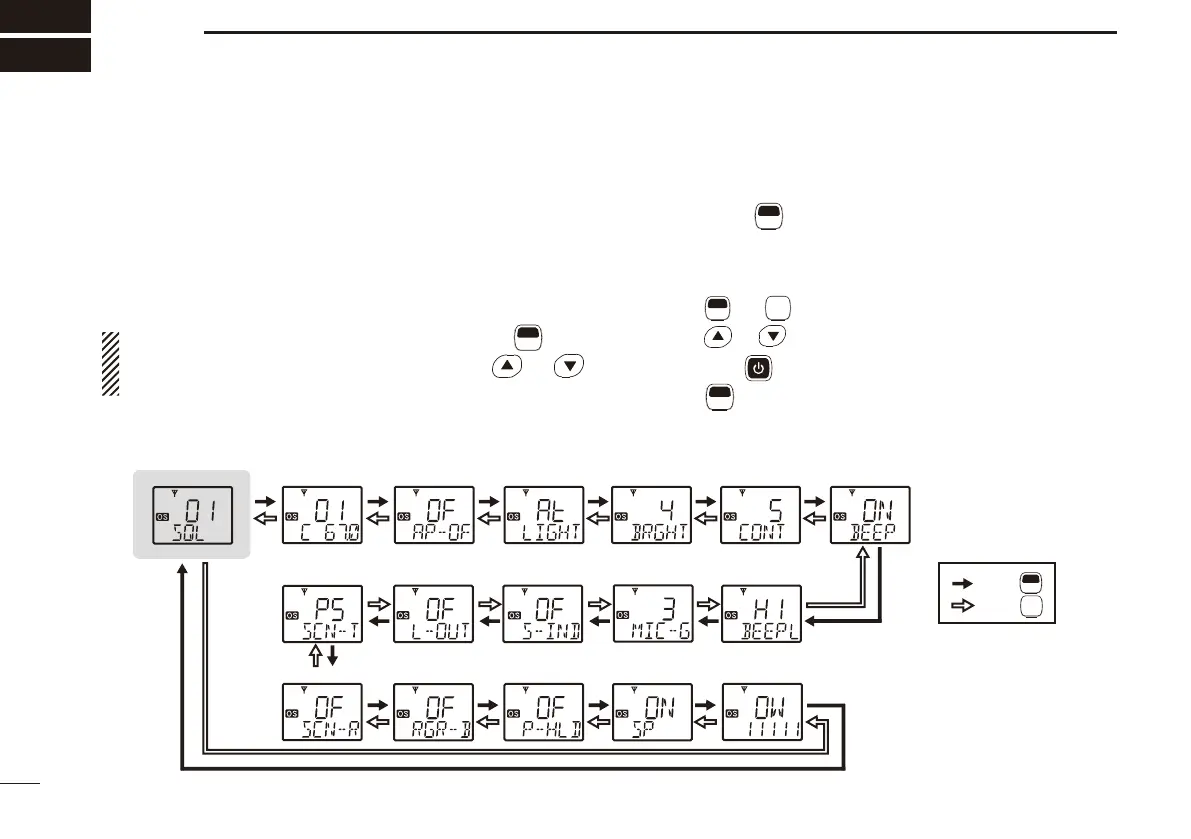
Set mode allows you to change various common settings for
the transceiver, or individual settings for the operating chan-
nel. Essentially, you can customise the transceiver to suit
your preferences and operating style.
Available functions may differ, depending on the pre-setting
using the CS-440N
CLONING SOFTWARE.
NOTE: Set mode can be accessed using the
F
SET
(Set
Mode) key after turning ON the power with
or
(p. 19). In this case, “all set mode” is selectable.
Set mode operation D
Hold down q
F
SET
(Set Mode) for 2 seconds to enter Set
mode.
• When no key is pushed for 30 seconds, the transceiver returns
to normal operation.
Push w
F
SET
* or
MONI
TSQL
* to select the desired item, if necessary.
Push e
or to select the desired value of the item.
r Hold down for 2 seconds to turn OFF the power, or hold
down
F
SET
(Set Mode) for 2 seconds to exit Set mode.
*Regardless of the assigned key function.
: Push
: Push
Starting item
• CTCSS/DTCS • Auto Power OFF • Backlight • Brightness • Contrast • Beep• Squelch Level
• Own ID
• Lock-out
• Signal Message
• Speaker
• Mic Gain
• Beep level
• Roger Beep
• Scan Restart
• PTT Hold
• Scan Stop Timer
F
SET
MONI
TSQL


 To Next Page