41
9
OTHER FUNCTIONS
9
RX frequency ■ (for RX channels only)
The receive frequency in the RX channels can be re-pro-
grammed between 450 to 520 MHz, depending on the set-
ting.
RX channel setting D
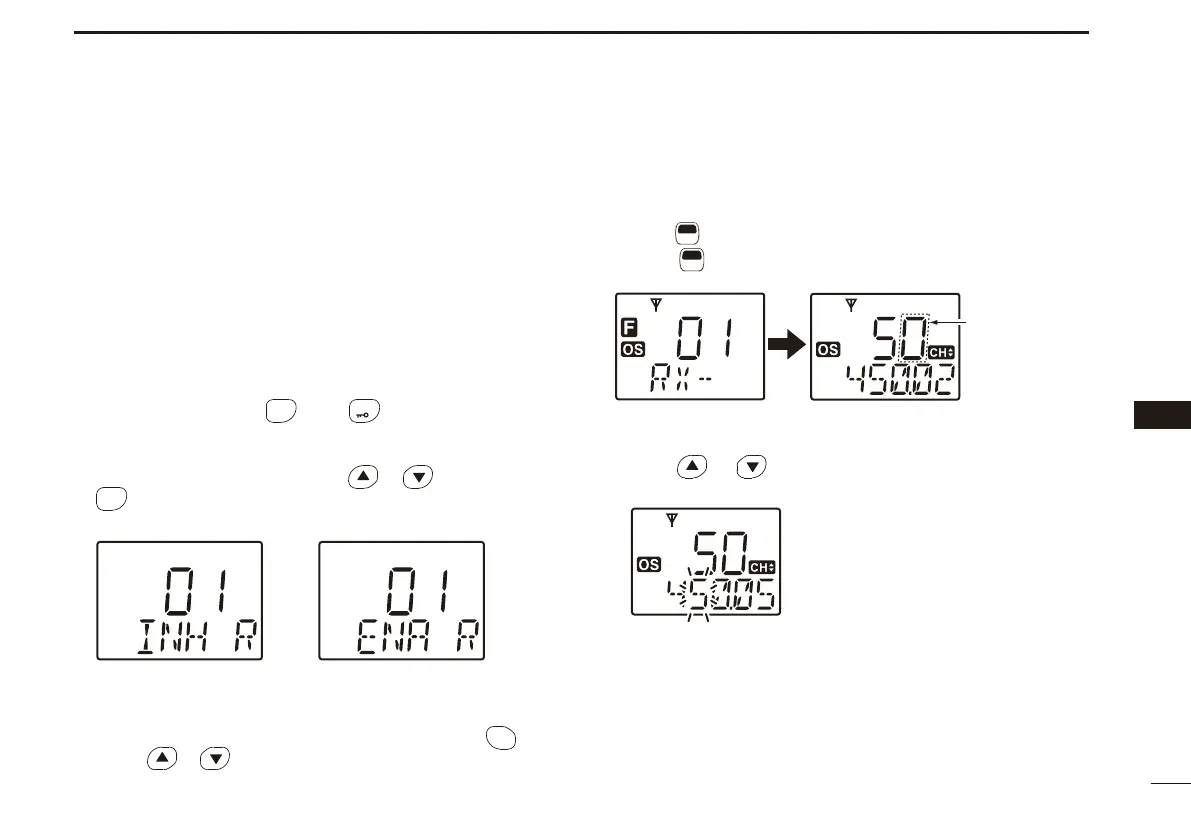
The RX channels do not appear on the LCD (default; “Inhibit”
setting) and cannot be selected. Therefore, the RX channels
should be set to “Enable” before programming the RX fre-
quency.
While holding down q
SCAN
TAG
* and
LOW
*, turn ON the power
to display all pre-programmed RX channels (including the
inhibited channels.)
Select the desired channel with w
or , and then push
SCAN
TAG
* to set the displayed channel “Enable.”
“Inhibit” setting “Enable” setting
e Turn the power OFF, then ON.
• The “Enable” channels appear on the LCD, and push
CH
SQL
, then
push or to select the desired RX channel.
RX frequency programming D
Select the desired RX channel (‘RX-XX’). (See to the left) q
Push w
F
SET
(Function) to enter the Function mode, then hold
down
F
SET
(RX VFO) for 2 seconds to enter the RX VFO
mode.
RX channel
(in Function mode)
RX VFO mode
Appears when
channel spacing
is set.
e Push or several times to select the desired fre-
quency.
*Regardless of the assigned key function.
☞
Continued on the next page.


 To Next Page