43
9
OTHER FUNCTIONS
9
PTT hold ■
The PTT switch can be operated as a one-touch PTT switch
(each push toggles between transmit/receive). Using this
function makes it possible to transmit without holding down
the PTT. To prevent accidental, continuous transmission with
this function, the transceiver automatically inhibits the trans-
mission after 3 minutes.
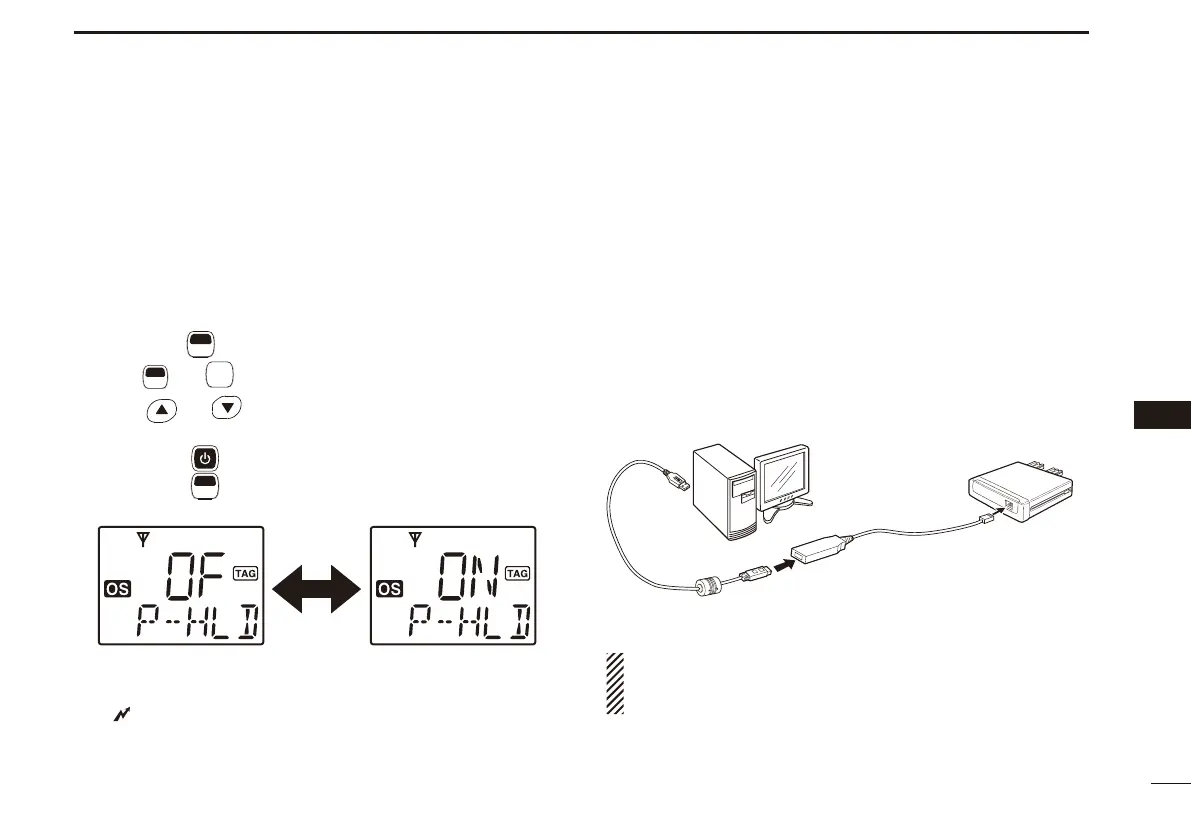
Hold down q
F
SET
(Function) for 2 seconds to enter Set mode.
Push w
F
SET
* or
MONI
TSQL
* several times until “P--HLD” appears.
Push e
or to turn the PTT hold function ON or
OFF.
r Hold down
for 2 seconds to turn OFF the power, or
hold down
F
SET
(Function) for 2 seconds to exit the Set
mode.
t When the hold function is set to ON, push [PTT] to transmit
and then push again to receive.
• “ ” appears while transmitting.
*Regardless of the assigned key function.
Data cloning ■
Cloning allows you to transfer the data quickly and easily
from a PC to a transceiver using the optional CS-440N
CLON-
ING SOFTWARE.
Data cloning can be done to and from a PC (Microsoft
®
Win-
dows
®
XP(32 bit)/7(32 bit/64 bit) Microsoft
®
Windows Vista
®
(32 bit)) using the CS-440N
CLONING SOFTWARE and the op-
tional cloning cable OPC-1122U (USB type).
Consult the CS-440N
CLONING SOFTWARE´s Help fi le for de-
tails.
to the [MIC] connector
OPC-1122U
(USB type)
to a USB port
PC
IC-440N
NOTE:
The USB driver cannot be used with 64 bit versions of
Microsoft
®
Windows
®
XP or Microsoft
®
Windows Vista
®
.


 To Next Page