33
7
TONE SQUELCH AND POCKET BEEP
6
7
Tone squelch ■
The transceiver is equipped with 51 CTCSS tone frequen-
cies, 104 DTCS codes. CTCSS/DTCS operation provides
communication with silent standby since you will only receive
calls from group members using the same CTCSS tone fre-
quency or DTCS code.
NOTE: Channels 5 and 35 are used for the emergency
channels, and CTCSS/DTCS operation is not selectable
on these channels.
Setting CTCSS tone frequency/ D
DTCS code
Select the desired channel (excluding chan- q
nel 5 or 35). (p. 14)
Hold down w
F
SET
(Set Mode) for 2 seconds to enter Set
mode.
e Push
F
SET
* or
MONI
TSQL
* several times until “C” appears.
r Push
SCAN
TAG
* to toggle the CTCSS tone frequency/DTCS
code setting mode.
t Push
or to set the desired CTCSS tone frequency
or DTCS code.
y Hold down
for 2 seconds to turn OFF the power, or
hold down
F
SET
(Set Mode) for 2 seconds to exit the Set
mode.
*Regardless of the assigned key function.
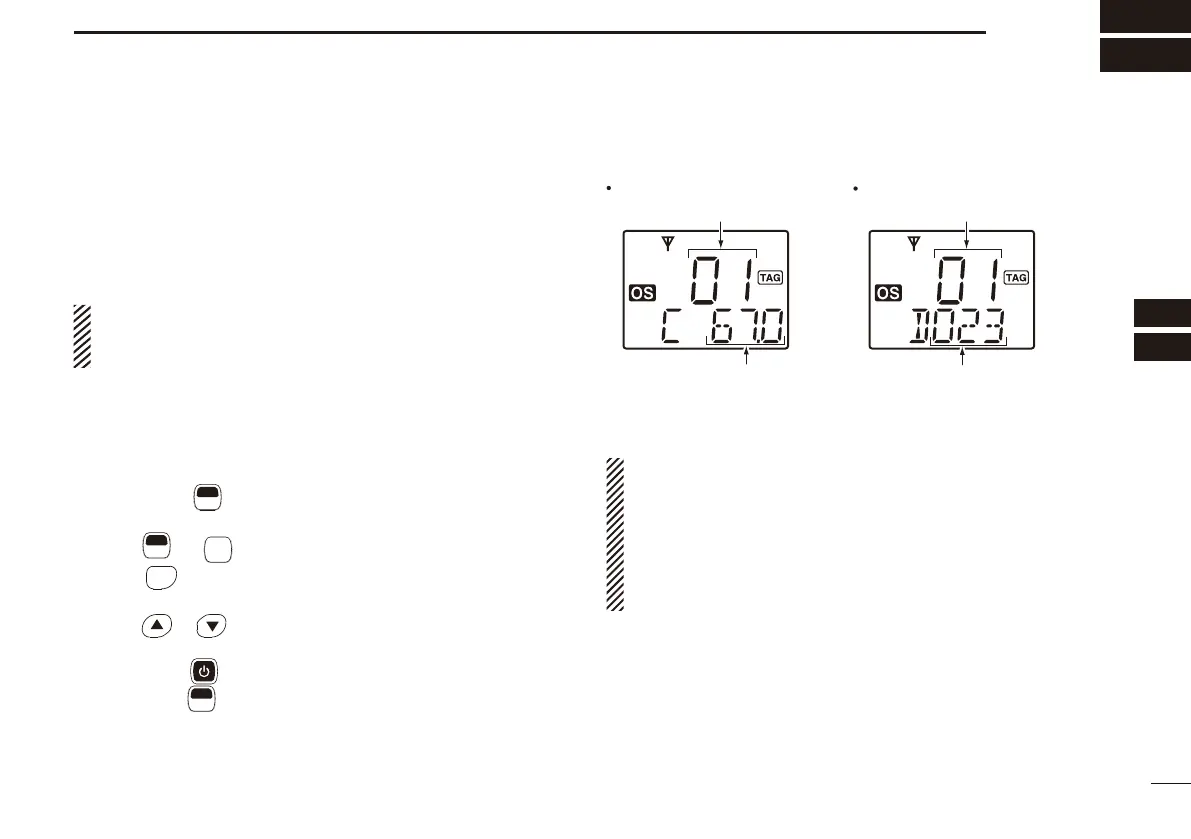
CTCSS tone setting mode
DTCS code setting mode
DTCS code
CTCSS tone frequency
List number (grey line) List number (grey line)
NOTE:
• The available CTCSS tone frequencies and DTCS codes
are listed on the next page.
• The transceiver has 51 tone frequencies and conse-
quently their spacing is narrow, compared to units having
38 tones. Therefore, some tone frequencies may receive
interference from adjacent tone frequencies.
[


 To Next Page