30
6
SCAN
Scan resume mode D
Hold down q
F
SET
(Set Mode) for 2 seconds to enter Set
mode.
Push w
F
SET
* or
MONI
TSQL
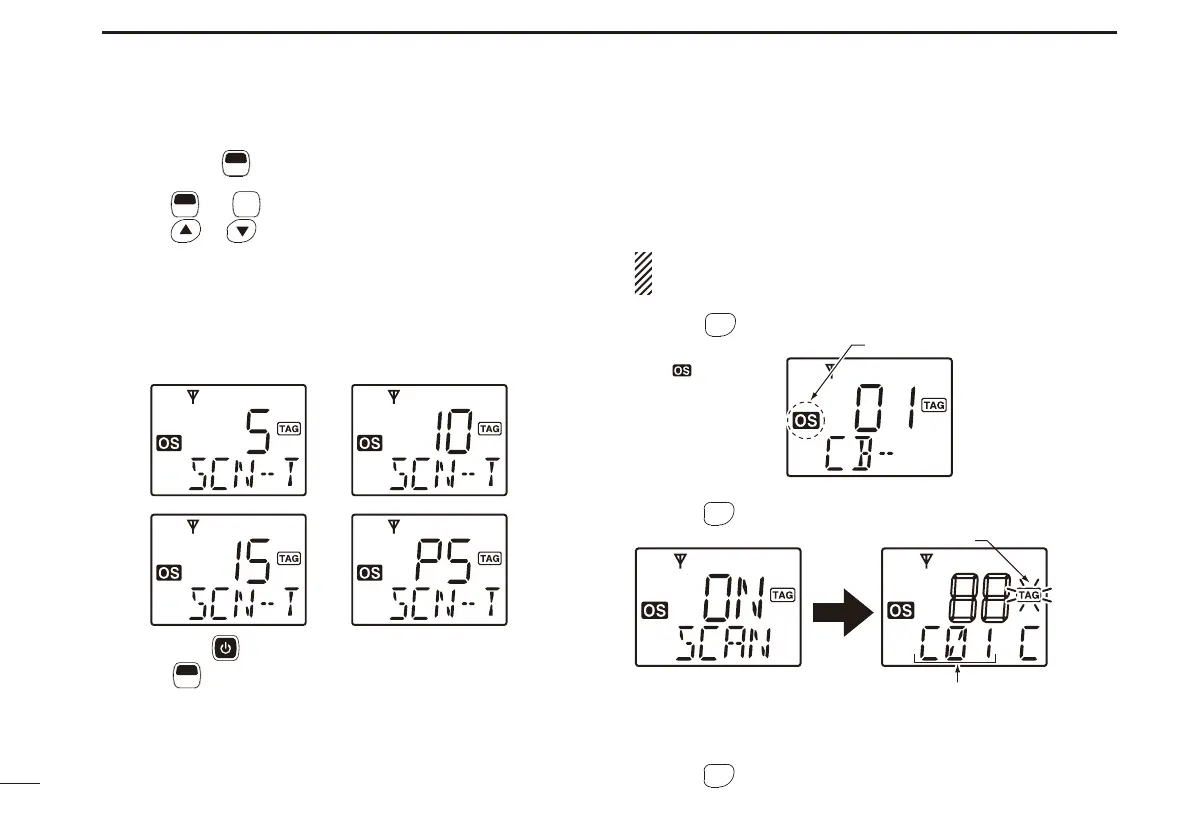
* several times until “SCN-T” appears.
Push e
or to select the Scan resume timer.
• 5 : Scan pauses for 5 seconds then resumes.
• 10 : Scan pauses for 10 seconds then resumes.
• 15 : Scan pauses for 15 seconds then resumes.
• P5 : Scan pauses until the signal disappears, then resumes
for 5 seconds after the signal disappears.
( P5 is recommended for typical use, and is the default setting).
r Hold down for 2 seconds to turn OFF the power, or hold
down
F
SET
(Set Mode) for 2 seconds to exit Set mode.
*Regardless of the assigned key function.
Open scan ■
Open scan automatically searches for transmitted signals
and facilitates to locate new stations for contacting or listen-
ing purposes.
IMPORTANT!:
Open scan can transmit on a start channel or busy channel.
Push q
OGP
RS
(Scan Mode) several times to select the Open
scan. (p. 29)
• “ ” appears.
Push w
SCAN
TAG
(Scan) to start the Open scan.
Blinks
Scan start channel
e When receiving a signal, scan pauses and resumes, ac-
cording to the selected Scan resume mode (see to the
left.)
r Push
SCAN
TAG
(Scan) to cancel the scan.
Open scan is selected.
Appears


 To Next Page