40
9
OTHER FUNCTIONS
These functions have an answer back feature and allow con-
fi rmation if a call has reached the receiving party, even if the
operator is temporarily away from the transceiver. Smart ring
is a manual confi rmation, while ATS is automatic.
Smart-Ring D
Set the same CTCSS tone frequency for all of the Group q
transceivers and turn ON the tone squelch. (pp. 21, 32)
Push w
F
SET
(Function) to enter the Function mode, then push
PRIO
SETP
(S-Ring) to send the Smart-Ring call.
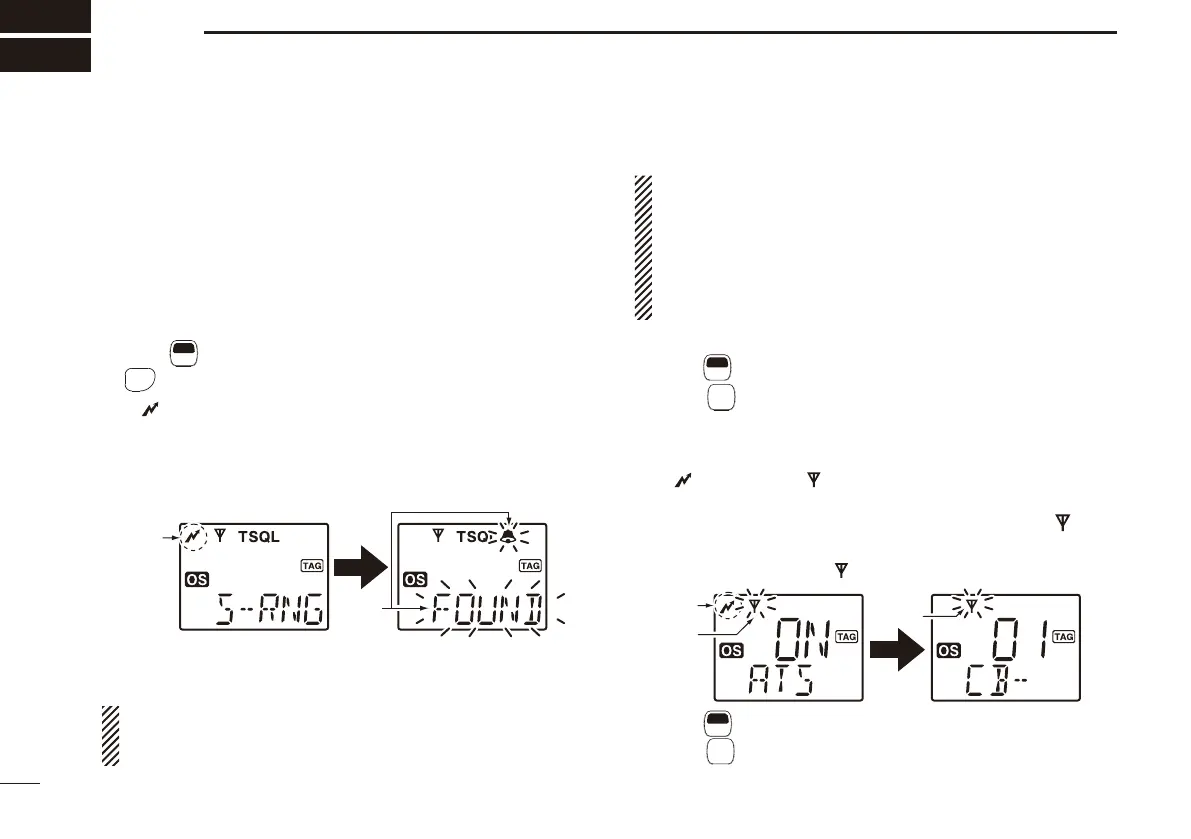
• “ ” appears.
• When a member of a specifi ed group answers a call, “ë” and
“FOUND” blink.
• If no answer is received, the transceiver will sound short faint
beep tones and “FAILD” appears.
Blink
Appears
Push e [PTT] to answer and stop the fl ashing icons.
NOTE: This function is available only if the called station
has the same CTCSS tone frequency and is operating on
the same channel.
NOTE:
• The setting to the left is for the calling station only. A
called party automatically sends an answer back signal
without any pre-settings. All IC-440N’s set to the same
operating channel, and in the surrounding communica-
tion area, will send an answer back call.
• When
“TSQL” is not displayed, “N/A” appears.
ATS D
Push q
F
SET
(Function) to enter the Function mode, then hold
down
MONI
TSQL
(ATS) for 2 seconds to turn ON the ATS func-
tion.
• When RX channel is selected, error beep sounds.
• The transceiver starts to send a searching signal every 60 sec.
• “ ” appears and “ ” starts to blink on the display when the
function is activated.
• When the transceiver receives an answer back signal, “ ” stays
on the display until the next search transmit.
• If no reply is received, “ ” blinks until the next search transmit.
Appears
Blinks
Blinks
w Push
F
SET
(Function)to enter the Function mode, then hold
down
MONI
TSQL
(ATS) for 2 seconds to turn OFF the ATS func-
tion.
Smart-Ring and ATS ■ (Automatic Transponder System)


 To Next Page