27
1
2
3
4
5
6
7
8
9
10
11
12
13
14
15
16
11
TROUBLESHOOTING
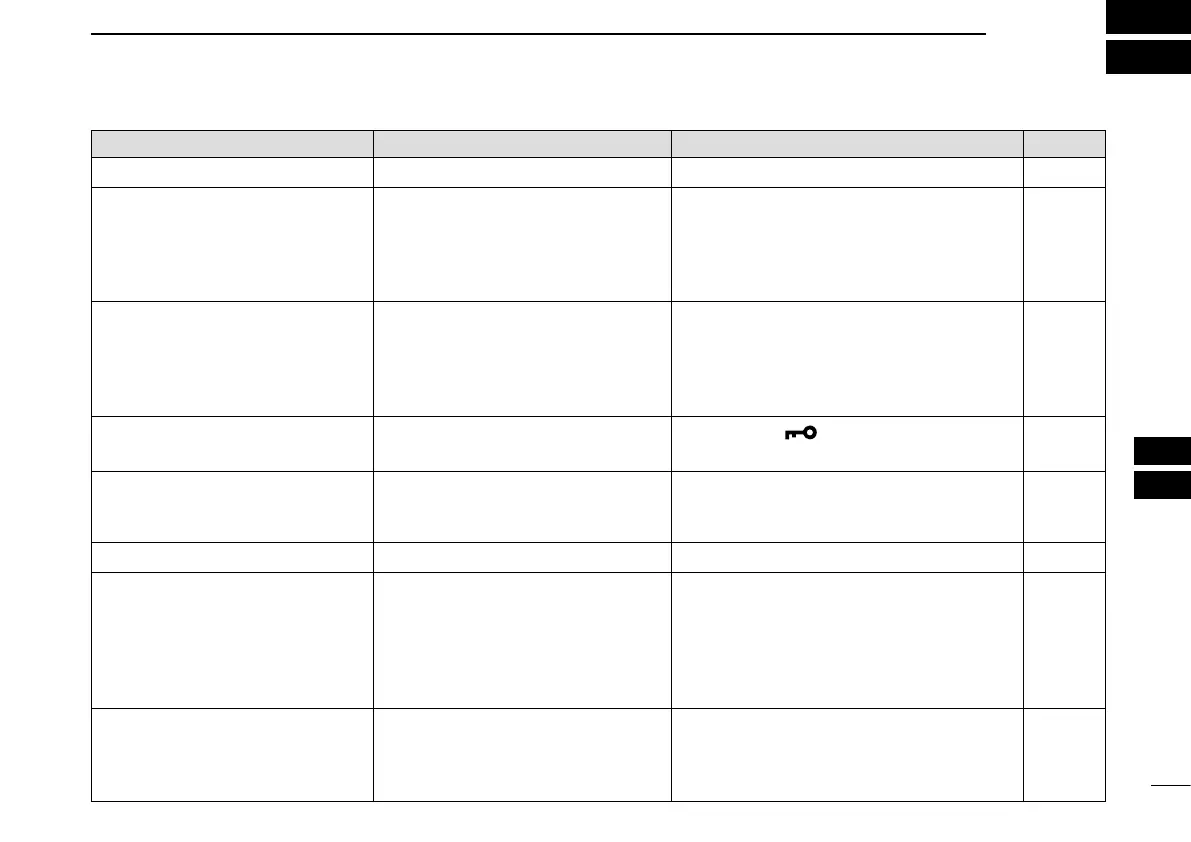
PROBLEM POSSIBLE CAUSE SOLUTION REF.
The transceiver does not turn ON. •Thebatteryisexhausted. •Chargethebattery. Page 3
No sound from speaker, or sound
is muffled.
•Thesquelchlevelistoohigh.
•Volumelevelistoolow.
•TheVolumeMutefunctionisON.
•Speakerhasbeenexposedto
water.
•Adjustthesquelchlevel.
•Adjustthevolumelevel.
•TurnOFFthefunction.
•Removewaterfromthespeakergrill.
Page 11
Page10
Page 12
Page 13
Transmitting is impossible, or high
power can not be selected.
•Somechannelsarelimitedtolow
power or only receive.
•Theoutputpowerissettolow.
•Thebatteryisexhausted.
•Selectadifferentchannel.
•Push[Hi/Lo] to select high power.
•Chargethebattery.
Pages
31, 32, 33
Page 11
Page 3
The displayed channel cannot be
changed.
•TheLockfunctionisactivated. •Holddown[ ] (Hi/Lo) for 1 second to
turn OFF the function.
Page 12
Scan does not start •Lessthan2channelsaresetas
Favorite channel.
(Only Favorite channels are scanned.)
•SetdesiredchannelsasFavorite
channels.
Page 15
No beep sounds. •BeepTonefunctionisturnedOFF. •TurnONtheBeepToneintheSetmode. Page 18
Thebatteryiconblinks,and"Er"
and"CHG"aredisplayed.
•The battery is charged outside
the charging temperature range of
0°C(+32°F)to+45°C(+113°F).
•The battery temperature becomes
hot such as after continuously
transmitting for long time.
•Keepthetransceiverinacoolplaceuntil
the internal battery cools down.
—
The battery cannot be fully
charged.
•The transceiver power is turned
ON while charging.
•The internal battery has becomes
weak.
•TurnOFFthetransceiver'spower,and
then charge the battery again.
•Replacetheinternalbattery.Askyour
dealer for details.
Page 3
Page 24



 To Next Page