22
7
DSC OPERATION
New2001
D Regular call
Select the nature of the Distress call to include in the
Regular Distress call.
1. Push
.
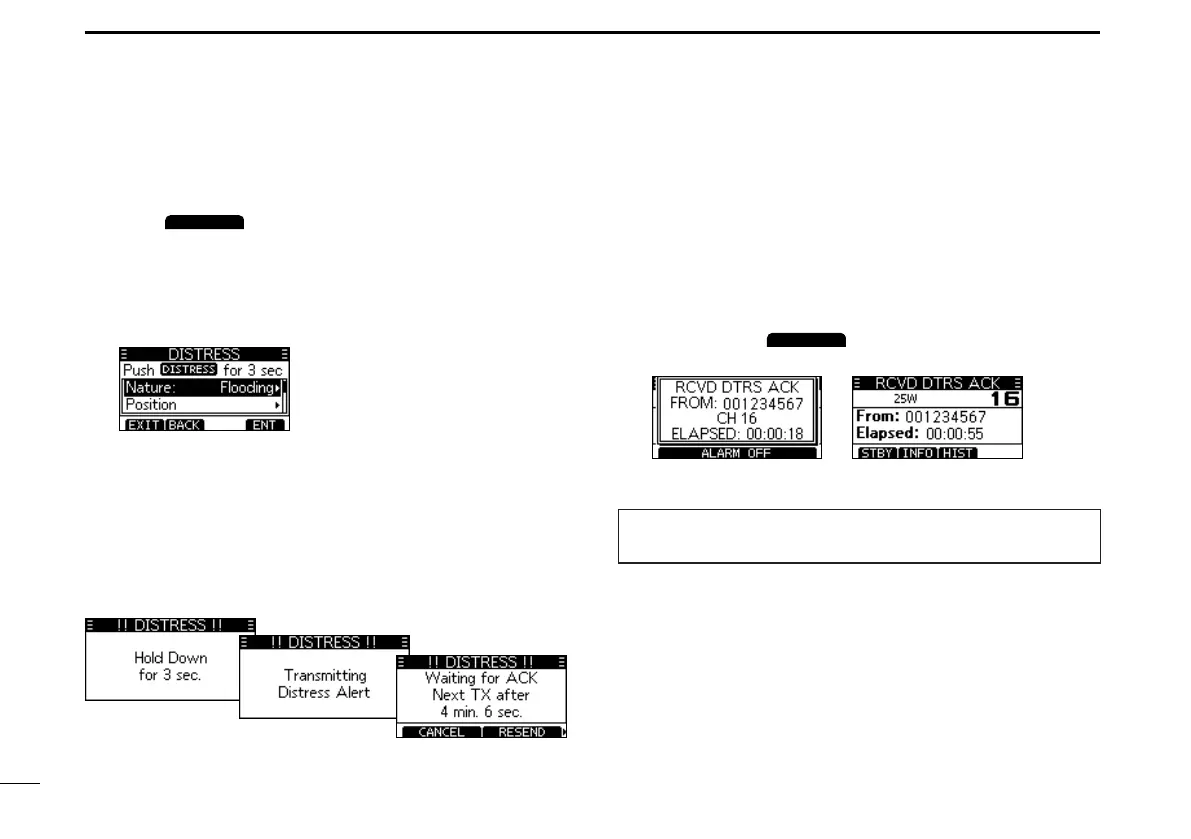
• The “DISTRESS”
screen is displayed.
2. Push [ENT] to enter the Nature selection mode.
3. Push[▲],[▼],orrotate[DIAL]toselectthenatureof
theDistress,thenpush[ENT].(Example:Flooding)
• The setting is saved and returns to the previous screen.
L IfnovalidGPSdataisbeingreceived,push[▲],[▼],or
rotate [DIAL] to select “Position,” then enter the latitude,
longitude, and UTC.
L See “Entering the position and time” on page 20 for details.
4. Whileliftingupthekeycover,holddown[DISTRESS]
(theredbutton)for3secondsuntilyouhear3short
countdownbeepsandalongbeepsound.
• The backlight blinks.
5. Aftersending,waitforanAcknowledgementcall.
• “Waiting for ACK” is displayed.
L The Distress call is automatically sent every 3.5 to 4.5
minutes,untilanAcknowledgementisreceived,ora
Distress Cancel call is sent.(p.23)
6. WhenyoureceiveanAcknowledgement,analarm
sounds. Push
to turn OFF the alarm.
• Channel 16 is automatically selected.
7. Holddown[PTT]tocommunicate.
TIP:YoucanalsosendaRegularcallbyselectingthe
“Distress” item on the Menu screen.



 To Next Page