EasyManua.ls Logo

Icom IC-M330GE - User Manual

Icom IC-M330GE
80 pages
Print Icon
To Next Page IconTo Next Page
Loading...
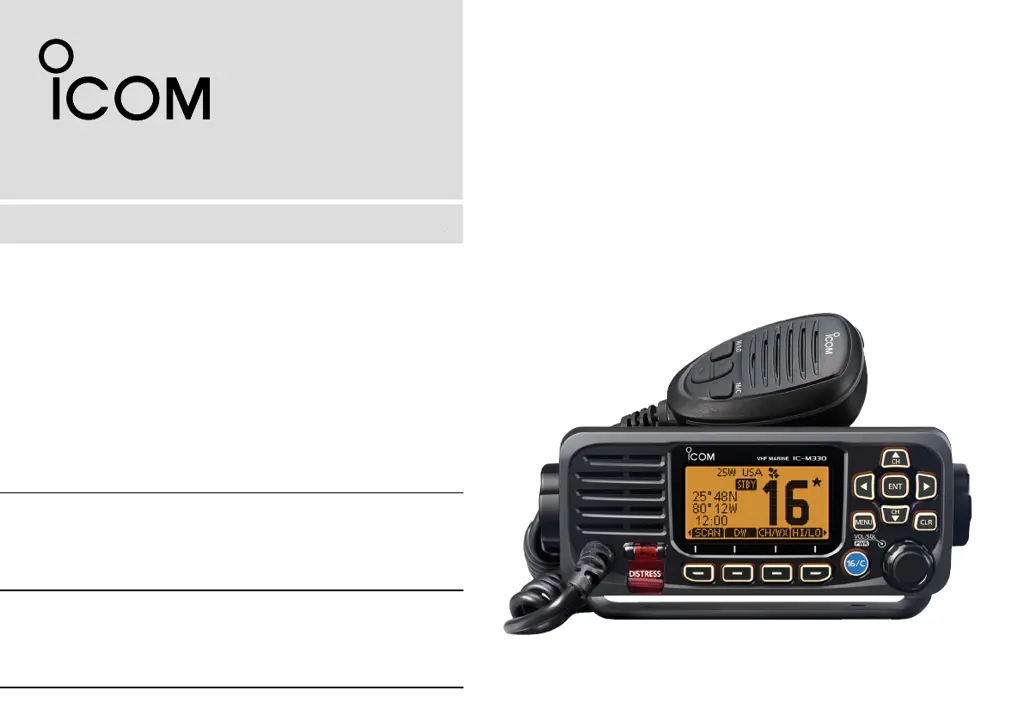
VHF MARINE TRANSCEIVERS
iM330
iM330E
iM330G
iM330GE
INSTRUCTION MANUAL
INSTRUCTION MANUAL
1-1-32 Kamiminami, Hirano-ku, Osaka 547-0003, Japan

Table of Contents

Questions and Answers

  • R
    ryatesSep 8, 2025
    What to do if Icom Transceiver “??” blinks instead of the position and time?
    • C
      courtney13Sep 8, 2025
      If your Icom Transceiver displays “??” instead of the position and time, it could be because 23.5 hours have passed since you manually entered the position, or the GPS position is invalid. To resolve this, enter the current position and time.
  • S
    Stephanie GarciaSep 12, 2025
    How to fix Icom Transceiver when it cannot transmit with high power?
    • C
      Cheryl WardSep 12, 2025
      If you cannot transmit with high power on your Icom Transceiver, it could be due to a couple of reasons. Some channels may be set for low power or receive only, according to regulations. Try changing channels. Alternatively, the output power may be set to low. Push the [HI/LO] button to select high power.
  • A
    Alicia EwingSep 12, 2025
    Why does scan not start on my Icom Transceiver?
    • M
      Mark LoganSep 13, 2025
      If your Icom Transceiver scan does not start, it could be because fewer than two favorite channels are set. To resolve this, set the Favorite channels.
  • R
    Ryan HuntSep 14, 2025
    How to enable beep sounds on Icom Transceiver?
    • D
      david49Sep 14, 2025
      If you are not hearing any beep sounds on your Icom Transceiver, it is likely that the Key Beep function is turned OFF. To enable the beep sounds, turn ON the Key Beep function.
  • B
    bbeckSep 16, 2025
    What to do if Individual or Group ID cannot be set on Icom Transceiver?
    • J
      Jenna LewisSep 16, 2025
      If you cannot set the Individual or Group ID on your Icom Transceiver, it is likely that the entered ID code is incorrect. For an Individual ID, the first digit must be between '1' and '9.' For a Group ID, the first digit must be '0.' To resolve this, enter a correct ID code.

Summary

FEATURES AND DEFINITIONS

DSC Functionality

Provides DSC functions for distress alert and general DSC calls.

EMERGENCY PROCEDURES

RADIO OPERATION SAFETY WARNINGS

RF Exposure Limits and MPE Radius

Explains the estimated Maximum Permissible Exposure radius based on FCC guidelines.

OPERATIONAL PRECAUTIONS

Critical Safety Warnings

Lists critical safety warnings for installation and operation.

OPERATING RULES AND REGULATIONS

INITIAL SETUP PROCEDURES

Entering MMSI Code

Step-by-step guide to entering the Maritime Mobile Service Identity (MMSI) code.

BASIC OPERATION GUIDE

SCAN OPERATION GUIDE

DUALWATCH AND TRI-WATCH GUIDE

DSC OPERATION GUIDE - ADDRESSES

Managing DSC Address IDs

How to enter and manage Individual and Group DSC IDs.

DSC OPERATION GUIDE - GROUP IDS

Entering Group IDs

Procedure to enter Group IDs and assign names.

DSC OPERATION GUIDE - POSITION AND TIME

Entering Position and Time Manually

Manual entry of vessel position and UTC time for Distress calls.

DSC OPERATION GUIDE - DISTRESS CALLS

Sending a Distress Call

Step-by-step guide for sending a Distress call via DSC.

DSC OPERATION GUIDE - REGULAR DISTRESS

Sending a Regular Distress Call

Procedure for sending a Distress call with a specified nature of distress.

DSC OPERATION GUIDE - DISTRESS CALL MANAGEMENT

Cancelling a Distress Call

How to send a Distress Cancel call if a Distress call was made incorrectly.

DSC OPERATION GUIDE - OTHER CALLS

Sending Other DSC Calls

Instructions for sending non-distress DSC calls like Individual, Group, etc.

Sending an Individual Call

Steps to send an Individual DSC call to a specific station.

DSC OPERATION GUIDE - ACKNOWLEDGEMENTS

Sending Individual Acknowledgements

How to send an Acknowledgement for an Individual call.

DSC OPERATION GUIDE - INDIVIDUAL ACK

Sending Individual Acknowledgements (Continued)

Continuation of sending Individual Acknowledgements.

DSC OPERATION GUIDE - ALL SHIPS CALL

Sending an All Ships Call

Procedure for broadcasting a message to all ships via DSC.

DSC OPERATION GUIDE - GROUP CALL

Sending a Group Call

Steps to send a DSC call to a pre-defined group.

DSC OPERATION GUIDE - TEST CALL

Sending a Test Call

How to initiate a Test DSC call for functional verification.

DSC OPERATION GUIDE - TEST ACK & POSITION REQUEST

Sending Test Acknowledgements

How to send an Acknowledgement after receiving a Test call.

Position and Polling Request Calls

How to request position information or poll a station.

DSC OPERATION GUIDE - POSITION REPLY

Sending a Position Reply Call

How to respond to a Position Request call.

DSC OPERATION GUIDE - RECEIVING DISTRESS

Receiving Distress Calls

Steps for receiving and responding to Distress calls.

DSC OPERATION GUIDE - RECEIVING OTHER CALLS

Receiving Other DSC Calls

How to receive various other DSC calls like Individual, Group, etc.

Receiving an Individual Call

Procedure for handling an incoming Individual DSC call.

DSC OPERATION GUIDE - RECEIVING GROUP CALL

Receiving a Group Call

Steps for receiving a Group DSC call.

DSC OPERATION GUIDE - RECEIVING ALL SHIPS CALL

Receiving an All Ships Call

How to receive an All Ships DSC call.

DSC OPERATION GUIDE - RECEIVING POSITION REQUEST

Receiving a Position Request Call

Handling incoming Position Request calls.

DSC OPERATION GUIDE - RECEIVING TEST CALL

Receiving a Test Call

Procedure for receiving a Test DSC call.

DSC OPERATION GUIDE - CALL LOGS AND TEST ACK

Receiving Test Acknowledgements

How to handle an incoming Test Acknowledgement call.

DSC OPERATION GUIDE - LOG MANAGEMENT

DSC OPERATION GUIDE - MULTI-TASKING

DSC OPERATION GUIDE - TASK MANAGEMENT

DSC OPERATION GUIDE - SETTINGS

DSC Configuration Settings

Configuration options for DSC features like Auto ACK, CH Auto SW, etc.

DSC OPERATION GUIDE - ACKNOWLEDGEMENT SETTINGS

DSC OPERATION GUIDE - SELF-TEST AND PROCEDURES

DSC OPERATION GUIDE - AIS INTEGRATION

Individual Calls via AIS Transponder

How to make DSC calls using an optional AIS transponder.

DSC OPERATION GUIDE - AIS INTEGRATION CONTINUED

Individual Calls via AIS Transponder (Continued)

Continuation of making DSC calls with an AIS transponder.

CONNECTIONS AND MAINTENANCE - EXTERNAL CONNECTIONS

CONNECTIONS AND MAINTENANCE - HARDWARE CONNECTIONS

CONNECTIONS AND MAINTENANCE - ACCESSORIES AND CARE

CONNECTIONS AND MAINTENANCE - MOUNTING

CONNECTIONS AND MAINTENANCE - FLUSH MOUNTING

TROUBLESHOOTING GUIDE

Common Problems and Solutions

A guide listing common problems, their causes, and solutions.

Icom IC-M330GE Specifications

General IconGeneral
BrandIcom
ModelIC-M330GE
CategoryTransceiver
LanguageEnglish

Related product manuals