18
6
DSC OPERATION
D Deleting Individual ID
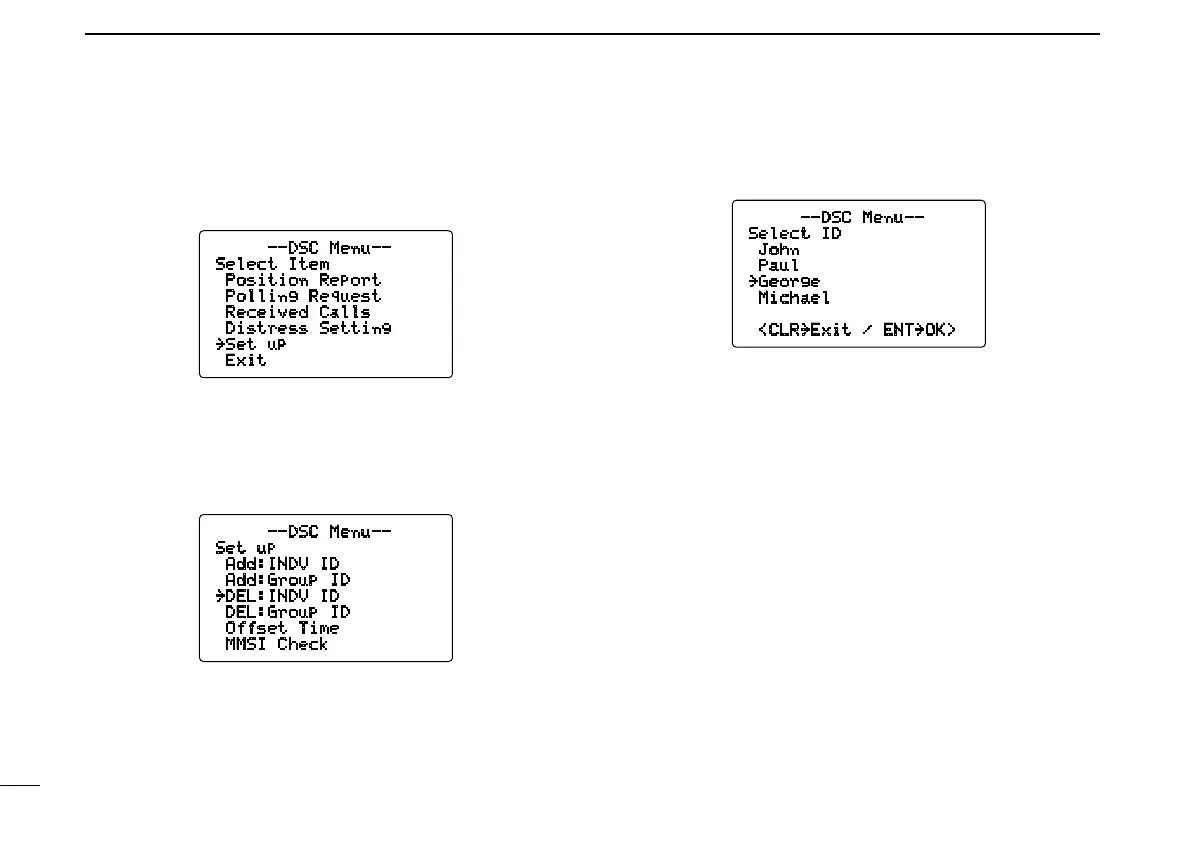
q Push [MENU] to enter the DSC menu.
w Rotate [CHANNEL] to select “Set up,” p u s h
[CHANNEL•ENTER].
--DSC Menu--
Select Item
Position Report
Polling Request
Received Calls
Distress Setting
˘Set up
Exit
e Rotate [CHANNEL] to select “DEL:INDV ID,” push
[CHANNEL•ENTER].
•WhennoaddressIDisprogrammed,“No ID” is displayed.
Push [CLR] to exit.
--DSC Menu--
Set up
Add:INDV ID
Add:Group ID
˘DEL:INDV ID
DEL:Group ID
Offset Time
MMSI Check
r Rotate [CHANNEL] to select the desired ID name for de-
leting.
--DSC Menu--
Select ID
John
Paul
˘George
Michael
<CLR˘Exit / ENT˘OK>
t Push [CHANNEL•ENTER] to delete the address ID and
return to the set up menu.
y Push [CLR] or rotate [CHANNEL] to select “Exit,” push
[CHANNEL•ENTER].
•ReturnstotheDSCmenu.
•Repeatagaintoreturntothenormaloperationcondition.



 To Next Page