New2001
5
3
PANEL DESCRIPTION
New2001
1
2
3
4
5
6
7
8
9
10
11
12
13
14
15
16
y SCAN KEY [SCAN•DUAL]
• Starts and stops normal or priority scan when pushed.
(pp. 14, 15)
• Enters the Watch mode when held down for 1 second.
(p. 16)
u CHANNEL/WEATHER CHANNEL KEY
[CH/WX•U/I/C] (IC-M73), [CH] (IC-73EURO)
• Selects and toggles the regular channels and weather
channel* when pushed. (pp. 9, 10)
• Selects the U.S.A., International, Canadian or ATIS
channel group* when held down for 1 second. (p. 9)
- The function display shows which channel group is
active.
• Push to return to the display before you selected the
channel when the priority channel or the Call channel is
selected.
* Selectable contents differ depending on the transceiver version.
NOTE: [CH/WX•U/I/C] and [CH] are described as [CH/
WX•U/I/C] in this instruction manual.
i CHANNEL UP/DOWN KEYS [Y]/[Z]
• Selects the operating channel. (pp. 8–10)
• Selects the SET mode option of the item. (p. 25)
•
Selects the SET mode item when pushed along with
[
]
.
(p. 25)
• Checks Favorite (TAG) channels, or changes the
scanning direction during a scan. (p. 15)
• Selects the Function mode item. (p. 17)
o TRANSMIT POWER/LOCK KEY [H/L•LOCK]
• Selects high, middle or low power when pushed. (p. 11)
• Toggles the lock function ON/OFF when held down for 1
second. (p. 12)
!0 FAVORITE (TAG) KEY [FAV•★]
• Push this key to sequentially select the Favorite (TAG)
channels, while ignoring untagged channels, in a channel
group. (p. 15)
• Hold down for 1 second to set or clear the displayed
channel as a Favorite (TAG) channel. (p. 15)
• While holding down this key, turn ON power to clear or
set all Favorite (TAG) channels in the selected channel
group. (p. 15)
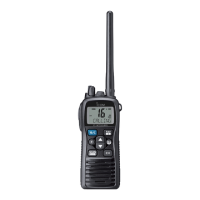
!1 SPEAKER-MICROPHONE CONNECTOR [SP MIC]
Connects the optional external speaker-microphone or
headset. (p. 36)
NOTE: Attach the [SP MIC] cap when the optional
speaker-microphone is not used.
!2 ANTENNA CONNECTOR
Connects the supplied antenna. (p. 2)



 To Next Page