23
7
FUNCTION MODE OPERATION
New2001
1
2
3
4
5
6
7
8
9
10
11
12
13
14
15
16
The 10-digit ATIS code can be programmed and confirmed
with the following operation.
The ATIS code programming is not necessary and con-
firmation can only be performed when the ATIS code has
been programmed by your dealer. The code programming
can be performed 1 time only, if the code has not been
programmed by your dealer.
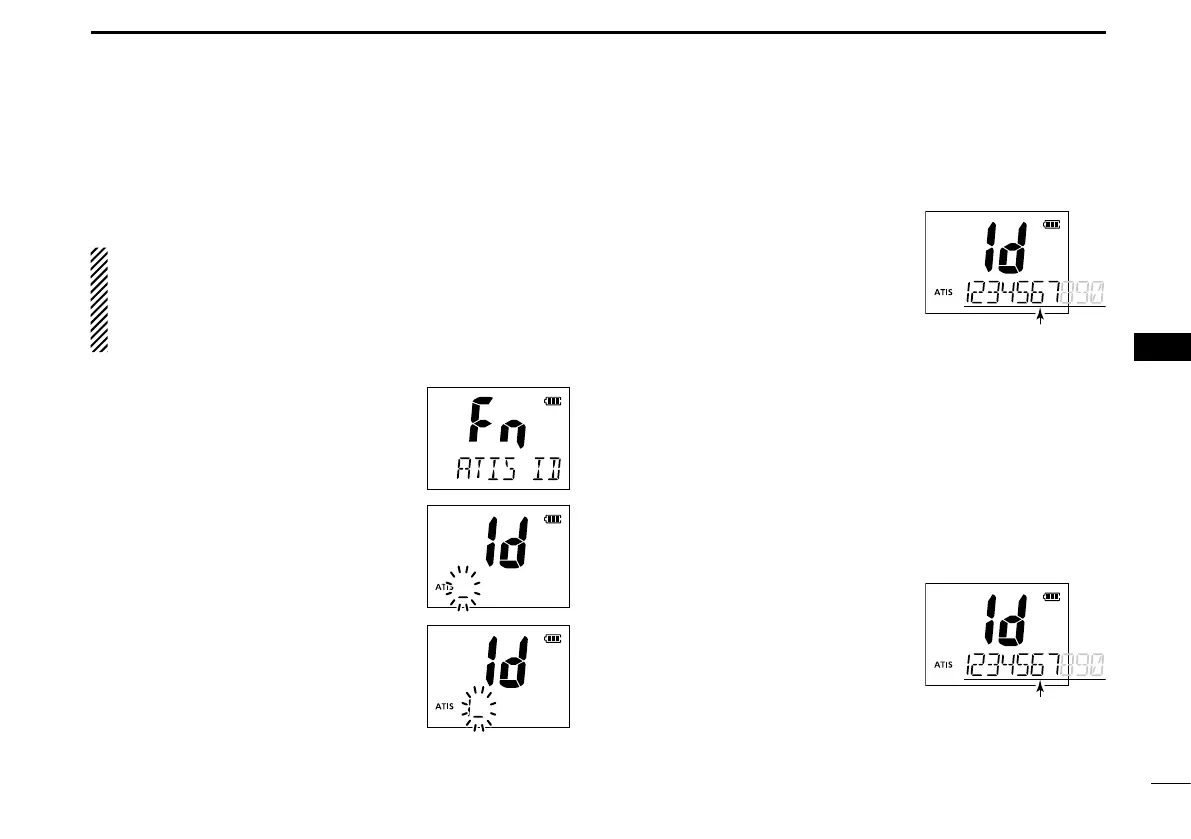
Push q [F] to enter the function mode,
and then push [Y]/[Z] to select the
ATIS code programming function.
• “ATIS ID” appears.
w Push [H/L•LOCK] to edit the ATIS
code.
• “Id” and “ATIS” appear, and the 1st char-
acter of the code blinks.
Push e [Y]/[Z] to select a number.
r Push [CH/WX•U/I/C] to move to the
right; then push [Y]/[Z] to select a
number.
• Push [SCAN•DUAL] to move to the
left.
After inputting the 10-digit ATIS t
code, push [H/L•LOCK] to write
the code into the memory, then
goes to the ATIS code confirma-
tion mode.
Deleting the ATIS code (All clear):
While in the ATIS code editing mode, push [FAV•★] to de-
lete.
D ATIS code confirmation
(When the ATIS code has been programmed)
Push q [F] to enter the function mode, and then push [Y]/
[Z] to select the ATIS code programming function.
• “ATIS ID” appears.
w Push [H/L•LOCK] to confirm the
ATIS code.
• “Id” and “ATIS” appear.
• The ATIS code is displayed and
scrolls in the channel comment dis-
play.
e Push [H/L•LOCK] to return to
normal operation.
.
■ ATIS code programming
(For only the Dutch and German versions)



 To Next Page