17
7
FUNCTION MODE OPERATION
1
2
3
4
5
6
7
8
9
10
11
12
13
14
15
16
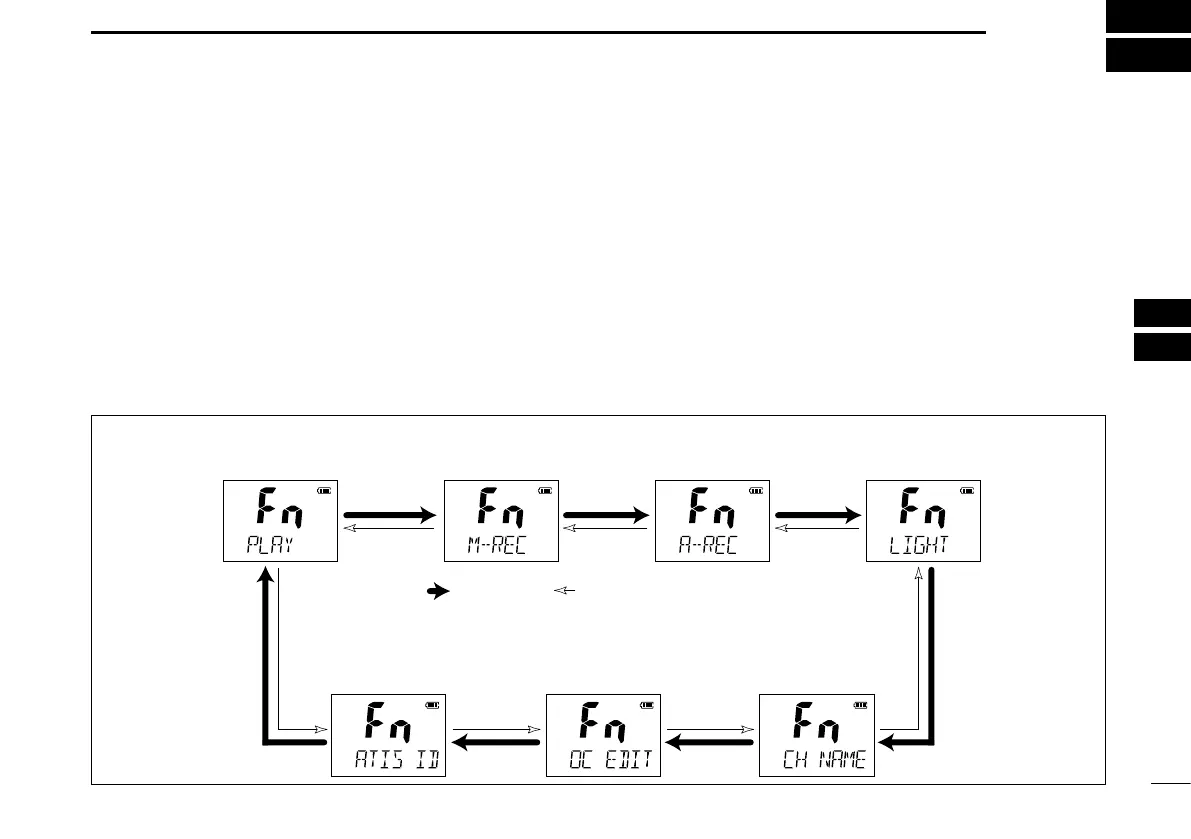
■ About the function mode
There are 7 transceiver functions
‡
in the function mode: Play
back function
‡
, Manual recording function
‡
, Automatic record-
ing function
‡
, backlight function, channel naming function,
opening comment entry function and the ATIS code program-
ming function
†
.
†
For only the Dutch and German versions.
‡
Depending on versions.
D Entering the function mode
Push q
[F]
to enter the function mode.
• “PLAY” (Play back function) appears.
• When no key is pushed for 5 seconds, the transceiver returns to
its normal condition.
w Push [Y]/[Z] to select the desired item.
e Push [H/L•LOCK] to select or decide the desired option
of the item.
• Some items exit the function mode when pushing [H/L•LOCK].
To exit the function mode, push r [F].
D FUNCTION MODE ITEMS
Playback function*
,‡
Manual recording
function
‡
Automatic recording
fucntion
‡
Backlight function
ATIS code programming
function
†
Opening comment
entry function
Channel naming
function
: Push [Y] : Push [Z] *Starting item
†
For only the Dutch and German versions.
‡
Depending on versions.



 To Next Page