22
7
FUNCTION MODE OPERATION
New2001
The IC-M73/IC-M73EURO can assign up to 16-character
opening comments.
You may replace the factory-set opening comment with a
comment of your own. The opening comment appears each
time the IC-M73/IC-M73EURO is powered ON. The comment
may be up to 16 characters long.
You can use same characters as “Channel naming function.”
(p. 21)
D Opening comment programming
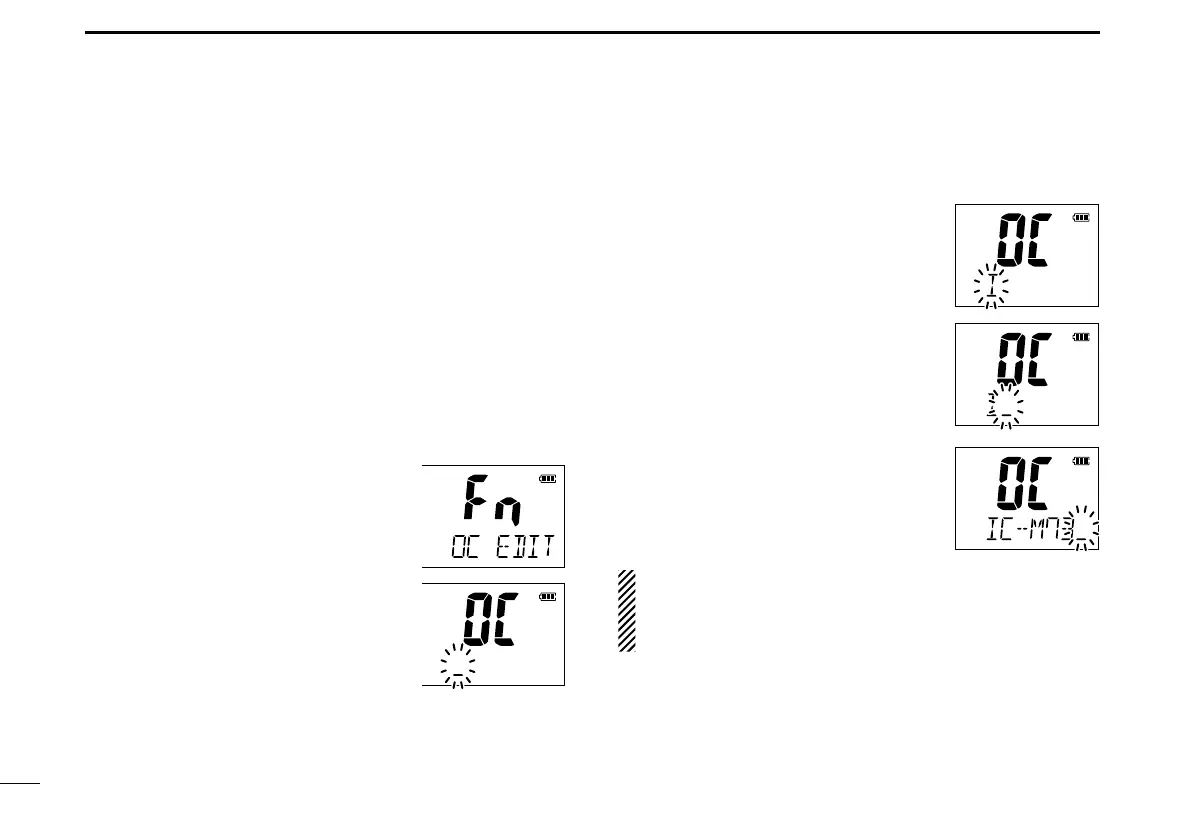
Push q [F] to enter the function mode, and then push [Y]/
[Z] to select the channel naming
function.
• “OC EDIT” appears.
w Push [H/L•LOCK] to edit the open-
ing comment.
• The 1st character of the currently pro-
grammed comment blinks.
Push e [Y]/[Z] to select a character.
r Push [CH/WX•U/I/C] to move to the
right; then push [Y]/[Z] to select a
character.
• Pushing [SCAN•DUAL], moves to left.
Continue until the desired charac- i
ters have been entered, then push
[H/L•LOCK] to return to normal op-
eration.
Deleting the opening comment (All
clear):
While in the opening comment editing
mode, push [FAV•★] to delete.
The programmed opening comment is briefly displayed or
scrolled when the transceiver is powered ON.
However, the opening comment display can be skipped by
pushing [16/C].
■ Opening comment entry function



 To Next Page