New2001
4
New2001
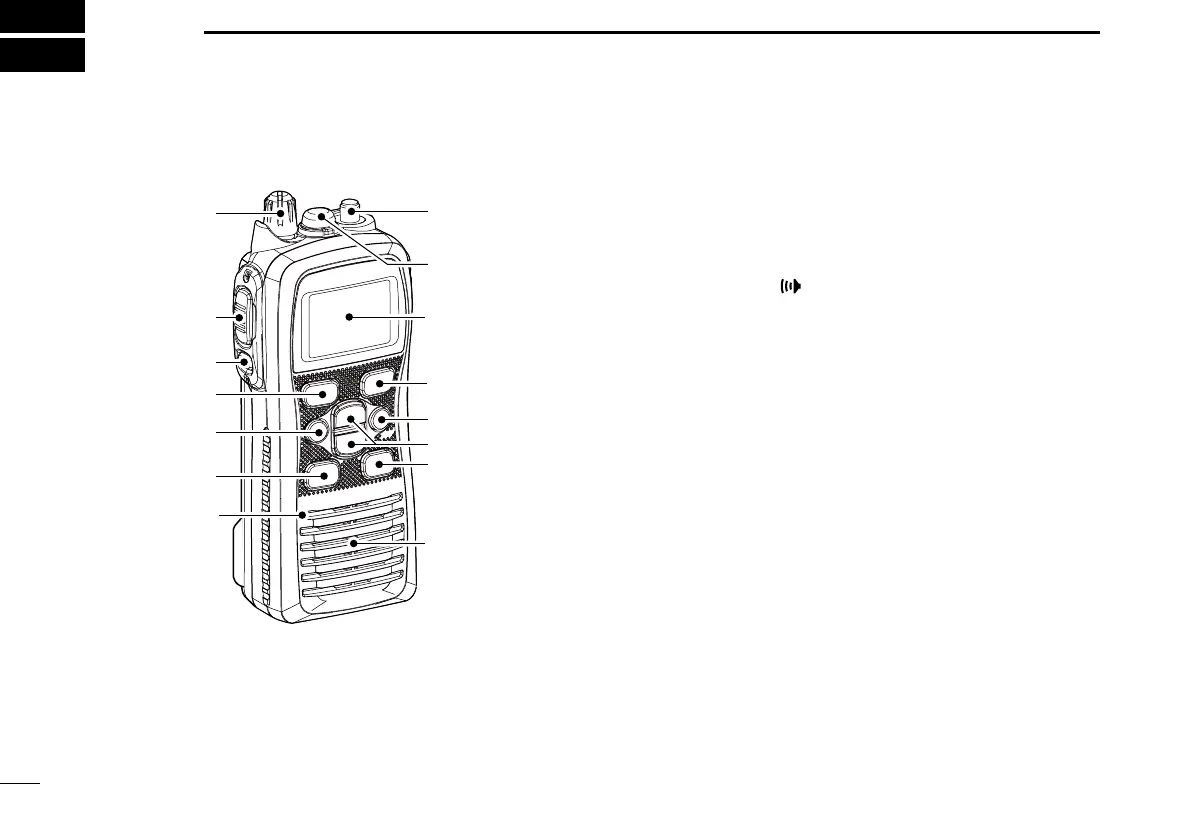
PANEL DESCRIPTION
3
■ Front, top and side panels
q
w
e
y
t
r
Microphone
!2
!1
!0
o
u
i
Speaker
Function
display (p. 6)
q VOLUME CONTROL [VOL]
Turns ON power and adjusts the audio level.
w PTT SWITCH [PTT]
Hold down to transmit; release to receive.
e MONITOR KEY
[
]
• Manually opens the squelch to monitor the channel while
held down. (p. 12)
• Push this switch, then adjust the squelch level with [Y]/
[Z]. (p. 13)
• While holding down this switch, turn the ON power to
enter the SET mode. (p. 25)
r CHANNEL 16 KEY [16/C]
• Selects Channel 16 when pushed. (p. 8)
•
Selects the Call channel when pushed for 1 second.
(p. 8)
•
Enters the Call channel write mode when the Call channel
is selected and this key is held down for 3 seconds. (p. 12)
t FUNCTION KEY [F]
• Enters the Function mode when pushed. (p. 17)
• The AquaQuake function is activated when held down for
1 second. (p. 13)
• While holding down this key, turn ON the power to enter
the recording counter mode.



 To Next Page