28
8
SET MODE
New2001
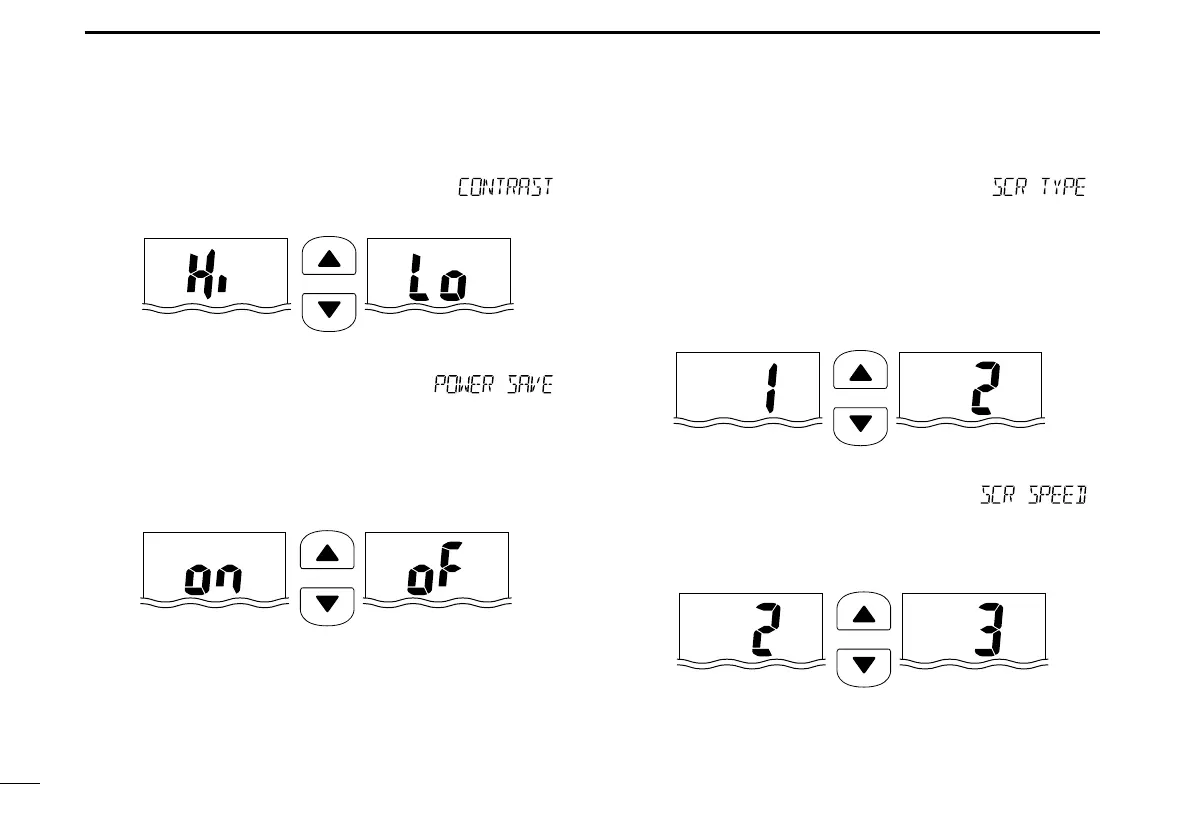
D LCD contrast selection “ ”
The contrast of the LCD can be set to Hi (default) or Lo.
Push
High contrast (default)
Low contrast
D Auto power save function “ ”
The auto power save function reduces current drain by deac-
tivating the receiver circuit for preset intervals.
• ON : The power save function is turned ON. The power save func-
tion will activate when no signal is received, and no operation
is performed for 5 seconds
• OFF : The power save function is turned OFF.
Push
Power save ON
(default)
Power save OFF
D Channel name scroll type “ ”
Set the channel name/comment scroll type to 1 or 2.
• 1: The rst 7 characters are displayed for approximately 1 second
then scrolls. When the channel name or comment is 7 character
or less, it does not scroll (default).
• 2: The channel name or comment scrolls regardless of the number
of characters after no name or comment (blank) is displayed for
1 second.
Push
Scroll type 1 (default)
Scroll type 2
Scrolling speed “ D ”
Selects the channel name/comment scroll speed.
• 1: Scrolls 3.33 characters in a second.
• 2: Scrolls 2.5 characters in a second.
• 3: Scrolls 2 characters in a second.
Push
Scroll speed 2 (default)
Scroll speed 3



 To Next Page