27
8
SET MODE
New2001
1
2
3
4
5
6
7
8
9
10
11
12
13
14
15
16
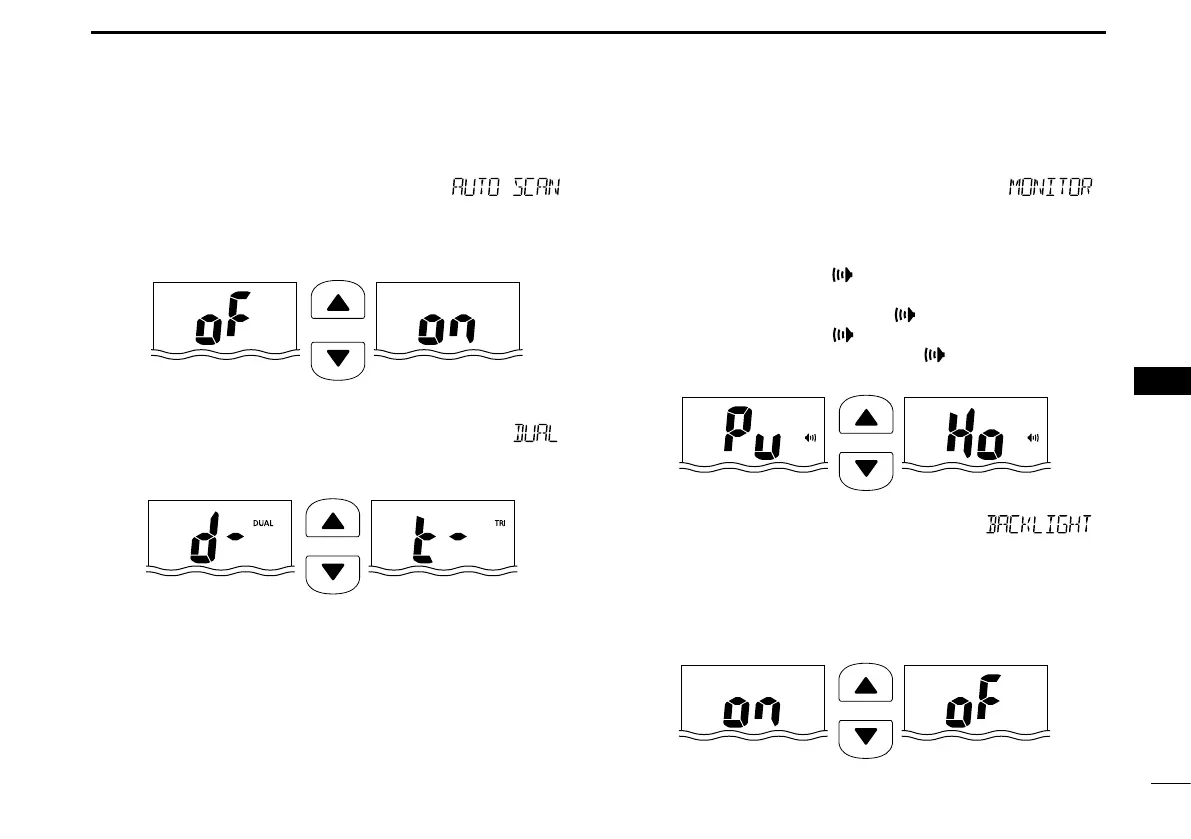
D Auto scan function “ ”
Except for the HOL version, the auto scan function automati-
cally starts the desired scan when no signal is received, and
no operation is performed for 30 seconds
Push
Auto scan OFF (default)
Auto scan ON
D Dual/Tri-watch function “ ”
Except for the HOL version, this item selects Dual or Tri-watch
as desired. See page 16 for details.
Push
Dualwatch (default)
Tr i-watch
D Monitor key action “ ”
The monitor key action temporarily cuts off the squelch func-
tion. This key action contains PUSH (Pu) or HOLD (Ho) set-
tings, as shown below.
• Pu (PUSH): After pushing
[
]
for 1 second, the squelch opens
and audio is heard. The squelch is held open while con-
tinuously holding down
[ ]
. (default)
• Ho (HOLD): After pushing
[ ]
for 1 second, the squelch opens
and audio is heard even if
[ ]
is released. To close
the squelch, push any key.
Push
Push setting (default)
Hold setting
Backlight function “ D ”
This function is convenient for nighttime operation. The back-
light can be turned ON or OFF.
• The backlight is automatically activated when any key except for
[PTT] is pushed.
• The backlight is automatically turned OFF after 5 seconds of inac-
tivity.
Push
Backlight ON
(default)
Backlight OFF



 To Next Page