New2001New2001
9
4
BASIC OPERATION
New2001
1
2
3
4
5
6
7
8
9
10
11
12
13
14
15
16
D U.S.A., International, Canadian and ATIS
channels
The transceiver has U.S.A.*
1
, International, Canadian*
2
and
ATIS*
3
channels. You must select the proper channels for the
operating area.
*
1
Only USA, UK, EXP, CHN and AUS versions.
*
2
Only USA, EXP and CHN versions.
*
3
Only HOL version.
Push q [CH/WX•U/I/C] to select a regular channel.
• If the weather channel appears, push [CH/WX•U/I/C] again.
Push w [Y]/[Z] to select a channel.
• “DUP” appears for duplex channels.
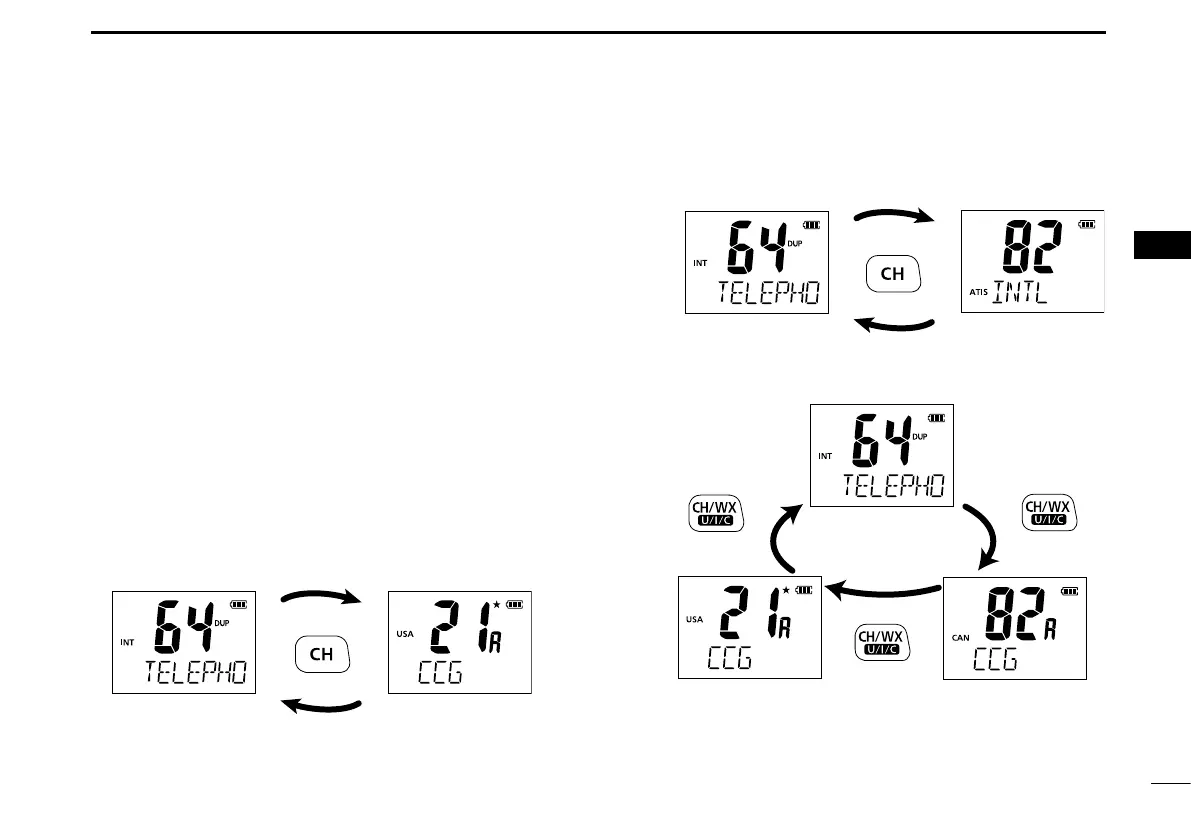
e To change the channel group, hold down [CH/WX•U/I/C]
for 1 second.
• Repeat until you reach the desired channel group.
For U.K. and Australia versions
U.S.A. channelsInternational channels
Hold down
for 1 second
Hold down
for 1 second
Hold down
for 1 second
Hold down
for 1 second
Hold down
for 1 second
For Dutch version
For U.S.A., Export, and China versions
International channels
International channels
U.S.A. channels
ATIS channels
Canadian channels



 To Next Page