33
Installation and Servicing
SECTION 2 - INSTALLATION
INSTALLATION
MIN MAX MIN
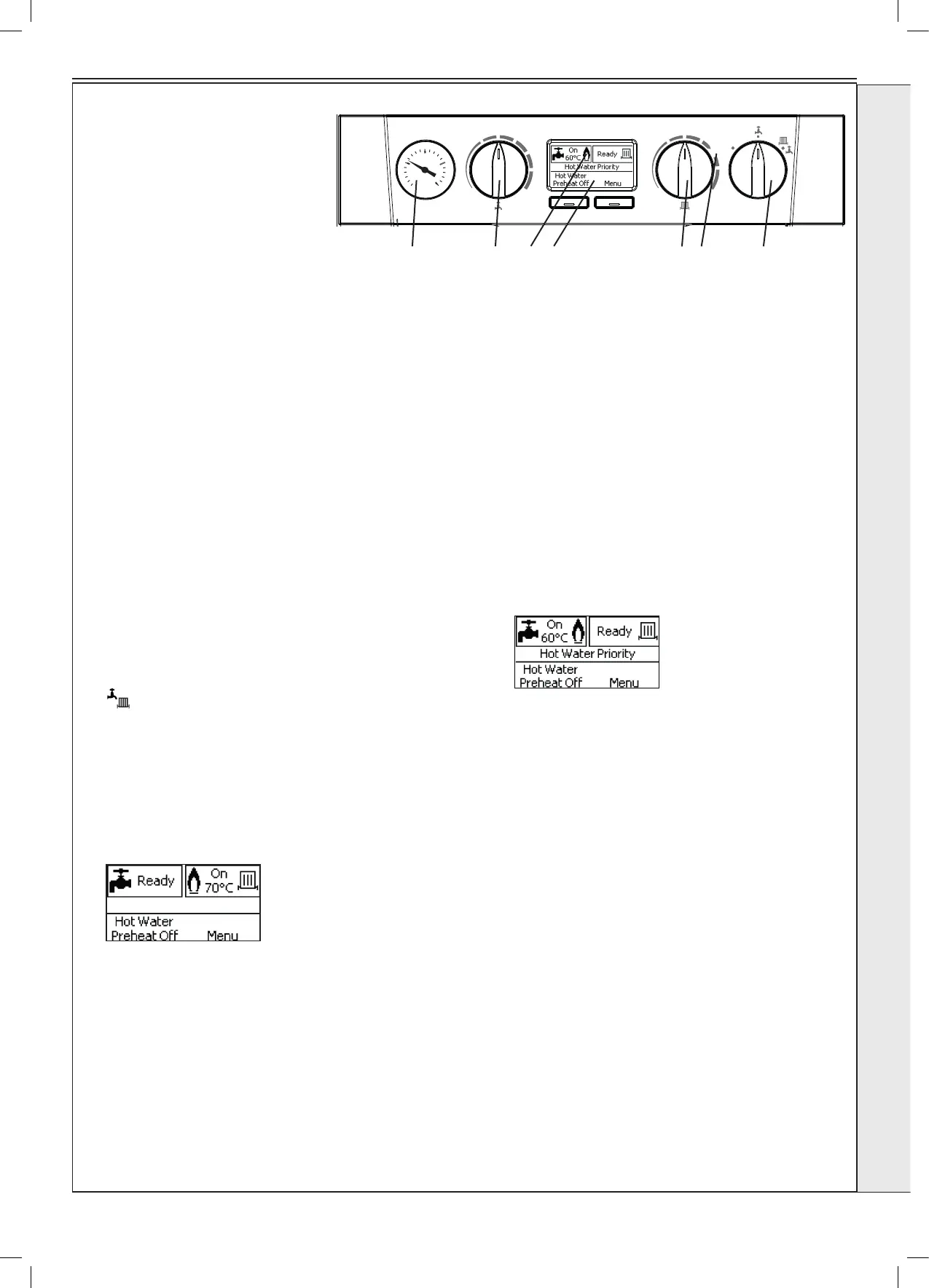
MODE
e
BOILER
OFF
MAX
2.25 INITIAL LIGHTING
1. Check that the system has been lled and that the boiler is not
airlocked. Ensure the automatic air vent cap is open.
Note.
It is important the burner is not operated before the system is fully
vented of air. Refer to Vent System Section on Page 35. If it is
necessary to operate the appliance pump to assist venting of the air
this must be done with the gas service cock turned off.
2. Ret the boiler front panel. Refer to Section 3.2.
3. Check that the drain cock is closed and that the CH and DHW
isolating valves are OPEN.
4. Check that the electrical supply is OFF.
5. Check that the boiler mode knob (C) is OFF.
6. Check that the gas service cock is OPEN.
7. Slacken the screw in the inlet pressure test point (H) and connect
a gas pressure gauge via a exible tube.
8. Switch the electricity supply ON and check all external controls are
calling for heat.
CENTRAL HEATING
9. Set the CH temp control (B) to max and turn the mode knob (C) to
‘
’. The boiler control should now go through its ignition sequence
until the burner is established.
10. If the boiler does not light then after 5 attempts the boiler will lock
out and display “Ignition Lockout”.
Restart the boiler (Refer to Section 2.28). The boiler will repeat its
ignition sequence. If restart occurs 5 times within 15 minutes then
“Too Many Restarts” will be shown.
When the burner is established a screen similar to the following will
be shown.
DOMESTIC HOT WATER
11. With the boiler ring, set the DHW Temp Knob (A) to
maximum and fully open a DHW tap.
The boiler should continue to run and the display should
change from showing:
12. Ensure that with the boiler operating the dynamic gas
pressure is able to obtain maximum output. Refer to
Table 2.
IMPORTANT
The gas input to the burner is regulated by the gas
valve according to the air flow produced by the
fan. It is NOT user-adjustable. Any interference to
sealed settings on the gas valve will adversely affect
operation and render our warranty void.
For additional gas supply information refer to “Gas Supply”
on page 9.
13. Turn off the DHW tap.
14. Remove gas pressure gauge, tighten inlet pressure test
point and check for gas tightness.
Legend
A. Domestic Hot Water Temperature Knob
B. Central Heating Temperature Knob
C. Mode Knob
D. Boiler Status Display
E. Burner ‘on’ Indicator
F. Central Heating Economy Setting
N. Pressure Gauge
AN DE B F
C





 To Next Page