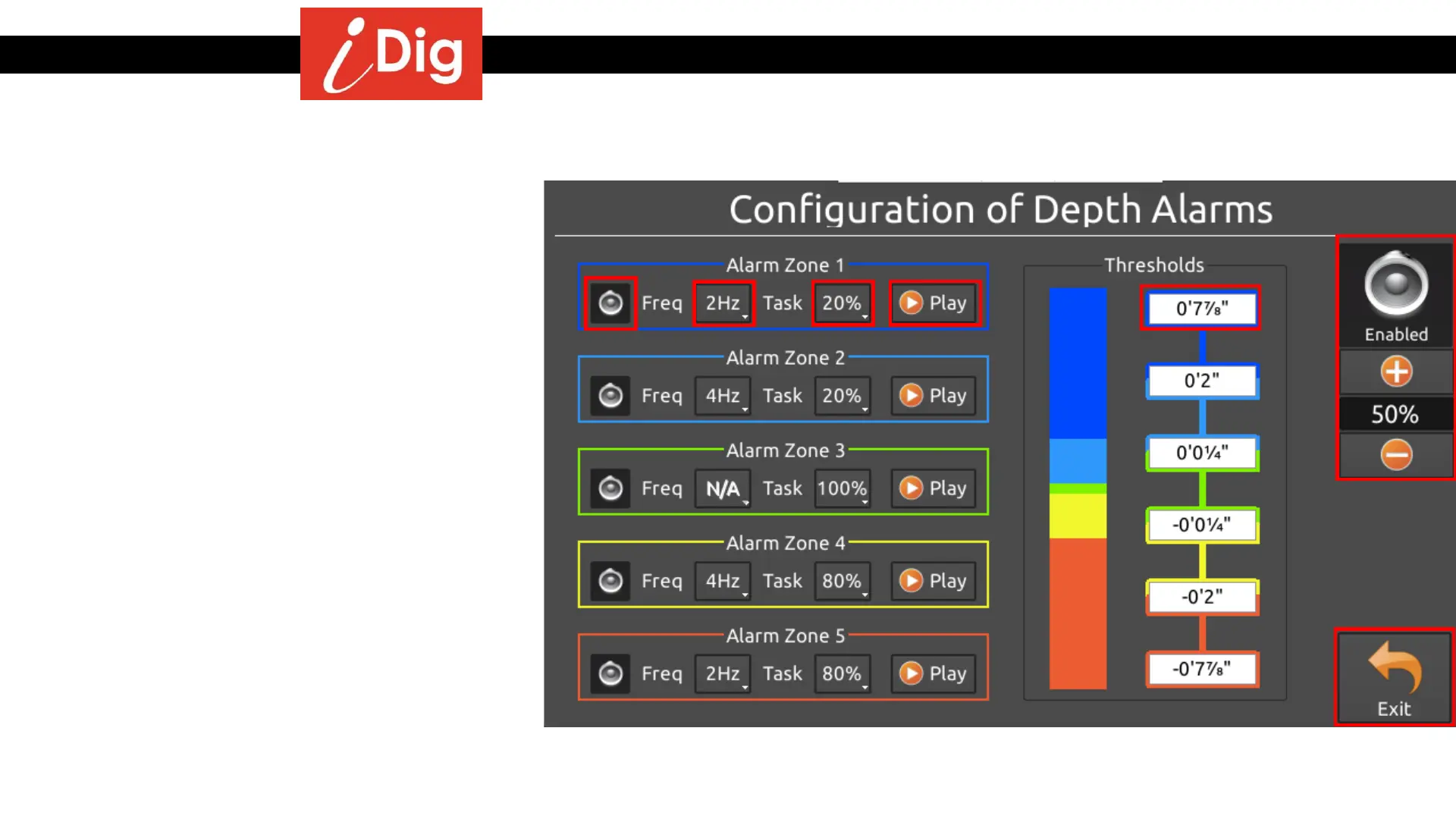
Work Settings – Audible Alarms
154
Elevation & Reach Alarms
The Audible Alarms for Elevation and Reach can be
customized by touching the Depth Alarm and Reach
Alarm buttons respectively from the Work Settings
screen. This screen will then appear and allow you to
customize the beeps that occur the closer you get to and
from an on grade signal.
• By pressing the SMALL horn symbols you can turn
on/off the alarm for the various zones.
• By pressing the “Freq” button you can set how many
times per second the alarm will beep. You can select
from .5Hz to 20Hz.
• By pressing the “Task” button you can set the
percent per second the alarm will beep. You can
select from 5% to 100%. For example, if you select
50%, the select Hz alarm will sound for ½ second.
• By pressing the “Play” button you can hear a sample
of what the alarm will sound like.
• By pressing the “Thresholds” button for a particular
zone you can establish the distance from grade when
the alarm will activate.
• By pressing the BIG horn symbol in the top right
hand corner of the screen you can enable/disable the
entire system as well as adjust the volume.
• Press “Apply” when all of the settings have been
completed.



 To Next Page