32 iDirect Satellite Router Installation and Commissioning Guide
iDX Release 3.3
Initial Alignment
receiver or a map. For the procedures that follow, log in to the Satellite Router as described
in “Logging In to iSite” on page21.
To Calculate Look Angle:
1. In the iSite Tr
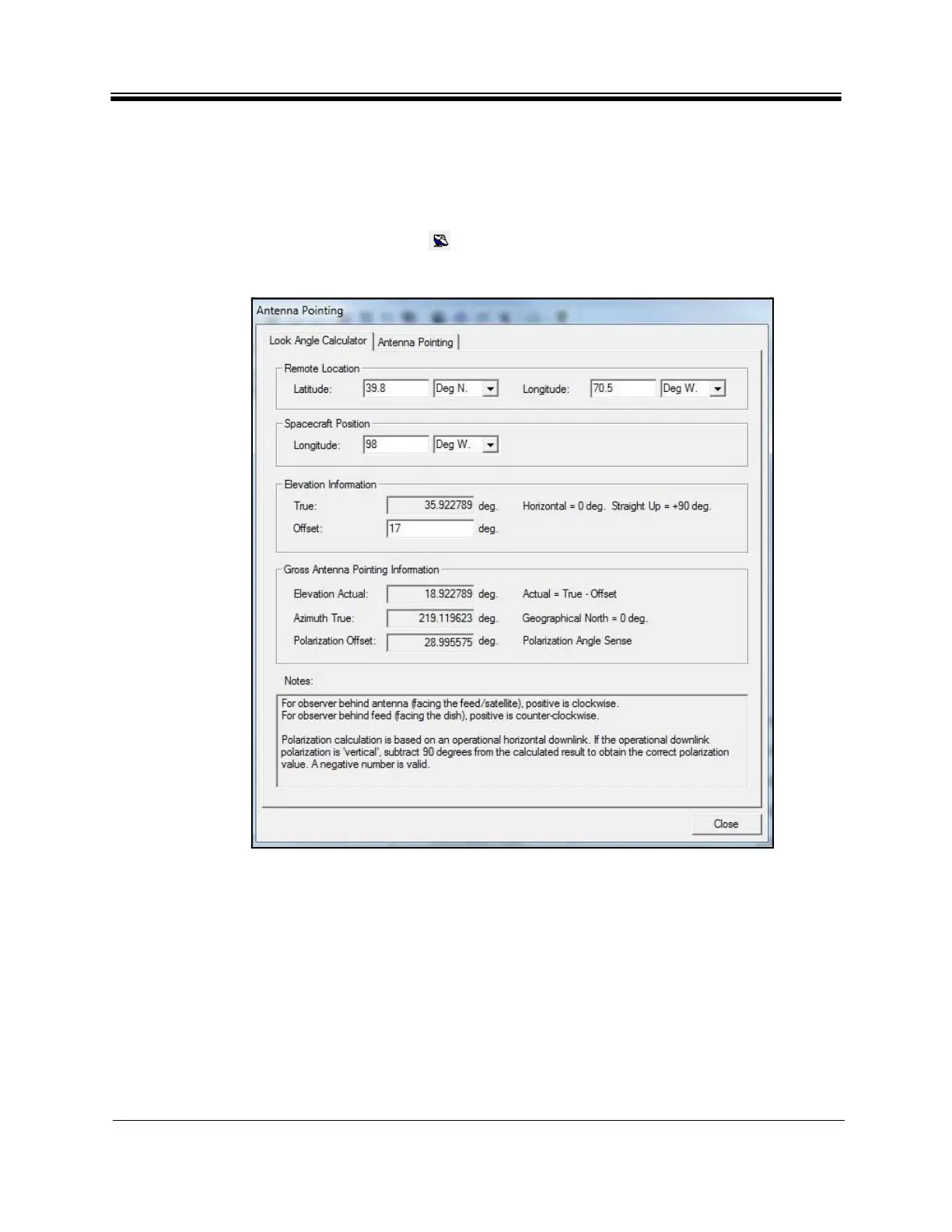
ee View, right-click the Remote and select Align Antenna Antenna
Pointing. Alternately, click the icon in the tool bar. The Antenna Po
inting dialog box
appears. See Figure 21.
Figure 21. iSite Antenna Pointing Dialog Box: Look
Angle Calculator
Note: If commissioning a mobile remote, some data entry fields will be blank. Enter
the corre
ct information for the site location.
2. In the An
tenna Pointing dialog box, select the Look Angle Calculator tab.
3. Under Remote Locati
on, enter the Latitude and Longitude of the antenna in decimal
notation. Select degrees North or South of the equator, and degrees East or West of the
Prime Meridian in the adjacent drop-down boxes.
4. In Spacec
raft Position, the Longitude field is automatically populated. If not, enter the
orbital position of the spacecraft in degrees East or West of the Prime Meridian.



 To Next Page