DP2200 Analogue threshold display
24
11 Troubleshooting
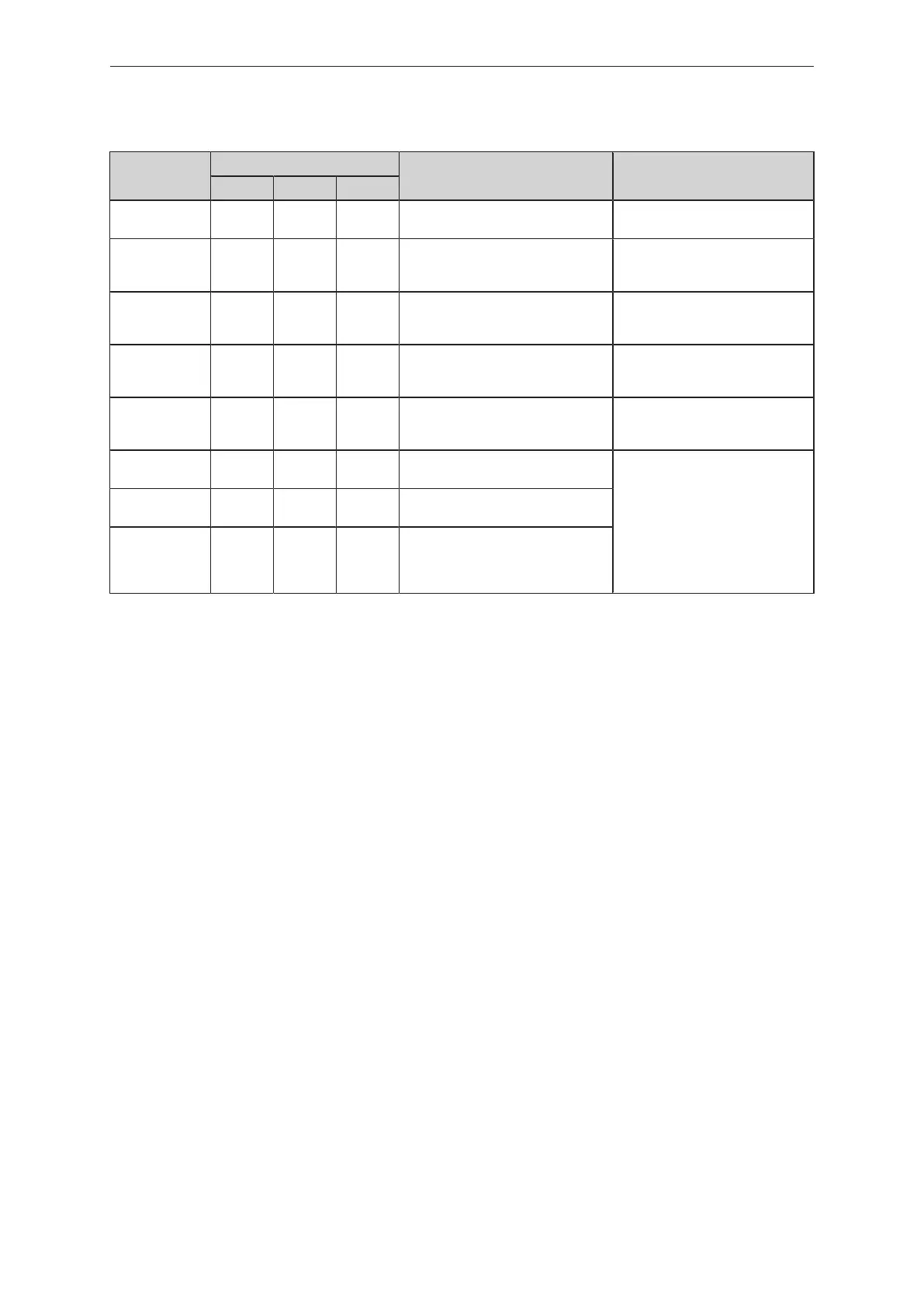
Display
LED
Error Troubleshooting
I Power II
OFF off off off Supply voltage too low. Check/correct the supply voltage:
Electrical connection (Ò/10)
SC1 flashes any any Excessive current at switching out-
put OUT1.
Check switching output OUT1 for
short circuit or excessive current.
Remove the fault.
C.Loc any any any Parameter setting via pushbuttons
locked due to active IO-Link trans-
mission.
Wait until parameter setting via
IO-Link is finished.
S.Loc any any any Parameter setting via pushbuttons
disabled by software.
Unlocking only possible via IO-
Link interface/IO-Link parameter
setting software.
Loc any any any Parameter setting via pushbuttons
disabled.
Unlock pushbuttons:
Locking / unlocking (Ò/22)
OL any on any Process value too high (measured
current > 21mA).
Check connected sensor and cur-
rent range:
Representation of the measured
current value (Ò/13)
Check the setting for internal or
external analogue termination for
OUT2:
A.Trm ─ analogue termination for
OUT2 (Ò/16)
UL any on any Process value too low (measured
current < 3.6mA).
nPrb any on any No sensor connected to the ana-
logue input.


 To Next Page