10. Troubleshooting 59
10.2 Solving Hopper SSR Error
Error:
After powering on the machine, the hopper keeps working and can’t be stopped.
Cause:
The Hopper SSR’s jump setting is incorrect.
How to solve:
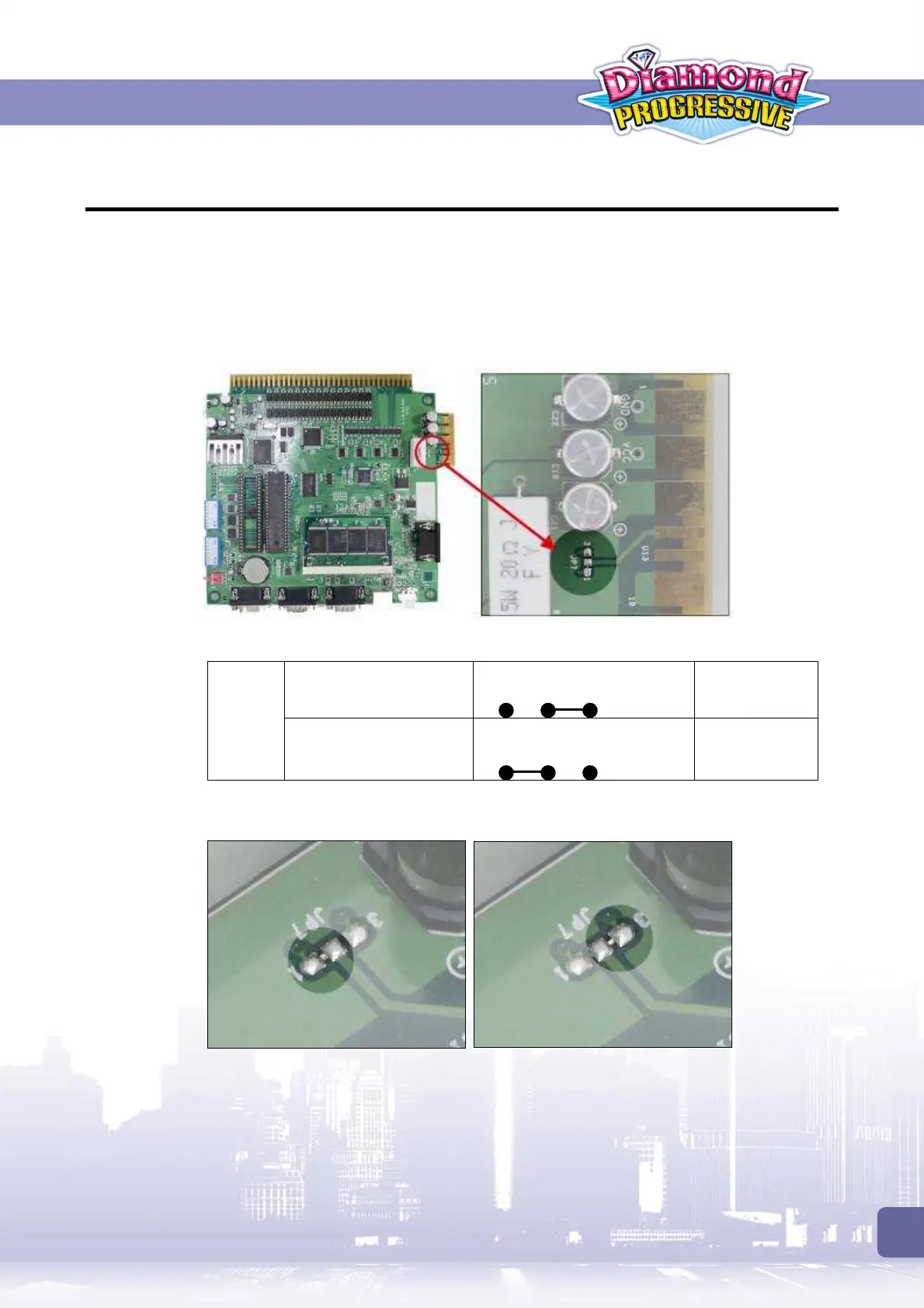
1. Locate the Hopper SSR jump (JP7) on the PC board. Then identify current HOPPER SSR is
at HIGH ACTIVE or LOW ACTIVE.
2. Change to use the alternative JP7 setting.
Low Active
(Default)
Short pins 1-2
JP7
High Active
Short pins 2-3
The following example shows how to change from
LOW ACTIVE
to
HIGH ACTIVE
.
Open pins 1 and 2
Remove the solder bridge between
pins 1-2.
Short pins 2 and 3.
Then apply solder to bridge pins 2-3.
3 2
1
3 2
1



 To Next Page