User Manual PROFview XL 4 The PROFview XL Application Software
4.3 General notes on operation
4.3.1 Help
When designing the PBT application software, special attention was devoted to a clear structure and a self-
explanatory graphical user interface. All elements of the user interface display detailed explanations when the
mouse pointer is moved over a control element ("tool tip").
This document is also supplied in electronic form and can be called both via the help function
and by
pressing the F1 key. It contains a detailed description both of the measurements and of the program opera-
tion.
4.3.2 Data saving
All measurement, protocol and export data set using the PBT application software and determined via the
PBT device at the PROFIBUS plant, can be stored in a document with the file extension ".pbt". The document
can be opened either by double-clicking on the file in the Windows® Explorer or by dragging the file to the
program (drag & drop).
4.4 Program structure
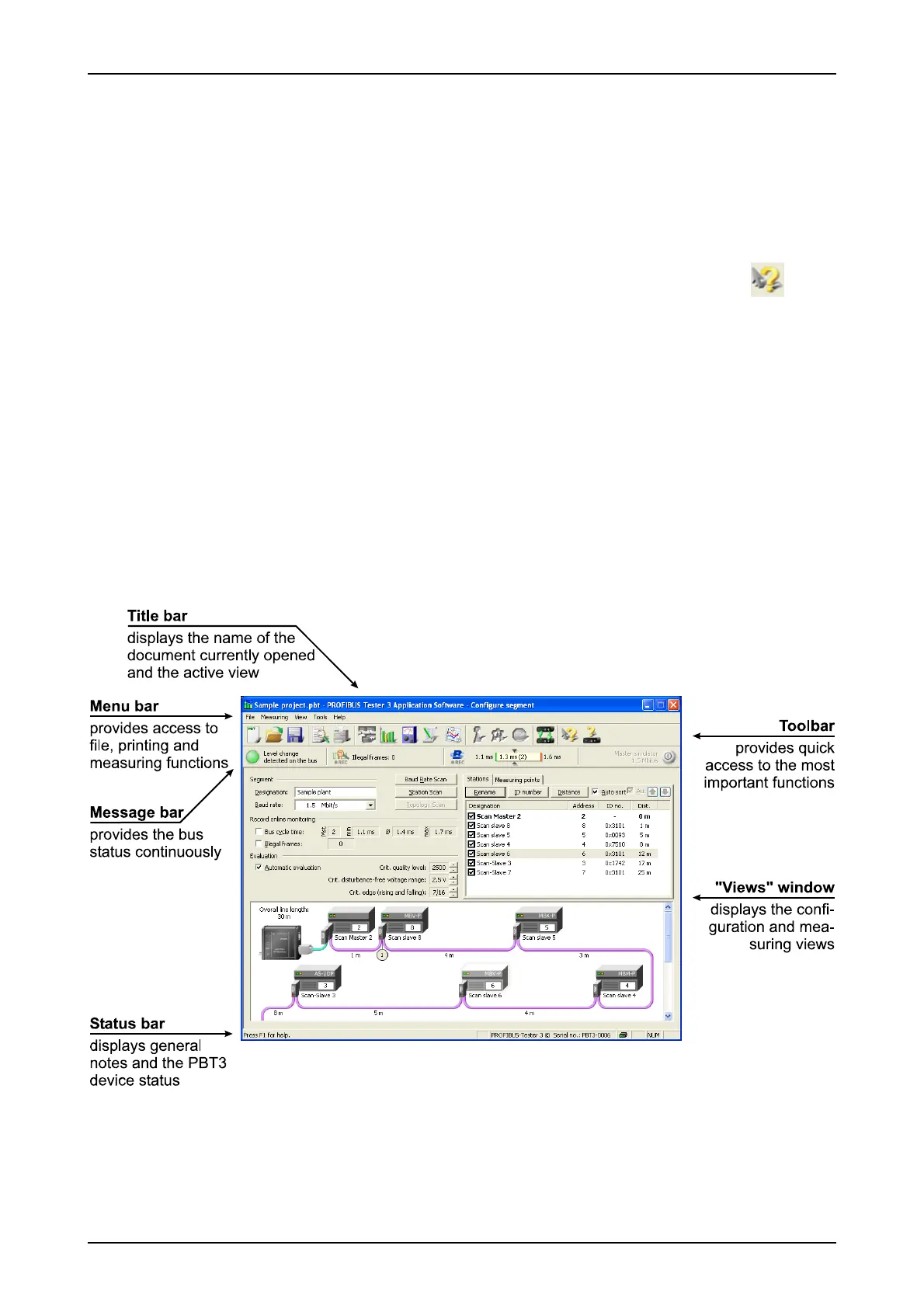
The graphical user interface of the PBT application software is divided into various areas (Fig. 3).
PROFview XL 13
Fig. 3: Structure of the PBT application software



 To Next Page